





What can you expect?
This comparison will help you understand the strengths of each platform and decide which is best for your specific needs.


 Platform approach |  All-in-one visual website platform  Headless content platform |
 Website building | Build pages visually without starting from code Build the frontend separately using your preferred framework |
 Content management | CMS connected directly to the website Structured content managed independently from the frontend |
 Design control | Visual control over layouts, styles, interactions, and responsive behavior Frontend determines the visual experience |
 Development dependency | Many website changes can be handled without developers Custom frontend changes generally require development |
 Frontend | Built directly in Webflow Requires a separate frontend application |
 Hosting | Website hosting is built into the platform Frontend hosting is managed separately |
 Publishing | Design, edit, and publish from one platform Content and frontend deployment follow separate workflows |


Why teams choose Webflow
Your website shouldn't need a long development cycle every time you want to launch a new page or update an existing one. Webflow gives design and marketing teams more control over the website while giving developers the flexibility to create sophisticated digital experiences.

Design and build in one place
Turn designs into production-ready websites without handing every visual decision over to developers.
Make changes without the bottleneck
Update pages, create landing pages, change layouts, and publish content without creating a development ticket.
Simple website infrastructure
Webflow brings hosting and website management into the same platform, reducing the need to coordinate separate tools for your core website.
Create consistent experiences
Reusable components and CMS structures help teams maintain consistency across pages while making it easier to expand.
Launch faster
From new campaign pages to major website updates, teams can move from idea to live website without building a separate frontend.
Market position comparison
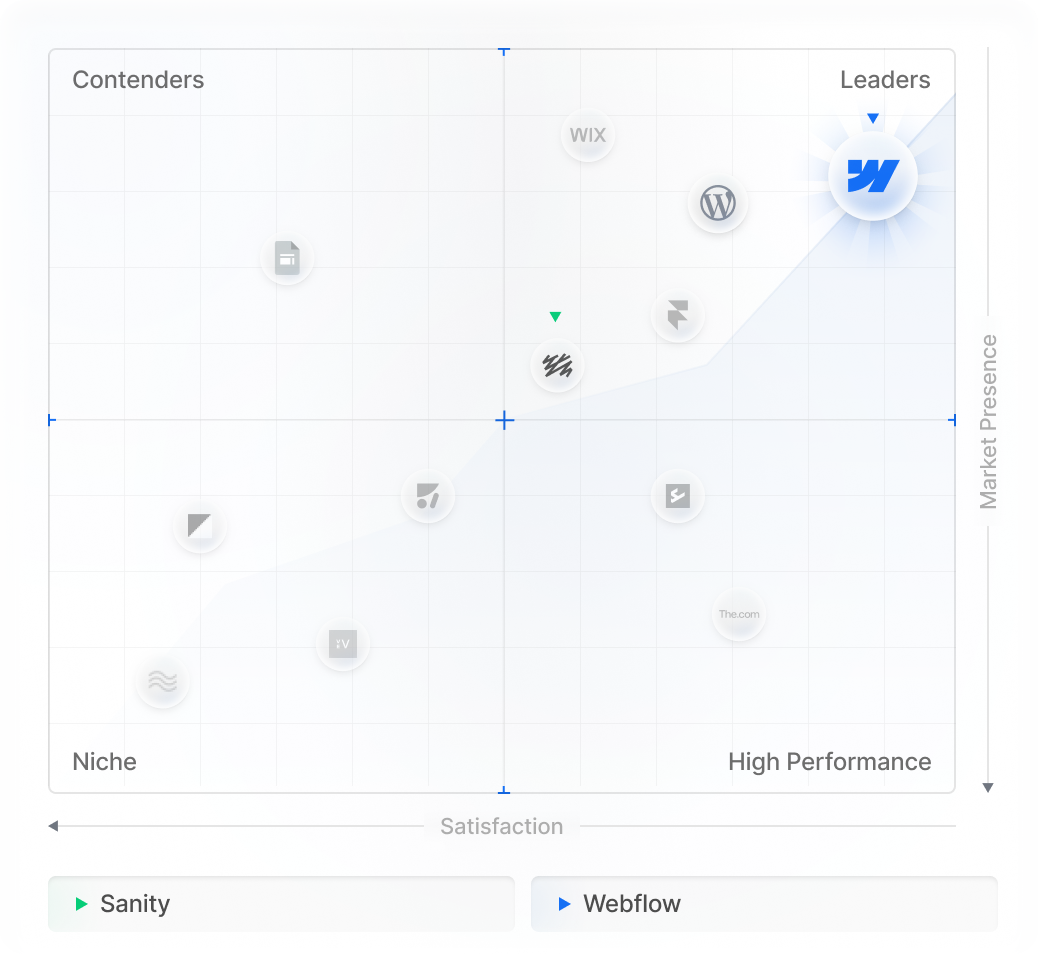
Webflow Adoption
With Webflow, your design, website, CMS, and hosting work together. This gives marketing teams more control over the finished website and reduces the number of moving parts.
With Sanity, your content sits separately from the frontend. This gives development teams more freedom to decide how that content is delivered and experienced.


What information should I prepare before our initial discovery call?
It is helpful to have your project goals, target audience, brand guidelines, and an approximate budget ready for discussion.
What makes Flowtrix different from other agencies in Edtech?
Unlike other agencies, we understand your business first, rather than jumping straight into the scope. Our discovery call is a tailored conversation where we listen carefully to your goals, challenges, and unique needs, enabling us to draft value-driven solutions.
How long do projects typically take?
An average Edtech website design project timeline typically ranges from 8 to 10 weeks. However, every project is unique, and we tailor the schedule to accommodate its specific scope and requirements for the best output.
Do you offer on-going support?
Yes, our support plan will help you get right back on the track, while we take care of the maintenance tasks
Do you help highlight product impact or case studies?
Absolutely. We structure and design impact pages, proof sections, and real-world success stories to help institutions trust your platform faster.
Can you support product-led and sales-led EdTech models?
Yes. Whether your flow is free trial → activation or demo → institution onboarding, we tailor the site to match your funnel.
Do I need a Zapier or Make subscription for these integrations to work?
It depends on the solution. While we often use "no-code" middleware for speed, we also build native custom code integrations and direct API connections that can bypass third-party subscription costs entirely, saving you monthly overhead as you scale.
Can Flowtrix build a custom dashboard or client portal inside Webflow?
Absolutely. By integrating Webflow with tools like Firebase, Wized, or Memberstack, we can create personalized user experiences, gated content, and dynamic dashboards that pull real-time data from your external databases.
What happens if an API changes or an integration breaks?
External platforms update their APIs frequently. We offer Managed Integration Support, which includes proactive monitoring. If an endpoint changes or a connection fails, our team is alerted immediately to implement a fix before it impacts your business operations.
Can you integrate Webflow with our internal, proprietary software?
Yes. If your internal system has a documented API (REST or GraphQL), we can build a secure bridge. If it doesn't have an API, we can often consult on setting up a middleware layer to make your data accessible to your Webflow frontend.




.svg)
.svg)