


Use to summarize this article


- The $25/mo sticker price is just the Site plan. A real 5-person B2B team pays $158 to $195 a month once Workspace, seats, and add-ons are added.
- Webflow's May 2026 restructure merged CMS and Business into Premium and introduced a new $2,500/mo Team tier between Premium and Enterprise.
- Seats are priced by role, not team size: Full seats cost $39/mo, Limited seats cost $15/mo, and Free seats cost nothing.
- Optimize, Analyze, and Localize now bill separately from the Site plan, priced by actual usage.
- Existing customers keep current pricing until their first renewal on or after June 29, 2026.
The $25 a month you see on Webflow's homepage is not what you'll actually pay.
That number covers one thing: your Site plan. It says nothing about your team, your seats, or the add-ons most real marketing sites end up needing.
A typical 5-person B2B marketing team lands closer to $158 a month once everything is added up. Not $25.
This guide breaks down every layer, verified directly against Webflow's own pricing page, so you know exactly what you're paying for before the invoice shows up.
Why the pricing feels confusing?

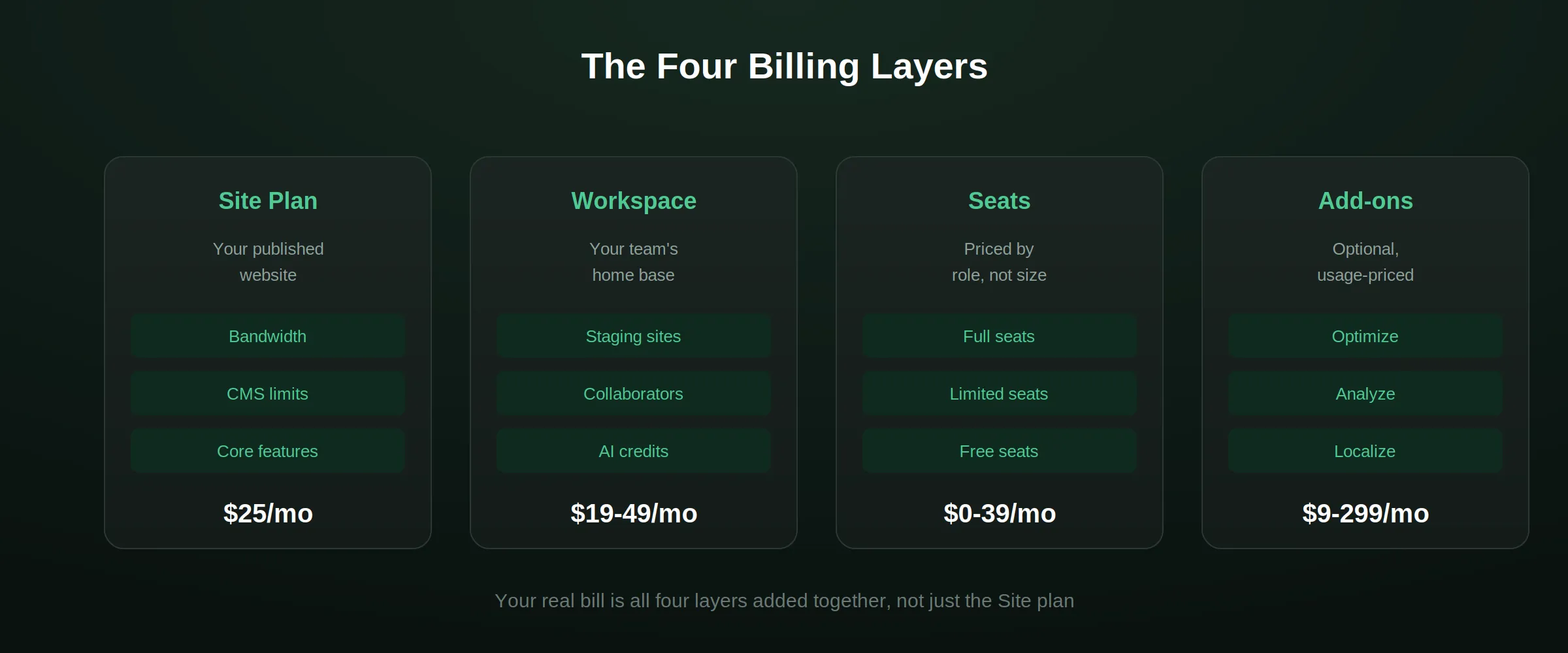
You're not buying one plan. You're combining four separate things.
A Site plan covers your published website: bandwidth, CMS limits, and core features. A Workspace covers your team: staging sites, collaborators, and monthly AI credits.
Seats sit inside your Workspace, priced separately by role. Add-ons cover the extras: A/B testing, analytics, and multi-language support.
Most people budget for the Site plan and stop there. Then the other three layers show up on the first real invoice.
What changed in the May 2026 restructure?
Webflow rebuilt its entire pricing structure this year. The old CMS and Business Site plans are gone.
Both merged into one new plan called Premium. A brand new tier called Team now sits between Premium and Enterprise, something that didn't exist before.
Optimize, Analyze, and Localize used to come partly bundled into higher plans. Now all three are sold separately, priced by actual usage.
AI credits are also new. Every Workspace plan now includes a monthly credit allocation for Webflow's AI features.
The Site plans, one by one
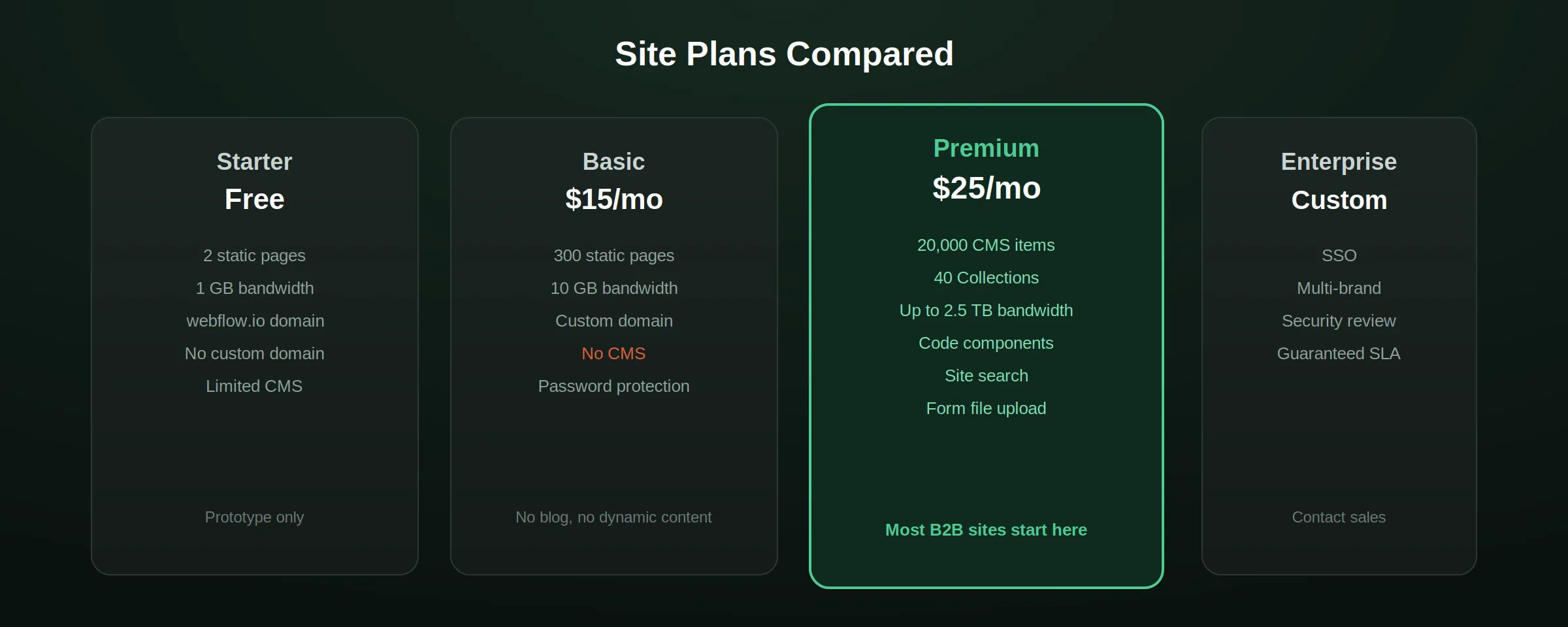
Webflow has three paid Site plans, plus a free tier called Starter.
Starter costs nothing: It doesn't expire, and it's not a trial.
You get a webflow.io subdomain, limited CMS, 1 GB of bandwidth, and 50 form submissions. You also get Webflow AI, MCP server access, and Webflow Cloud app hosting, all for free.
The real limit is 2 static pages. That's fine for prototyping. It's not enough for a real, public-facing site.
Basic costs $15 a month billed yearly: You get a custom domain, 300 static pages, 10 GB of bandwidth, unlimited form submissions, and password protection.
There's no CMS on this plan. No blog, no dynamic content, no Collections at all.
If your site is a landing page, a portfolio, or an early MVP with no content section planned, Basic covers it completely.
Premium costs $25 a month billed yearly, or $39 a month billed monthly: This is the plan almost every real B2B marketing site needs.
It includes everything in Basic, plus the actual Webflow CMS: 20,000 CMS items and 40 Collections. That's generous enough that most teams won't hit the ceiling for years.
You also get code components, site search, form file upload, and bandwidth that scales from 50 GB up to 2.5 TB as add-ons.
The simple rule: if you'll publish more than five pieces of content in the next year, skip Basic and start on Premium directly.
Premium's included bandwidth tops out around 2.5 TB before you'd need to add more, and Webflow prices that scaling in clear steps. An extra 50 GB runs $20 a month annually, or $30 monthly.
Push further and the numbers climb accordingly: 100 GB extra costs $40 annually, 250 GB extra costs $100 annually, and the largest published tier, nearly 2.5 TB on top of your base allowance, runs $974 a month annually or $1,460 monthly.
Most B2B marketing sites never come close to needing these upper tiers. They exist for high-traffic content operations, not a standard resource library and blog.
Enterprise is custom-priced: There's no public number.
Everything in Team carries over, plus enterprise-ready scale, granular permissions, custom roles, advanced governance, secure integrations, a dedicated account manager, enhanced SLAs, and fully custom configurations.
You end up here when you need SSO, multi-brand or multi-region management at real scale, a formal security review, or a guaranteed uptime SLA backed by a contract. Most B2B marketing teams never actually need to go this far.
Annual versus monthly, and why it matters more than it sounds?
Every number in this guide so far assumes annual billing. Switch to monthly, and the gap is bigger than most people expect.
Premium jumps from $25 a month annually to $39 a month billed monthly, a 56 percent increase for the exact same plan. That pattern holds across nearly every tier Webflow sells.
If you're testing whether Webflow is the right fit, starting on monthly billing for the first month or two is a reasonable way to stay flexible. Once you know you're staying, switching to annual billing locks in the lower rate and it's one of the simplest cost decisions in this entire guide.
The Team plan: the new middle tier
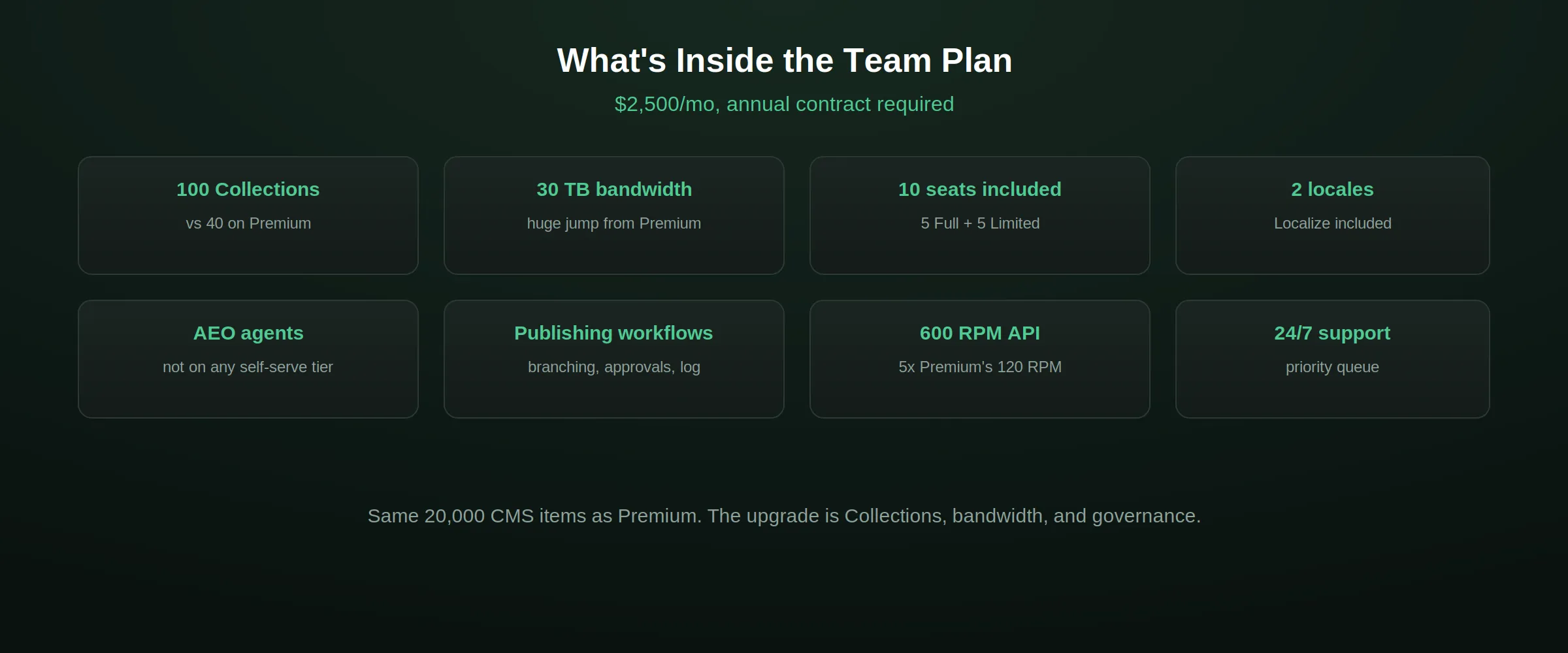
Team is the single biggest structural change in the 2026 restructure. It fills a real gap that used to exist between Premium and Enterprise.
Team costs $2,500 a month, and it requires an annual contract. There's no monthly billing option, and you sign up by talking to Webflow's sales team directly.
Here's exactly what's bundled in. The same 20,000 CMS items as Premium, but 100 Collections instead of 40. Up to 30 TB of bandwidth, a massive jump from Premium's ceiling.
Five Full seats and five Limited seats included, ten people total. Webflow Localize with 2 locales built in at no extra charge. AEO agents for AI search visibility, which aren't available anywhere else on the self-serve tiers.
You also get real publishing workflows: page branching, single-page publishing, review and approval steps, and a full site activity log with API access. Custom SSL, enhanced security, and 24/7 priority support round it out.
Team makes sense once you're past 40 Collections on Premium, need actual approval workflows instead of basic roles, or specifically want AEO agents. It also makes sense once your stacked Premium and Workspace costs are already close to $2,500 anyway, since Team then mostly just consolidates the billing.
For developers managing content programmatically, the API difference is worth knowing directly. Premium's content management API allows 120 requests per minute. Team raises that to 600 requests per minute, exactly five times higher, which matters if you're running large CMS migrations or syncing content from an external system on a schedule.
Workspaces: the part most people forget to budget
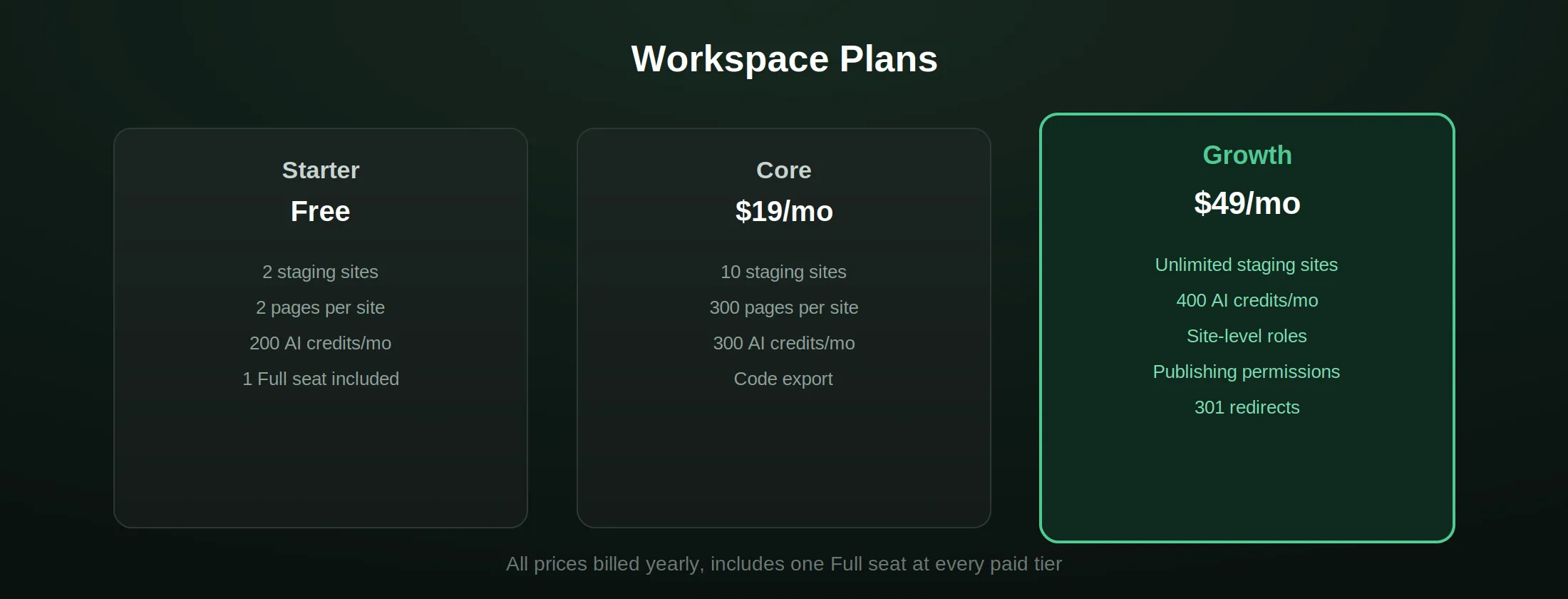
A Workspace is a completely separate purchase from your Site plan. It's where your team actually works, and it bills on its own schedule.
Starter, the free Workspace tier, gives you 2 staging sites, 2 pages per staged site, and 200 AI credits a month. One Full seat is included.
Core costs $19 a month billed yearly: You get 10 staging sites, 300 pages per staged site, 300 AI credits a month, custom code, code export, and one Shared Library.
Growth costs $49 a month billed yearly: Unlimited staging sites, 400 AI credits, site password protection, 301 redirects, site-specific access, site-level roles, and publishing permissions.
Every tier above Starter includes one Full seat. Everyone else you add needs a paid seat on top.
Freelancers and agencies working across multiple client sites have a separate track. Freelancer costs $16 a month billed yearly, covering 10 staging sites, one free client seat per site, and full CMS access on staging. Agency costs $35 a month billed yearly, adding unlimited staging sites, three free client seats per site, and unlimited Shared Libraries. Both include free client seats specifically so a client can log in and publish content without eating into your own paid seat count.
The three seat types, and why the difference matters?
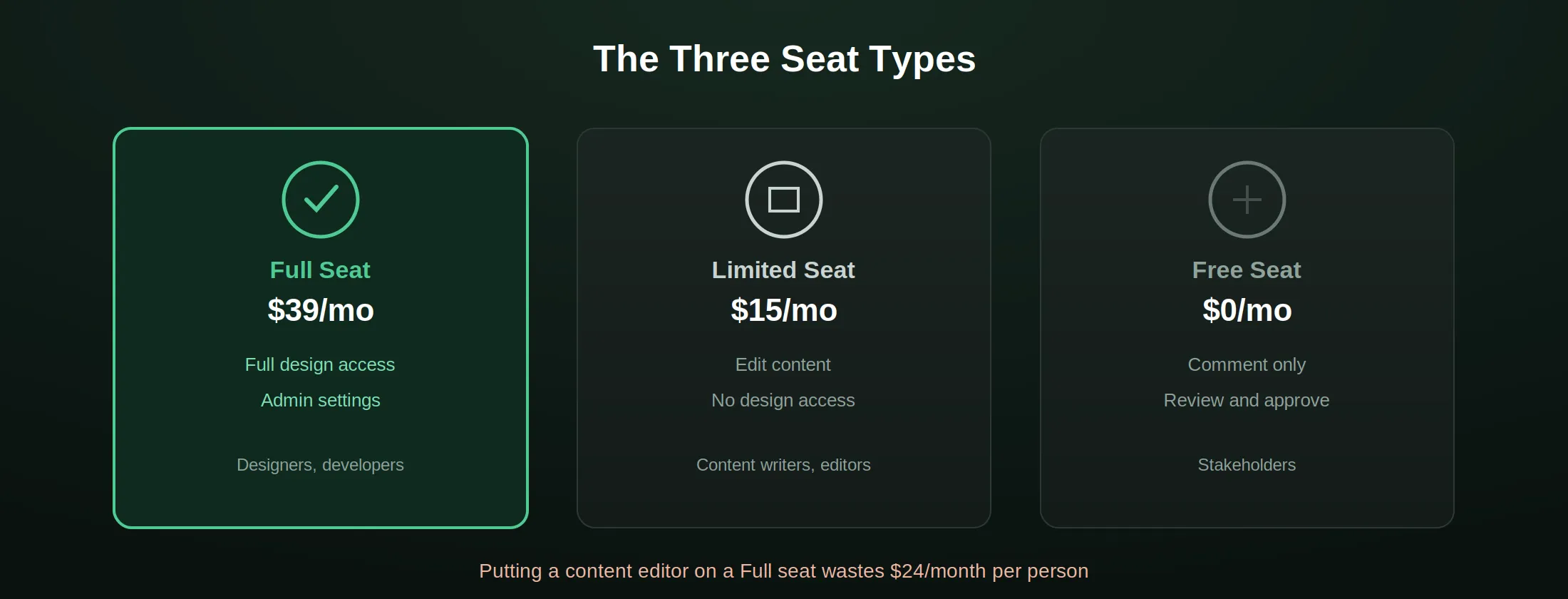
This is the single biggest lever for controlling your actual Webflow bill, and it's the part most teams get wrong on the first pass.
Full seats cost $39 a month per person, billed yearly: They get complete design access and can manage admin settings. This is the seat a designer or developer actually needs.
Limited seats cost $15 a month per person, billed yearly: They can edit content and build pages using existing components, but not touch the core design. This is the right seat for a content writer or editor.
Free seats cost nothing: They can only comment and review, which is exactly right for a stakeholder who needs to approve copy but never touches the CMS.
Putting a content editor on a Full seat because nobody checked the options means paying an extra $24 a month per person for design access that seat will never use.


Add-ons: Optimize, Analyze, and Localize
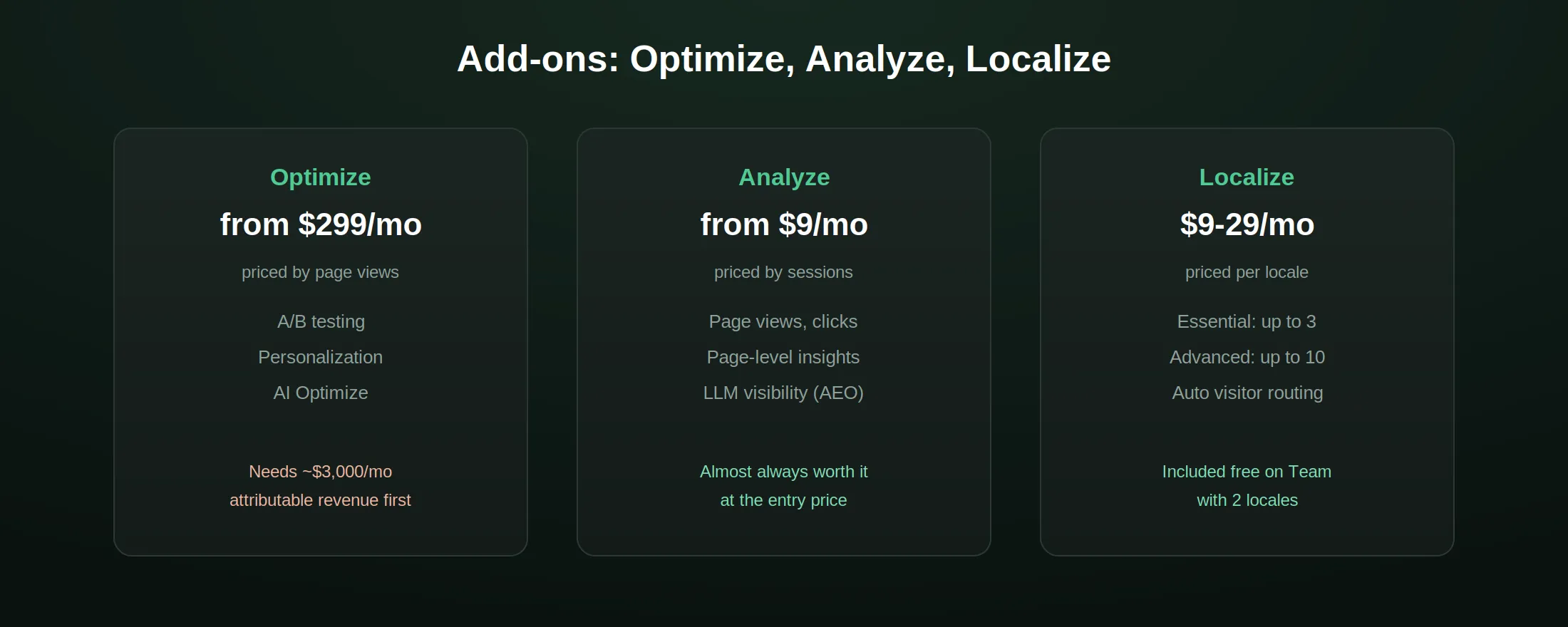
These three used to be partially bundled into higher plans. Now they're all separate purchases, priced by how much you actually use them.
Optimize starts at $299 a month, priced by page views, starting at 25,000 and scaling up to 500,000. It covers A/B testing, personalization, AI-driven test suggestions, and audience targeting, with up to 5 concurrent tests running at once.
This one only pays for itself once you have real traffic to test on. A useful rule: only add it once the monthly revenue attributable to your top pages is at least 10 times the Optimize cost, roughly $3,000 a month at the entry tier.
Analyze starts at $9 a month, priced by sessions, starting at 2,000 and scaling up through 10,000, 25,000, 50,000, 100,000, and beyond. You get auto-captured page views, sessions, click data, and page-level insights.
Analyze also reports AEO-specific data: how often AI systems like ChatGPT and Perplexity are actually citing your content, alongside standard AI agent traffic. At $9 a month entry, this is close to a no-brainer for most sites.
Localize Essential costs $9 a month per locale, covering up to 3 locales. It includes AI-powered translation, CMS localization, static page localization, and localized SEO.
Localize Advanced costs $29 a month per locale, covering up to 10 locales. It adds asset localization, meaning different images per region, custom localized URLs, and automatic visitor routing based on where someone's browsing from.
Team already includes Localize with 2 locales. Optimize and Analyze still need to be added separately, even on Team.
AI credits, and what they actually cost
Every Workspace plan now bundles a monthly pool of AI credits, used for image generation, AI-driven CMS actions, and AI Optimize suggestions.
Starter gets 200 credits a month. Core gets 300. Growth gets 400. Team gets a much larger pool, 100,000 credits a year.
If you run out, you can buy more directly: 2,000 extra credits for $20 a month billed yearly. For most marketing teams doing light, occasional AI work, the included pool covers everything without needing a top-up.
If you're selling products, not just publishing content
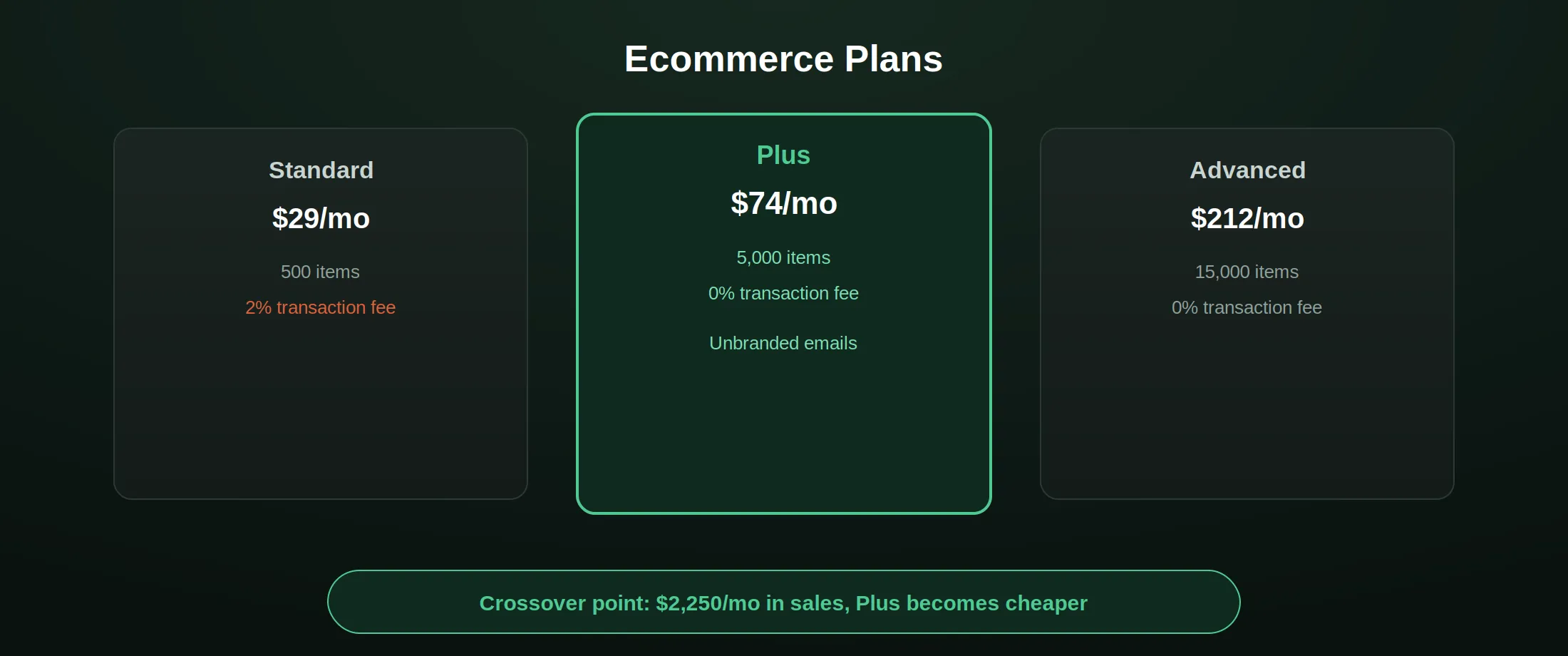
Ecommerce runs on its own separate set of Site plans, layered independently from Basic or Premium.
Standard costs $29 a month billed yearly: You get 500 ecommerce items, but a 2 percent transaction fee applies on top of whatever Stripe or PayPal already charges.
Plus costs $74 a month billed yearly: You get 5,000 items and the transaction fee drops to zero, plus unbranded order emails.
Advanced costs $212 a month billed yearly: 15,000 items, still zero transaction fee, with higher limits across the board.
Here's the actual math worth running before you pick a tier. The price gap between Standard and Plus is $45 a month. Standard's 2 percent fee equals that $45 gap once your monthly sales hit roughly $2,250. Past that revenue point, Plus is genuinely cheaper than Standard, even with its higher sticker price, because you stop paying the transaction fee entirely.
If your site is a marketing site with an occasional product page, not a real storefront, you probably don't need this track at all. Most B2B SaaS companies fall into that category.
What a real bill actually looks like?
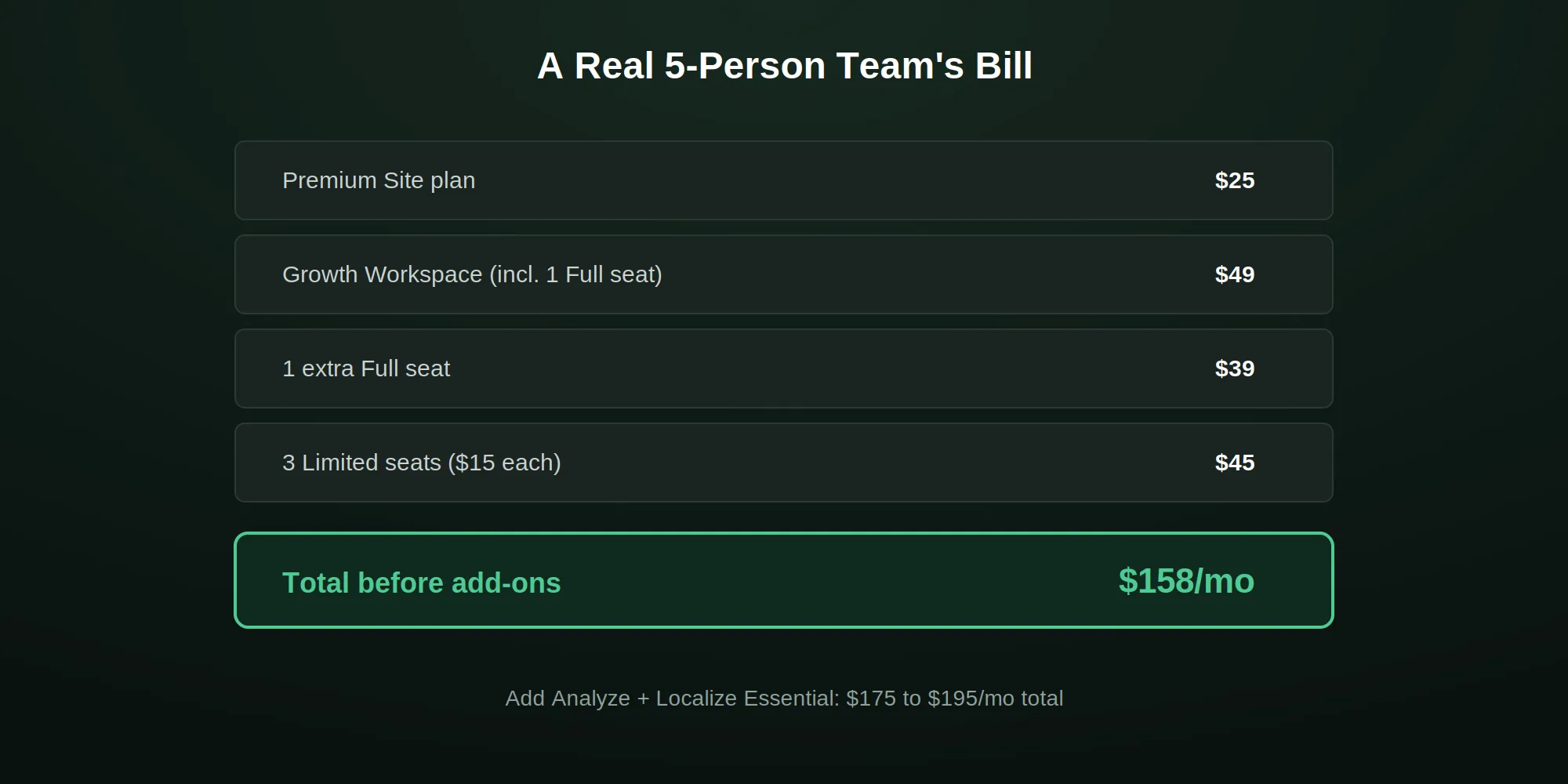
Here's the accurate math for a common team shape: a 5-person B2B marketing team running a content site with a blog and a resource library.
Premium Site plan: $25 a month. Growth Workspace, which already includes one Full seat: $49 a month.
Add one more Full seat for a second designer or developer: $39 a month. Add three Limited seats for the content team: $45 a month combined, at $15 each.
That's $158 a month before touching a single add-on. This is the real, verified baseline for this exact team shape, not a rough estimate.
Add Analyze at a light traffic tier, roughly $9 to $20 a month. Add Localize Essential if you're publishing in one additional language, another $9 a month.
The total for a properly equipped team lands between $175 and $195 a month.
A solo marketer or early-stage founder looks completely different. Premium at $25, a free Starter Workspace with its included Full seat, no add-ons yet. That's it. Roughly $25 a month, or $44 if you move up to a paid Core Workspace for more staging room.
Why teams actually stick with Webflow?
The sticker price comparison to WordPress misses the real story. WordPress's core software is free. Running it properly is not.
A properly maintained WordPress site typically needs managed hosting, premium plugins for features Webflow includes natively, ongoing security patching, and 5 to 15 developer hours a month. That combination runs $150 to $400 a month for most B2B sites.
Webflow removes almost all of that developer time by handling hosting, security, and core functionality directly.
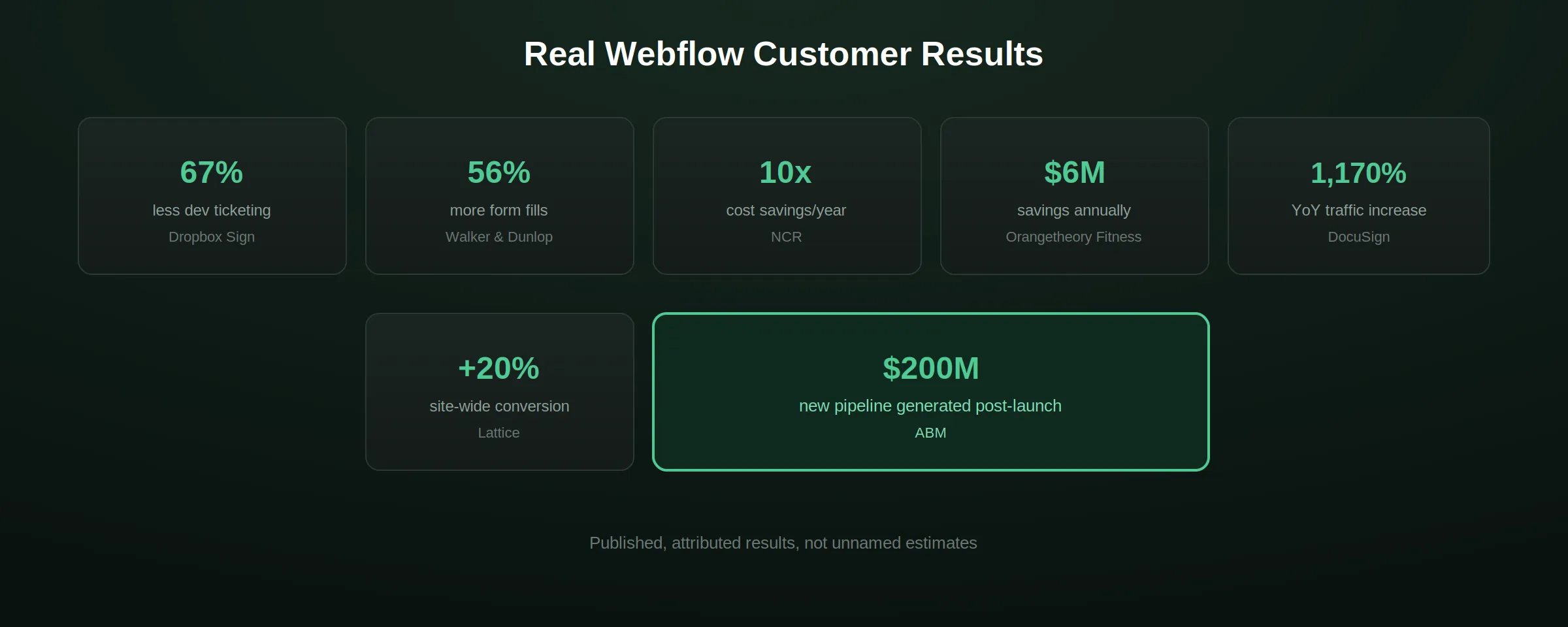
The proof shows up in Webflow's own published customer results. Dropbox Sign saw a 67 percent decrease in developer ticketing after moving to Webflow. Walker & Dunlop saw a 56 percent increase in form fills.
NCR reported 10x cost savings annually. Orangetheory Fitness reported $6 million in annual cost savings. DocuSign saw a 1,170 percent increase in year-over-year traffic, and Lattice saw a 20 percent lift in site-wide conversion.
These aren't small, cherry-picked numbers from an unnamed source. They're published, attributed results from real companies running real sites on the platform.
How to actually decide?
Start with one question: does your site need a CMS at all?
No blog, no resource section, no dynamic content means Basic covers you completely. Any real content program at all means go straight to Premium.
From Premium, only move up to Team if one of these is genuinely true. You're approaching or past 40 Collections. You need real publishing approval workflows, not just basic user roles.
You're running a CMS migration large enough to hit API rate limits on the self-serve plan. Or you specifically need AEO agents for AI search visibility right now, not eventually.
If none of those apply, stay on Premium. Add Optimize, Analyze, or Localize individually, only once your actual usage justifies each one.
Buying capacity you're not using yet is the single most common way teams overpay on Webflow.

How Flowtrix approaches this?
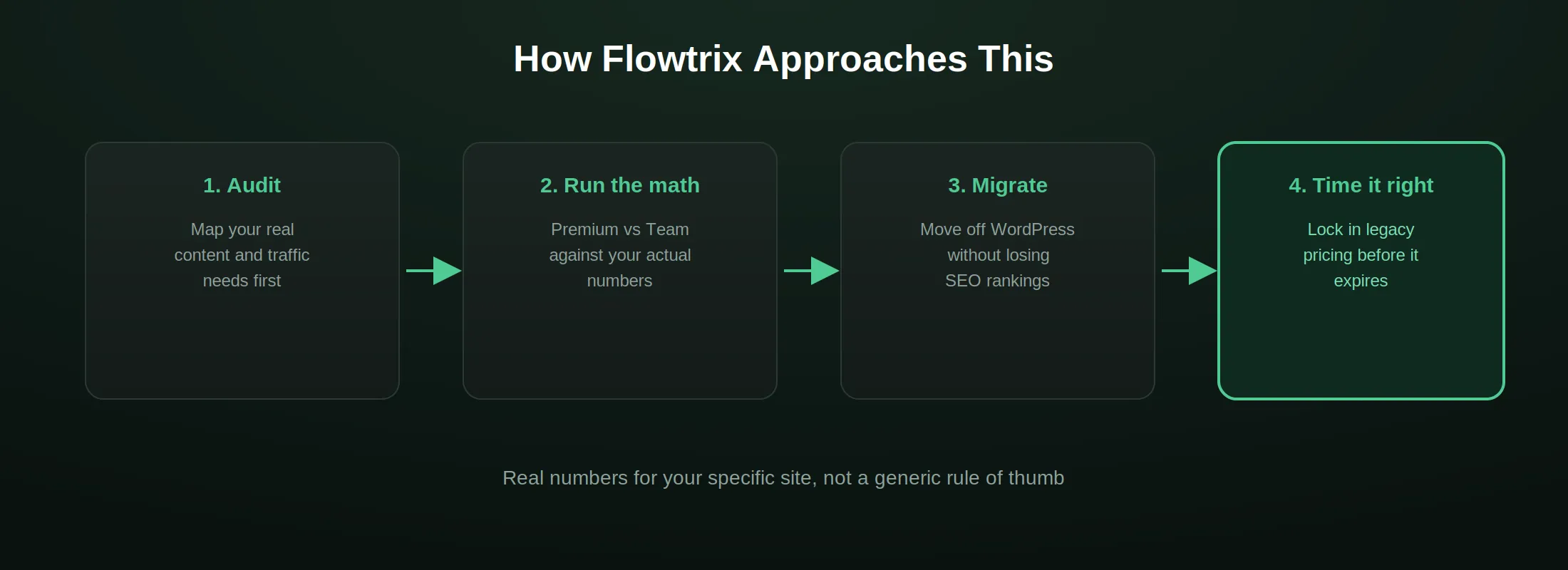
Flowtrix runs this exact Premium-versus-Team math for every B2B client before any contract gets signed. The decision comes from real numbers specific to that site, not a generic rule of thumb.
For teams still running WordPress, Flowtrix handles the full migration, so the team ends up owning its website operations directly instead of carrying WordPress's maintenance overhead every month.
For accounts already on Webflow, Flowtrix can also audit the current setup and time a plan switch so the account keeps favorable pricing for as long as the rules actually allow.
Webflow updates its pricing periodically. Treat every number above as accurate as of this writing, and confirm current figures directly on webflow.com/pricing before finalizing a budget.






.webp)




.svg)
.svg)

