



Use to summarize this article


- A headless CMS stores and manages content but has no built-in way to display it, delivery happens through an API instead.
- Traditional, decoupled, headless, and hybrid are four distinct architectures, not interchangeable terms, and mixing them up is the most common mistake in vendor comparisons.
- Marketers typically lose the visual drag-and-drop editor but gain content reuse across every channel from one source.
- Developers gain frontend freedom but take on more responsibility, routing, rendering, and SEO metadata all move into the codebase.
- Not every team needs headless. It earns its complexity when you genuinely need multi-channel delivery or frontend flexibility a traditional CMS can't give you.
Somewhere in the last few years, "headless CMS" stopped being a term only developers used in Slack threads and started showing up in marketing team meetings, RFPs, and vendor comparison sheets. If you searched for it because someone mentioned it in a meeting and you nodded along without fully knowing what it meant, you are not alone. Most people who use the term every day picked it up the same way.
This guide explains what a headless CMS actually is, how it works under the hood, how it differs from the traditional CMS most people grew up with, and what changes for a marketer versus a developer once a team makes the switch. No assumed background knowledge required.
Why this term exists at all?
It helps to know where headless CMS came from, because the term did not appear out of nowhere, it showed up in response to a specific problem.
Through the 2000s and early 2010s, most websites were built the way WordPress still works by default: one CMS, one website, content and template glued together. That was fine when a website was the only channel that mattered. Then two things happened roughly at the same time. Mobile apps became a second, equally important surface for the same brand content, and consumers started expecting the same information to show up consistently across email, social, in-store displays, voice assistants, and whatever new device category came next. A traditional CMS had no good answer for this. Getting the same product description into a website and a mobile app usually meant either duplicating content by hand in two systems or building a custom, fragile integration between them.
Headless architecture solved this by treating content as a service rather than a page. Instead of asking "what does this look like on the website," a headless CMS asks "what is this content, structurally," and lets literally any channel decide separately how to display it. The idea is not new technology so much as a different starting assumption about what a CMS's job actually is. If you already know you want a headless setup and just need to pick a platform, our ranking of the best headless CMS platforms in 2026 is a good next stop after this guide.
The quick answer
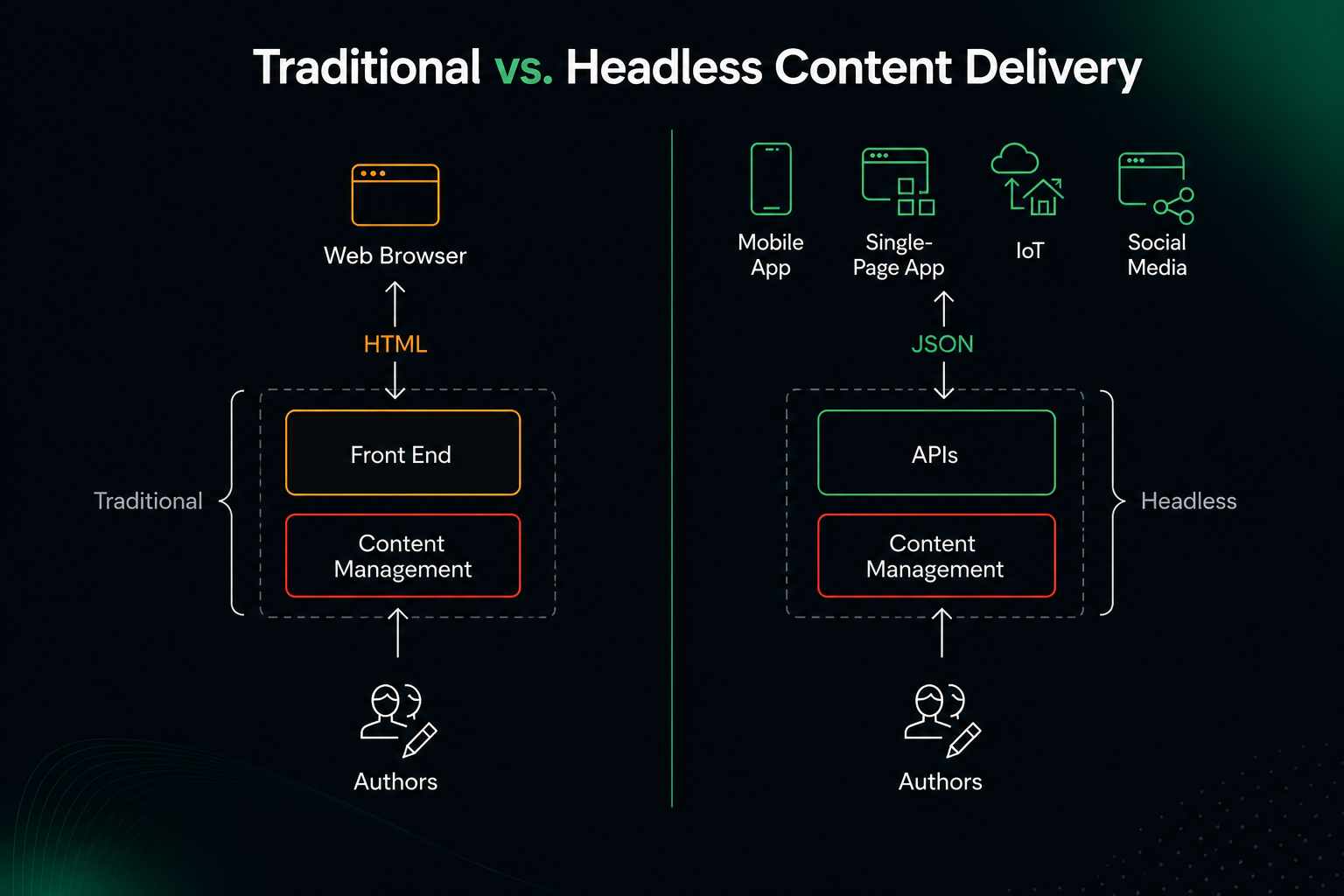
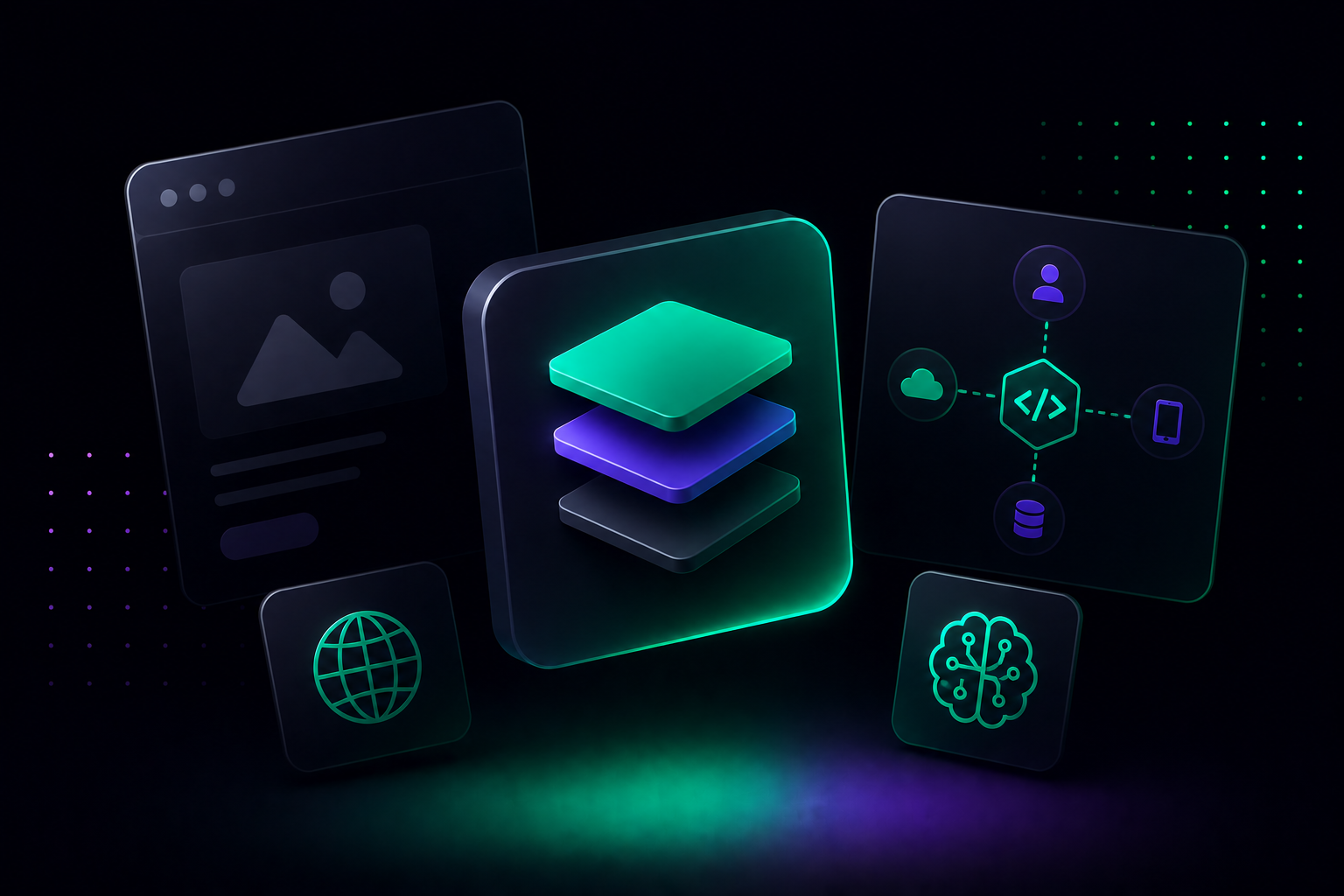
A headless CMS is a content management system that stores and manages your content but has no built-in way to display it. Instead of publishing directly to a website template the way WordPress does, it hands content off through an API, a structured data connection, to whatever frontend a developer builds, a website, a mobile app, a smartwatch display, a voice assistant, or all of them at once from the same content.
The word "headless" refers to the missing "head," the presentation layer that decides how content looks on a page. A traditional CMS has a body and a head bolted together. A headless CMS is just the body. Someone else builds the head, and they can build several different ones from the same body at the same time.
That is the whole concept in two paragraphs. The rest of this guide is about what that actually means in practice, because the concept is simple but the implications are not.
A better way to picture it
The restaurant analogy that keeps showing up across headless CMS explainers is worth borrowing because it genuinely holds up. Picture a traditional CMS as a restaurant where the kitchen and the dining room are permanently fused into one structure. You cannot redecorate the dining room without construction crews walking through the kitchen. You cannot open a second dining room across town without building an entirely new kitchen next to it, even though the food would be identical.
A headless CMS separates the kitchen from the dining room completely. The kitchen, your content, ingredients prepared and ready, does not care how many dining rooms exist or what they look like. It just sends dishes out through a service window, the API, whenever a dining room orders one. You can open a dining room with white tablecloths, one with counter seating, a food truck, and a delivery-only kitchen, all pulling from the exact same kitchen, at the exact same time, without the kitchen knowing or caring which one is asking.
That is what a headless CMS gives you: one content source, any number of "dining rooms," websites, apps, kiosks, wearables, chatbots, feeding off the same kitchen without ever touching it.
How a headless CMS actually works?
Underneath the analogy, three pieces make this work.
Content modeling: Before you write a single word, someone defines the shape of the content. Instead of a single "page" with a title, an image, and a body of text, a headless CMS asks you to define reusable content types. A blog post might have a title, an author reference, a publish date, a body, tags, and a featured image, each stored as its own structured field rather than one blob of HTML. That structure is what lets the same piece of content get reused correctly across a website, an app, and a search result snippet instead of arriving somewhere as a wall of mismatched HTML.
The content repository: Once modeled, content lives in a central hub, sometimes called a content lake or content repository, independent of any single website or app. This is the "kitchen" from the analogy. It is where editors actually work day to day, writing, uploading images, scheduling publishes, exactly the way they would in a familiar CMS dashboard. The difference is invisible to them at this stage. What is different is what happens next.
APIs: When a website, app, or any other channel needs that content, it asks for it through an API, usually REST or GraphQL. The API returns structured data, not a finished web page, just the raw content and its fields. A developer's frontend code, built in whatever framework the team prefers, Next.js, Astro, React Native, Vue, takes that structured data and decides how to render it. The same blog post data can render as a full article page on the website, a card in a mobile app feed, and a voice assistant summary, all pulled from one API call each, with zero duplication of the underlying content.
A worked example of content modeling
Abstract explanations of content modeling tend to blur together, so here is one concrete version. Say a team is modeling a "Product" content type for an ecommerce brand. In a traditional CMS, a product page is usually one big block of HTML with some fields sprinkled in. In a headless CMS, the same product gets broken into distinct, individually addressable fields: a product name, a SKU, a price, a short description, a long description, an array of image references, a category reference, and a set of size and color variants, each variant itself a small structured object with its own stock count.
Once modeled this way, that single product record can power a product detail page on the website, a compact product card in a mobile app's search results, a structured snippet that a search engine or AI answer engine can read directly, and a feed export for a marketplace partner, all without anyone retyping the price or the description a second time. Change the price once in the content repository, and every channel reflects it the next time it fetches data. That is the entire practical payoff of content modeling, and it is worth sitting with, because it is the piece that makes everything else in this guide actually work.
Headless vs traditional vs decoupled vs hybrid
This is where most explanations get muddy, because these four terms get used loosely and sometimes interchangeably, when they actually describe four distinct architectures.
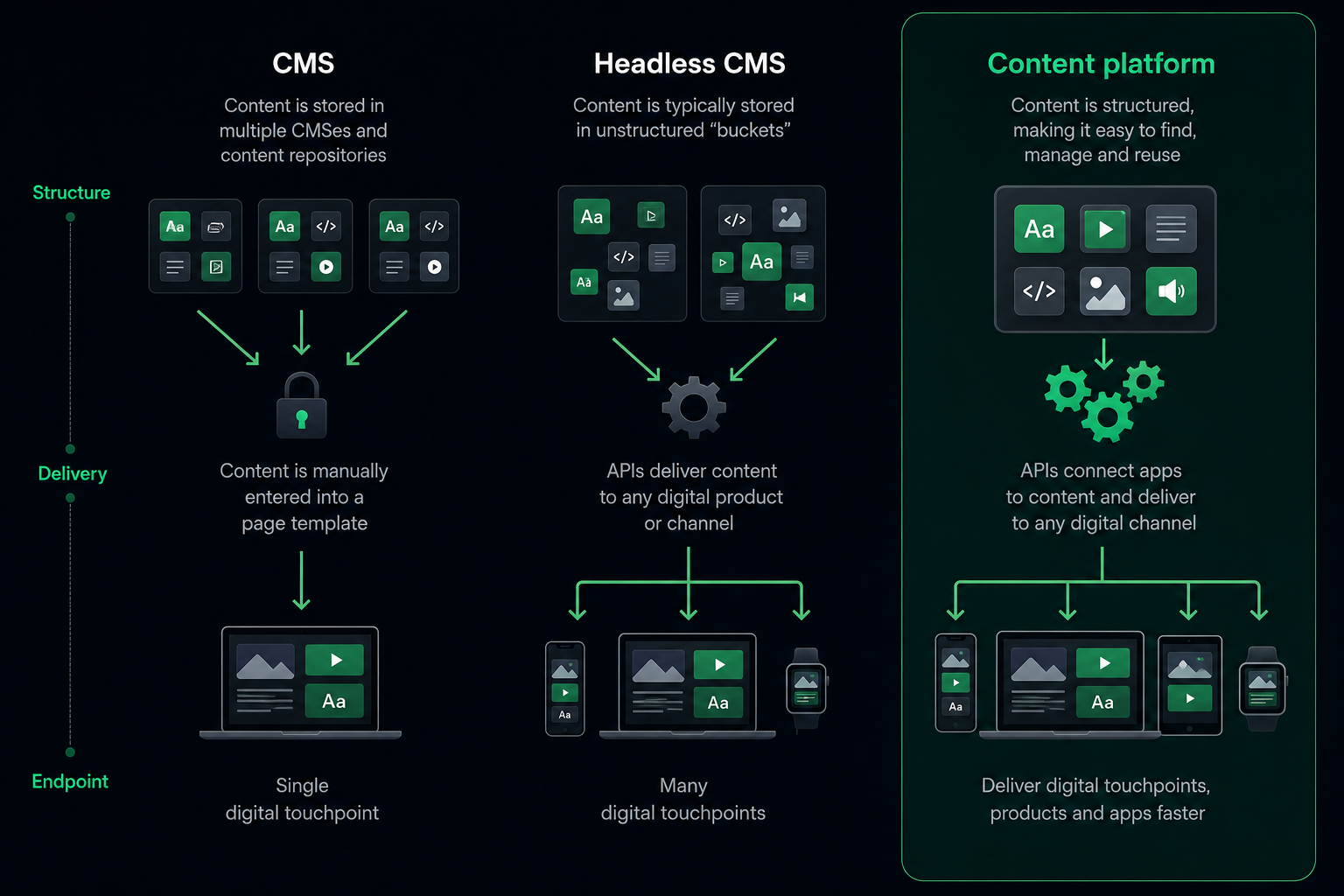
Traditional CMS: Content and presentation are fused into one system. WordPress in its classic form is the reference example. You write a post, pick a theme, and the CMS renders the final HTML page itself. It is fast to set up, familiar, and comes with a huge ecosystem of themes and plugins. The tradeoff is that your content is tightly bound to that one website. Reusing it anywhere else, an app, a kiosk, a partner's site, means manually copying it or building custom integrations that fight the CMS's assumptions.
Decoupled CMS: This is the middle ground, and it is genuinely useful to understand because it explains why some "headless" claims online are not quite accurate. A decoupled CMS separates the backend from the frontend the same way a headless CMS does, but it keeps a default frontend around as an option. WordPress with its REST API turned on is the classic decoupled example: you can still use its built-in theme system, or you can ignore it and pull content into a custom frontend through the API. You get a head, you are just not required to use it.
Headless CMS: No head exists at all. There is no default template, no built-in theme, nothing to fall back on. Every single frontend has to be built by a developer from scratch, using the API. This sounds like a downside and in one narrow sense it is, there is no shortcut, but it is also exactly why headless systems give teams maximum flexibility. Nothing about the CMS assumes what your content should look like or where it should appear.
Hybrid CMS: The newest category, and the one growing fastest right now. A hybrid CMS behaves like a traditional CMS by default, giving marketers a built-in editing experience and a working website out of the box, while also exposing full API access so developers can build additional custom frontends whenever they need to. The pitch is genuinely appealing: marketers get the fast, familiar path, developers get full API flexibility, and nobody has to choose one world and give up the other. This is the direction a lot of newer platforms, including BetterCMS, are built around, treating the old headless-versus-hosted tradeoff as a false choice rather than a permanent one.
What changes for a marketer?
If you are on a marketing team and your company is switching to a headless CMS, here is what is genuinely different day to day, stripped of jargon.
You will likely lose the classic drag-and-drop, see-exactly-what-you-get page builder, at least in a pure headless setup. Instead of building a page visually, you will typically be filling in structured fields, headline, subhead, image, CTA text, inside a form-like interface, and trusting that the developer-built frontend renders it correctly. Many platforms offer a live preview to bridge this gap, but the experience is genuinely less visual than what a WordPress or Squarespace editor gives you. This is consistently the single biggest adjustment marketers report after a headless migration, and it is worth knowing about before launch day, not after.
In exchange, you get real content reuse. Write a product description once and it can appear on the website, in the mobile app, and in a partner's syndicated feed, all without retyping it three times or hoping someone remembers to update all three copies when the price changes. For any brand running more than one channel, and almost every growing brand eventually does, that consistency stops being a nice-to-have and becomes the thing that prevents embarrassing mismatches between what the app says and what the website says.
You also get speed once things are running. New landing pages, campaign variants, and localized versions can ship without waiting on a full development cycle for each one, provided the components and templates already exist. The heavy lifting happens once, upfront, when developers build the flexible templates. After that, marketers are often filling in structured content into existing patterns rather than requesting a new build every time.
What this looks like on a Tuesday: A campaign manager needs a new landing page for a product launch happening in three markets. On a traditional CMS, this often means either duplicating an existing page three times and manually editing each copy, risking drift between versions, or filing a ticket and waiting for a developer to build three near-identical pages. On a well-built headless or hybrid setup, the same campaign manager fills in one structured content entry per market, headline, hero image, CTA text, pricing, using a template a developer already built once. All three pages publish the same afternoon, consistent in structure, different only in the content that actually needs to differ.
What changes for a developer?
For a developer, the switch to headless is less about giving something up and more about gaining room to work the way they actually want to.
You are no longer boxed into whatever templating language and hosting model the CMS vendor decided on. Want to build the frontend in Next.js, deploy it on Vercel, and use React Server Components? Go ahead. Want a completely separate lightweight Astro build for a marketing microsite pulling from the same content? Also fine, same API, different frontend. The CMS does not care, because it was never opinionated about presentation in the first place.
This also means you can iterate on the frontend without touching the content layer at all, and vice versa. A redesign no longer requires migrating years of content into a new template system. You point the new frontend at the same API and the content just flows through, unchanged.
The tradeoff developers should walk in expecting: more of the actual build is now your responsibility. A traditional CMS gives you a working website the moment you install a theme. A headless CMS gives you an empty frontend and an API. Routing, rendering strategy, SEO metadata handling, image optimization, all of it now lives in your codebase rather than being handled by the CMS out of the box. For teams that want that control, this is the entire appeal. For teams that just need a working site fast with minimal custom engineering, it is worth budgeting the extra frontend build time honestly rather than assuming it will be as quick as a theme install.
What this looks like on a Tuesday: A developer needs to add a new "case study" content type that did not exist before. On a traditional CMS built around a fixed template system, this can mean fighting the theme's assumptions about what a page contains, sometimes requiring a plugin or a custom post type workaround. On a headless CMS, the developer defines a new content model directly, whatever fields a case study actually needs, client name, results, quote, images, and builds a corresponding page template once. From that point on, anyone on the content team can create as many case studies as they want without touching code again. The upfront modeling work is real, but it is a one-time cost per content type, not a recurring one per piece of content.
Real companies actually running on this
It helps to see this outside the abstract. A few widely documented examples show how differently headless architecture gets used depending on what a brand actually needs.
Nike runs one of the most cited headless commerce setups in the industry. With hundreds of footwear styles and thousands of apparel items launching across roughly 170 markets, keeping product launches, athlete stories, and localized content synchronized across the web store and mobile app in real time was the whole point. A headless setup let Nike push the same launch content to web and app simultaneously without the frontend teams waiting on each other, which matters enormously during a high-traffic sneaker drop where the backend and frontend need to scale independently.
Spotify is a useful example precisely because it is not primarily an ecommerce story. Artist biographies, podcast descriptions, and playlist metadata need to show up correctly on your phone, your desktop app, your car dashboard, and a smart speaker that has no screen at all. A headless content layer is what makes it possible for that same piece of metadata to render as a screen element in one place and as spoken text in another, from a single source.
Coca-Cola manages content across a large number of localized country and region sites globally, an operation where manually maintaining separate content systems per market would be a maintenance nightmare. A centralized, headless content layer lets regional teams pull from shared brand content while still localizing language, imagery, and promotions per market, without duplicating the underlying content management work in every country.
Tesla is a slightly different case worth including because it shows headless working outside a massive, decade-old enterprise stack. Tesla's retail experience runs on a headless content setup that lets the same vehicle configuration and pricing content flow into the website's configurator, its retail app, and its in-showroom displays, all reading from one source, which matters enormously for a brand where pricing and configuration options change frequently and need to match exactly across every surface a customer might check before buying.
These are large companies with the engineering resources to make the most of a fully headless approach, worth keeping in mind before assuming your team needs to replicate their exact setup. Which leads to the next, more useful question.


Do you actually need a headless CMS?
Not every team does, and it is worth being honest about that before committing to a migration.
Headless architecture earns its complexity when you genuinely need to deliver the same content across more than one channel, when your traffic or content volume has outgrown what a template-based CMS handles gracefully, or when your developers want frontend freedom that a traditional CMS's theme system does not give them. If you run one website, your content team is small, and nobody is asking for an app or a kiosk display anytime soon, a traditional or hybrid CMS will likely get you to launch faster with far less custom engineering, and that is a completely legitimate choice, not a lesser one.
The honest tradeoffs worth knowing before you commit: a pure headless setup usually means a steeper learning curve for non-technical editors, a live preview experience that takes real engineering effort to build well, and meaningfully higher upfront development cost, since you are building a frontend from nothing rather than installing a theme. None of that makes headless the wrong choice. It makes it the wrong choice for teams that do not actually need the flexibility it is built to provide.
On cost specifically: The sticker price of a headless CMS platform is rarely the real number that matters. The bigger cost is almost always the frontend build, since a headless CMS gives you no default template to fall back on. A small marketing site with a handful of page types might need two to six weeks of frontend development before launch, depending on design complexity. A larger site with many content types, personalization, and multiple locales can run considerably longer. That cost is front-loaded rather than ongoing, which is exactly the opposite of a traditional CMS, where setup is cheap and cumulative maintenance across years is where the real cost tends to hide. Neither model is objectively cheaper. They spend the money at different points in the timeline, and knowing which one your budget and timeline can actually absorb matters more than comparing platform pricing sheets side by side.
Common misconceptions worth clearing up
A few ideas about headless CMS circulate that do not hold up well once you look closely.
Headless is always faster: Frontend performance depends on how the frontend is built, not on whether the CMS is headless. A poorly built headless frontend can be just as slow as a bloated traditional site. Headless gives developers the tools to build something fast, it does not guarantee it automatically.
Headless is only for big enterprises: Nike-scale examples make headless sound like an enterprise-only concern, but plenty of small teams adopt headless architecture specifically because it is lighter weight than a bulky traditional CMS installation, particularly for content-focused sites that do not need a full plugin ecosystem.
Headless and decoupled mean the same thing: As covered above, they genuinely do not. A decoupled CMS keeps an optional built-in frontend. A headless CMS has none at all. Getting this distinction wrong is one of the most common mistakes in vendor comparisons.
You lose SEO control with headless: SEO performance in a headless setup depends entirely on how the frontend handles metadata, structured data, site speed, and rendering strategy, server-side rendering versus client-side rendering matters a lot here. A well-built headless frontend can perform excellently on SEO. A poorly built one will not, the same as any website.
A short glossary, because the jargon compounds fast
A handful of terms tend to show up right alongside "headless CMS" and make conversations harder to follow if you do not already know them.
API (Application Programming Interface): The connection point that lets the CMS and the frontend talk to each other, sending structured content data back and forth.
REST and GraphQL: Two common types of APIs a headless CMS might expose. REST sends fixed data structures per endpoint. GraphQL lets the frontend request exactly the fields it needs in a single query, often reducing unnecessary data transfer.
Content modeling: The process of defining the structure of your content, what fields a blog post has, what fields a product page has, before any content gets written.
Omnichannel delivery: Publishing the same underlying content across multiple channels, web, app, voice, kiosk, consistently, from one source.
SSR and SSG: Server-side rendering and static site generation, two common approaches a headless frontend uses to turn API content into an actual web page, each with different tradeoffs for speed and freshness.
Composable architecture: A broader term for building a stack out of independent, swappable pieces, a headless CMS for content, a separate search tool, a separate commerce engine, rather than one monolithic platform doing everything.
CDN (Content Delivery Network): A network of servers spread across locations worldwide that caches and serves content close to the visitor requesting it, reducing load times. Most headless CMS APIs route through a CDN so content loads quickly regardless of where in the world a request comes from.
Structured content: Content broken into distinct, labeled fields, a title field, a price field, an image field, rather than one unstructured block of formatted text. Structured content is the foundation that makes content modeling, API delivery, and multi-channel reuse possible in the first place, and it is also what makes content easier for AI systems and answer engines to read and cite accurately.
How to actually evaluate one?
If you are far enough into this that you are now comparing platforms, a few questions matter more than a feature checklist.
Ask who is actually going to use the editing interface day to day, and have that person try it before you commit, not after. A platform that looks great in a sales demo can still be a frustrating daily experience for the marketer who has to use it every morning.
Ask what the live preview experience actually looks like. This is the single most common headless CMS complaint from non-technical editors, and it varies enormously between platforms, some genuinely solve it well, others still ask editors to publish blind and check the live site afterward.

Ask how much frontend work is truly required before launch, and get a realistic estimate from whoever is building it, not from the CMS vendor's marketing page. A platform with strong starter templates and SDKs can meaningfully cut this time down. One with none will mean a longer runway before anything ships.
Where a platform like BetterCMS fits into all of this?
Everything above describes headless CMS as a category, the tradeoffs are real regardless of which specific platform you eventually pick. Where a newer, AI-native platform like BetterCMS changes the picture is in how many of those classic tradeoffs it tries to close rather than accept as permanent.
The steep learning curve for non-technical editors and the missing visual preview, the most common complaint about pure headless setups, is addressed with a proper visual editor built for marketers from day one, not bolted on afterward as an admin panel improvement. The hybrid-versus-headless choice covered earlier in this guide is answered with both options available in the same platform, run fully headless with typed Astro and Next.js SDKs if your developers want complete frontend control, or use BetterCMS Cloud for hosting, staging, and forms out of the box if your team wants to move fast without assembling five separate tools first.
The newer layer on top of the classic headless model is AI-native tooling built directly into the content operations, an MCP server and CLI so AI agents and coding assistants can define schemas and manage content directly, with those agent actions running through the same roles and approval workflow a human editor would use, so speed does not come at the cost of control. Programmatic SEO and AEO tooling are built in as well, so content is structured for both traditional search engines and newer AI answer engines like ChatGPT and Perplexity from the start, rather than retrofitted later.
None of that changes the fundamental architecture explained in this guide, content and presentation are still separated, delivery still happens through APIs, the core concept holds. What changes is how many of the rough edges that have defined the headless CMS experience for the last decade get smoothed out before a team ever runs into them.
Headless CMS is a genuinely useful idea once the jargon clears, one content source, delivered anywhere, through an API, instead of glued to a single website. The architecture decision that actually matters is not headless versus not headless in the abstract. It is whether your team needs that flexibility badly enough to take on the tradeoffs that come with it, and if so, which platform closes the most of those tradeoffs before you have to discover them the hard way.
If your team is weighing a headless CMS migration and wants a partner to actually build it, Flowtrix works with B2B SaaS, AI, and cybersecurity companies on exactly this kind of project, from platform selection through to launch.









.svg)
.svg)

