


Use to summarize this article


- It's more than a timeline: A roadmap shows what needs to be decided at each stage, who owns it, and what has to be ready before the project moves on.
- Structure before visuals: Audit the existing site, map audiences and lock the sitemap before anyone opens a design file.
- SEO and migration start on day one: URL decisions, redirects and search intent shape the architecture. They can't be bolted on before launch.
- Build systems, not pages: Reusable templates, components and a CMS planned around the marketing team keep the site scalable after launch.
- Launch isn't the finish line: Real user data after go-live becomes the next phase of the roadmap.
An enterprise website roadmap is a structured plan that outlines what needs to happen to rebuild or improve a large company website, from strategy and content to UX, design, development, SEO, migration, launch, and optimisation. It also defines what needs to be decided at each stage, who owns those decisions, and what needs to be ready before the project moves forward.
For a small website, a simple task list might be enough. Enterprise websites are different.
There are more pages, more audiences, more stakeholders, more content, more integrations, and usually more SEO risk. A change to one part of the website can affect several others.
That is why an enterprise website roadmap should be planned before the enterprise website design work begins.
A good roadmap gives everyone a clear view of the project, what needs to happen first, what can happen at the same time, and what should wait until later.
What Is an Enterprise Website Roadmap?
An enterprise website roadmap is a plan for managing the different stages of a large website project. It typically covers business goals, research, audience needs, information architecture, content, SEO, UX, design, development, testing, migration, launch, and post-launch improvements.
It is more than a timeline.
A useful roadmap should answer:
- What are we trying to achieve?
- Who are we building the website for?
- What needs to change?
- Which pages do we need?
- What content needs to be created?
- What happens to the existing website?
- When does SEO come in?
- What needs to be designed and developed?
- Who approves each stage?
- What needs to be tested before launch?
- How will we measure success after launch?
Most importantly, it should show how these decisions depend on each other.
You cannot finalise page designs if you do not know what those pages need to do. You cannot finalise the sitemap if you have not understood the audiences and content requirements. And you should not plan SEO migration after the new website has already been built.
The roadmap connects all of these pieces.
Why Do Enterprise Websites Need a Roadmap?
Enterprise websites tend to grow over time.
A company starts with a few product pages. Then it adds new products, industries, markets, resources and customer stories. Different teams create new pages for campaigns. Sales asks for new content. Product marketing wants dedicated solution pages.
Eventually, the website becomes difficult to manage.
The problem is not always the number of pages. It is the lack of a clear system behind them.
This is why enterprise website planning needs to happen before the team starts designing everything.
Without a roadmap, common problems appear quickly:
- Design starts before the sitemap is final
- Content is written for pages that later disappear
- SEO is brought in too late
- New requirements appear during development
- Stakeholder feedback sends finished work backwards
- Migration becomes a last-minute task
- The launch date moves because dependencies were missed
A roadmap does not remove all of these problems.
It makes them easier to see before they become expensive.
How Do You Create an Enterprise Website Roadmap?
Start with the business goal, then work through the existing website, audiences, content, information architecture, SEO, UX, design, development, migration, QA and launch.
The exact order can change depending on the project, but the important thing is to understand the dependencies between each stage.
Here is a practical way to build one.
1. Start With the Business Goal
Before deciding how many pages you need, decide why the website needs to change.
“We need a redesign” is not really a goal.
Ask what is wrong with the current website and what the new one needs to accomplish.
For example:
- The company's positioning has changed
- The website no longer reflects the product
- Visitors do not understand the offering quickly enough
- The site is not generating enough qualified leads
- Organic traffic has declined
- Marketing cannot update the website easily
- The company is entering new markets
- Several websites need to be consolidated
- The current CMS is limiting the marketing team
These are very different problems.
If the main problem is positioning, the roadmap needs more strategy and messaging work.
If the problem is organic visibility, SEO and content need to be involved much earlier.
If the company is entering new markets, localisation, content structure and regional navigation may become major parts of the project.
The roadmap should reflect the actual business problem, not just the fact that the website looks old.
2. Audit the Existing Website
Before planning the new website, understand what is already working.
An enterprise website audit should look at more than design.
Review:
- Existing pages
- Organic traffic
- Search rankings
- Backlinks
- Top landing pages
- Conversion data
- Existing content
- Navigation
- CMS structure
- Forms
- Integrations
- Analytics
- Technical SEO
- Existing URLs
Then give important pages a clear decision:
Keep.
Rewrite.
Combine.
Move.
Remove.
Create new.
This can dramatically change the scope of a website redesign.
You may start with an assumption that the new website needs 150 pages. After an audit, you might discover that some pages can be combined, some are no longer useful, some need a rewrite, and only a smaller number actually need to be created.
That is why a page inventory should come before page design.

3. Understand Your Audiences
Enterprise websites rarely have one audience.
A website may need to serve:
- Executives
- Marketing teams
- Technical buyers
- Developers
- Procurement teams
- Existing customers
- Partners
- Investors
- Job candidates
- Different industries
- Different geographic markets
They may all arrive at the same homepage, but they do not necessarily want the same information.
Map the main audiences and understand:
- What they need to know
- What problems they are trying to solve
- What questions they have
- What proof they need
- Which pages they should see
- What action they should take
For example, a buyer might follow:
Industry → Solution → Product → Customer Story → Demo
A technical visitor might follow:
Product → Features → Integrations → Resources
These journeys should influence the website structure before the navigation is designed.
4. Build the Sitemap Before Designing the Website
This is one of the most important stages in an enterprise website roadmap.
Plan the structure before the visual design.
Your sitemap should define:
- Main navigation
- Product pages
- Industry pages
- Solution pages
- Resource sections
- Case studies
- Company pages
- Utility pages
- Footer navigation
- Page hierarchy
- URL structure
This is where information architecture becomes important.
A good enterprise website structure should make a large website feel simple.
Visitors should not need to understand the company's entire product organisation just to find one piece of information.
The sitemap also gives marketing, content, SEO, UX, design and development a shared document to work from.
It is much easier to change the structure here than after dozens of pages have already been designed.
5. Decide Which Pages Matter Most
Not every page deserves the same amount of attention.
Some pages are directly connected to revenue. Others support the user journey. Some are useful but can wait.
Divide the website into priorities.
Launch-critical
Pages that are necessary for the new website to work properly.
High-value
Pages that directly support traffic, conversions, sales or important audiences.
Supporting
Pages that are useful but can be launched later if needed.
This helps prevent a common enterprise website problem: spending too much time on low-impact pages while important pages are still waiting for content or approval.
It also gives the team a better way to handle scope.
Not every page has to be part of version one.
6. Create a Content Roadmap
Content should not be treated as something that happens after the design.
It is part of the website.
For each important page, define:
- Who is it for?
- What does the visitor need to understand?
- What is the main message?
- What action should they take?
- What existing content can be reused?
- What needs to be rewritten?
- What needs to be created?
- What proof is required?
- What images, video or product visuals are needed?
- What SEO requirements does the page have?
This becomes especially important for enterprise websites because content is often one of the biggest dependencies.
The design team may be ready to move forward, but the copy is not approved.
Or development is almost finished, but product information is still changing.
A content roadmap makes these dependencies visible.
It also helps the design team understand what each page actually needs before designing it.
7. Build SEO Into the Roadmap From the Beginning
SEO should not be a final check before launch.
By that point, many important SEO decisions have already been made.
SEO needs to be considered while planning:
- Sitemap
- Page hierarchy
- URLs
- Content
- Internal links
- Product pages
- Industry pages
- Solution pages
- Metadata
- Schema
- Redirects
- Migration
- Indexing
Start by identifying which existing pages bring valuable organic traffic.
Then decide what happens to them.
If a page stays, keep its SEO value in mind.
If two pages become one, decide which URL should survive.
If a page is removed, identify whether it needs a redirect.
If a new page is being created for an important search intent, make sure it has a clear place in the new website structure.
This is why an enterprise website roadmap and SEO roadmap should work together.
SEO affects the architecture, content, URLs and migration. It cannot simply be added after the design is finished.
8. Decide What Happens to the Existing URLs
This deserves its own place in the roadmap because URL changes can have a major impact on a large website.
Create a list of existing URLs and map them to the new structure.
For each URL, decide:
Keep the URL.
Change the URL and redirect it.
Merge it with another page.
Remove it.
This is particularly important for pages with:
- Organic traffic
- Search rankings
- Backlinks
- Strong internal links
- Important conversion activity
The migration plan should also account for metadata, canonicals, internal links, XML sitemaps and indexing.
For an enterprise website, website migration is not a technical detail that can be left until the last week.
It is part of the roadmap.
9. Plan UX Before High-Fidelity Design
Once the structure and content requirements are clear, move into UX.
This usually includes:
- User flows
- Wireframes
- Page templates
- Navigation
- Content hierarchy
- Responsive behaviour
- Conversion paths
The goal is to make sure the website works before spending time polishing how it looks.
For example, if the homepage needs to serve four very different audiences, that should be solved in the information architecture and UX.
Changing the colour of a button later will not fix a confusing user journey.
That is why website design should start with the structure and user experience, not just the visual direction.
10. Design a System, Not Just Individual Pages
Enterprise websites need to scale.
If the company has 30 solution pages, you do not want 30 completely different designs.
You want a flexible system that allows those pages to feel different where necessary while still belonging to the same website.
That usually means creating:
- Design system
- Reusable components
- Page templates
- Typography rules
- Spacing rules
- Interaction patterns
- Responsive behaviour
- Motion guidelines
This makes the current project easier to manage and makes future growth much easier.
What This Looked Like on Lyric
Lyric's website is a good example of why this matters.
Lyric's platform deals with complex supply chain technology, so the website had to explain technical ideas to enterprise buyers without making the experience difficult to follow.
Flowtrix designed and developed 10+ pages and built a scalable system around the site.
The project included modular page templates, a CMS for blogs, whitepapers, webinars, podcasts and customer stories, and a documented component system.
That meant the roadmap was not just about getting the initial pages live.
It also had to account for how Lyric's marketing team would continue creating and managing content after launch.
That is an important part of enterprise website planning: plan for the website you will need next year, not only the one you need on launch day.
11. Plan the CMS Around the Marketing Team
The CMS should be part of the roadmap before development starts.
Ask:
- Who will manage the website?
- Which content types need to be editable?
- Which pages need reusable templates?
- How often will new pages be created?
- Will different teams publish content?
- Are approval workflows required?
- What integrations are needed?
- Which elements should be controlled centrally?
The right CMS structure can make everyday marketing work much easier.
The wrong one can turn simple content changes into development tickets.
For enterprise websites, the CMS is not just a technology decision.
It is part of the operating model for the marketing team.
12. Get the Right People Involved Early
Enterprise website projects rarely belong to one team.
Marketing may lead the project, but the website can affect sales, product marketing, content, SEO, brand, product, IT and regional teams.
The problem is not having more stakeholders.
The problem is involving them too late.
Product marketing can help shape how products and solutions are presented. Sales can point out the questions prospects ask most often. SEO can identify pages and search traffic that need to be protected. Content teams can flag what needs to be rewritten or created. IT can identify technical or integration requirements before development begins.
This does not mean everyone needs to approve everything.
It means the people who have important information about the website should have a chance to contribute before decisions become expensive to change.
A simple way to manage this is to define:
Who contributes?
Who has useful information or expertise?
Who decides?
Who has the final say?
Who needs to know?
Who needs to be kept informed but does not need to approve the work?
This keeps the project collaborative without turning every decision into a group discussion.
13. Plan Development Around Reusable Systems
Development should not start with a list of individual pages.
Start with the system behind them.
Define:
- CMS collections
- Components
- Page templates
- Reusable sections
- Forms
- Integrations
- Permissions
- Analytics
- Tracking
- Responsive behaviour
This is where enterprise development can differ significantly from building a small marketing website.
The goal is not only to launch the current pages.
The goal is to give the marketing team a foundation they can continue using.
14. Give QA Its Own Phase
QA should not mean checking the homepage on the day before launch.
For a large website, testing needs to cover the entire experience.
Check:
- Navigation
- Forms
- Links
- CMS functionality
- Mobile layouts
- Desktop layouts
- Browser compatibility
- Integrations
- Analytics
- Tracking
- Metadata
- Schema
- Redirects
- Accessibility
- Performance
- Content accuracy
And do not leave all of it until the end.
Testing throughout development makes problems easier and cheaper to fix.
15. Plan the Launch as a Separate Workstream
A website launch involves more than publishing the new design.
The launch plan should cover:
- Final content checks
- URL redirects
- Migration
- Analytics
- Forms
- Integrations
- XML sitemap
- Indexing
- Search Console
- Performance
- Final SEO checks
- Backup of the old website
- Post-launch monitoring
Everyone should know what happens on launch day and who owns each task.
The launch should be a controlled transition from the old website to the new one.
Not a last-minute push to get everything live.
16. Keep the Roadmap Going After Launch
A website roadmap should not end when the website goes live.
Launch gives you something you did not have during the planning stage: real user behaviour.
Look at:
- Organic traffic
- Conversion rate
- Demo requests
- Qualified leads
- Landing page performance
- Search visibility
- Form completion
- User behaviour
- Content performance
Then use that information to decide what happens next.
Maybe a product page is getting plenty of traffic but very few demo requests.
Maybe an industry page is bringing in highly qualified visitors.
Maybe people are not reaching an important CTA.
These findings should become the next set of website improvements.
That is where conversion rate optimisation can become part of the post-launch roadmap.
What Should Be Included in an Enterprise Website Roadmap?
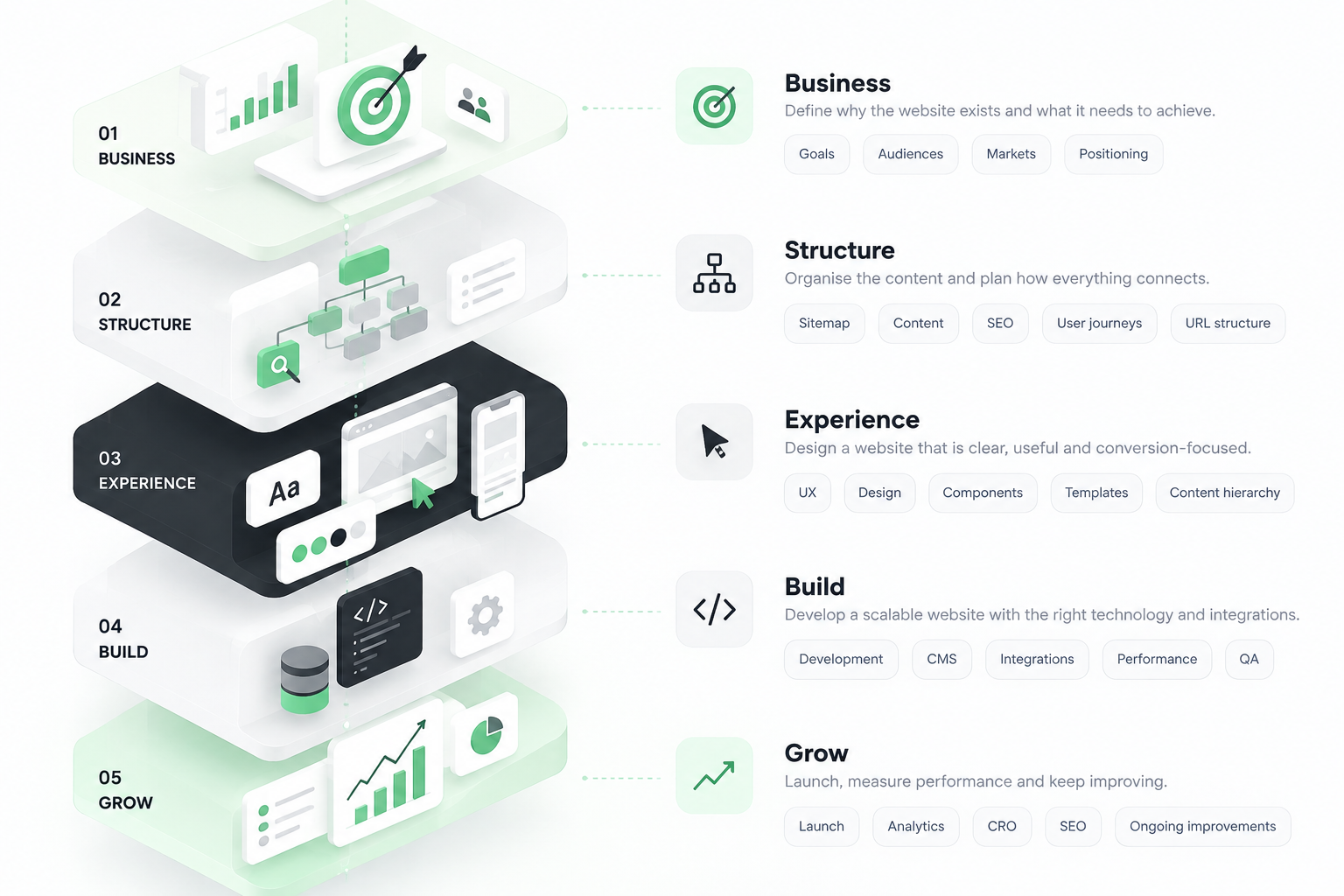
At a minimum, your roadmap should account for:
Business goals
What the website needs to achieve.
Website audit
What is working, what is not, and what should happen to existing pages.
Audience research
Who the website needs to serve and what each audience needs.
Information architecture
How the website's pages and content will be organised.
Content
What needs to be reused, rewritten, created or removed.
SEO
Search intent, page structure, URLs, internal linking and migration.
UX and design
User journeys, wireframes, templates and design systems.
CMS and development
How the website will be built and managed.
Stakeholder alignment
Who needs to contribute, decide and stay informed.
QA and launch
What needs to be tested before the website goes live.
Post-launch optimisation
What happens after real users start interacting with the new website.
If one of these is missing, the roadmap may still work, but there is a good chance the missing piece will show up later as a delay or unexpected task.
Enterprise Website Roadmap Template
You can keep the working roadmap simple.
For every phase, track five things:
Phase
What stage of the project is this?
Key work
What needs to happen?
Owner
Who is responsible?
Dependency
What needs to be finished first?
Approval
What needs to be signed off before moving forward?
For example:
This is more useful than a roadmap that only contains dates because it shows what needs to happen before the next stage can move forward.
How Long Does an Enterprise Website Redesign Take?
There is no fixed timeline for an enterprise website redesign.
The timeline depends on the number of pages, content requirements, number of templates, stakeholder involvement, CMS complexity, integrations, SEO migration, markets and approval process.
A smaller enterprise website project may take a few months. A larger website with significant migration, multiple markets, complex integrations or hundreds of pages can take considerably longer.
The important thing is to estimate the timeline after understanding the scope and dependencies, not before.
A launch date picked before the roadmap is usually just a target.
A launch date built around an understood scope is much more useful.
How Do You Prevent Scope Creep?
A roadmap will not stop new ideas from appearing.
It gives you a way to decide what happens to them.
When someone adds a new request, ask:
This is especially useful for enterprise projects because a small request can affect content, UX, design, development and QA.
Not every idea needs to be rejected.
Some simply need to become phase two.
Wayground: Why the Roadmap Has to Include More Than Design
Wayground is a good example of why enterprise website planning needs to cover the whole project.
Flowtrix worked on Wayground's website as part of its broader brand and digital evolution. The project involved creating a stronger website experience while handling the complexity that comes with a large, established platform.
The project resulted in a 2.5x increase in engagement.
The important lesson for roadmap planning is not just the result.
It is what has to happen behind that result.
Information architecture, UX, development, content, SEO, migration and launch cannot operate as completely separate pieces when the website is large.
They have to be planned together.
What Makes an Enterprise Website Roadmap Different?
An enterprise website roadmap is not simply a longer version of a small-business website plan.
The difference is complexity.
Enterprise websites usually have:
- More audiences
- More pages
- More stakeholders
- More content
- More integrations
- More SEO risk
- More approval points
- More markets
- More complex CMS requirements
- More dependencies between teams
That means the roadmap needs to focus heavily on structure and decision-making.
The question is not just:
“What are we building?”
It is also:
“What needs to be decided before we can build it?”
That is where a good enterprise roadmap earns its value.
Final Thoughts
Planning an enterprise website is not about creating a massive project plan with hundreds of tasks.
It is about putting the important decisions in the right order.
Start with the business goal. Understand the existing website. Map the audiences. Build the information architecture. Prioritise the pages. Plan content and SEO early. Then move into UX, design, development, QA, migration and launch.
And do not treat launch as the finish line.
The website will continue to change as the company changes. New products will launch. New markets will open. New content will be created. Search behaviour will change. Visitors will show you what is working and what needs improvement.
A good enterprise website roadmap gives the team enough structure to handle all of that without rebuilding the entire process every time.
That is the real purpose of the roadmap: not to predict every step, but to make sure the right decisions happen at the right time.
Flowtrix has delivered 120+ website projects for B2B SaaS, AI and cybersecurity teams. Here is the roadmap thinking in action.








.webp)





.svg)
.svg)

