



Use to summarize this article


- Cost by project type: A template-based Astro site runs $2,500 to $8,000, a custom marketing site with a headless CMS runs $8,000 to $25,000, and enterprise builds reach $50,000 to $150,000+.
- The framework is free: Astro has no license fee, so your budget goes to design, CMS, integrations, migration and the people doing the work.
- Running costs stay low: Hosting is often free to $50 per month, and maintenance typically costs 10 to 20 percent of the build cost per year.
- Lower 3-year total for content sites: Astro with a headless CMS comes to roughly $23,000 to $29,000, against $27,000 to $36,000 for WordPress and $30,000 to $40,000 for Next.js.
- Watch the hidden costs: Content creation, redirects and SEO preservation, analytics rebuilds, CMS seat limits and your own team's time are often missing from quotes.
An Astro website costs between $2,500 and $8,000 for a simple template-based site, $8,000 to $25,000 for a custom marketing site with a headless CMS, $20,000 to $50,000 for content-heavy or integration-heavy builds, and $50,000 to $150,000+ for enterprise projects. Hosting is often free to $50 per month, and ongoing maintenance typically runs 10 to 20 percent of the build cost per year.
“What is this going to cost me, and how do I know if the number is fair?”: that’s the most common question founders or CTOs ask us when discussing the tech stack for their website.
Astro is a modern web framework built around shipping as little JavaScript as possible. It’s popular for content sites, marketing sites, documentation, and increasingly for ecommerce front ends. But the actual Astro website development cost depends less on the framework itself and more on everything wrapped around it: design, CMS, integrations, migration, and who is doing the work.
If you’re planning to build using Astro, in this blog we will make its cost clear to you.
What’s included in an Astro website cost?
When someone asks about astro website development cost, they usually mean one of three different things, and mixing them up is the fastest way to get a quote that doesn’t match your expectations.
Here’s what’s included in the overall Astro website cost:
- Build cost: It is the one-time price to design, develop, and launch the site
- Run cost: It’s what you pay monthly or yearly to keep it online: hosting, CMS subscriptions, domain, monitoring, and tooling.
- Change cost: The cost required to evolve the site after launch: new pages, new features, redesigns, framework upgrades.
Astro itself is free and open source. There’s no license fee. Every dollar in an Astro budget goes to people’s time or to the services around the framework.
This means two Astro sites can differ in price by 20x without either being overpriced.

Astro website cost in 2026 for various project types
Page count is the metric clients reach for first and the one we trust least. A 12-page site with a bespoke design system, three integrations, and a migration from a legacy CMS can cost more than a 60-page site built from a solid template. So we estimate the cost by project archetype.
The table below shows you the typical astro website development cost based on project type and scope.
Note: These figures are based on our experience and market estimates; your quotes will vary by region and vendor.
Hourly rates behind them generally run $25 to $60 for offshore freelancers, $50 to $120 for experienced freelancers, $100 to $200 for agencies, and $150 to $250+ for senior US or UK consultancies.
Astro website development cost: Phase-wise breakdown
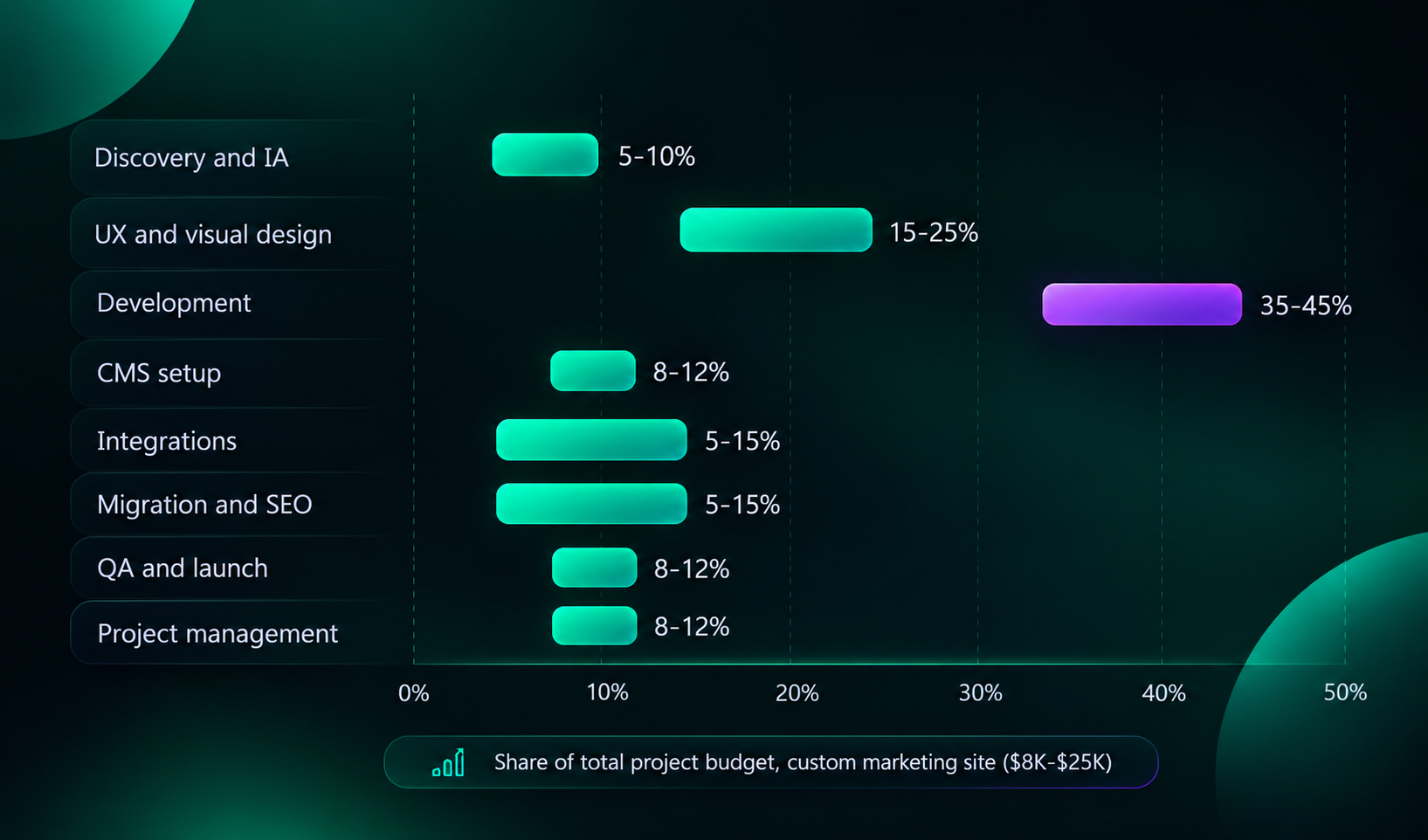
Here is a typical split for a custom marketing site built in Astro ($8,000 to $25,000 range):
- Discovery and information architecture (5 to 10%). Sitemap, content model, technical requirements, success metrics. Skipped discovery is the most common cause of mid-project budget growth.
- UX and visual design (15 to 25%): Wireframes, page templates, a component library. If you already have brand guidelines and a Figma file, this drops sharply.
- Development (35 to 45%): Astro components, layouts, content collections, responsive behavior, interactive islands, accessibility.
- CMS setup and content modeling (8 to 12%): Schemas, editor experience, previews, roles, webhooks for rebuilds.
- Integrations (5 to 15%): Forms, CRM, analytics, search, newsletter, booking tools.
- Content migration and SEO preservation (5 to 15%): Redirect maps, metadata transfer, internal link repair. Often grows on larger sites.
- QA, performance, and launch (8 to 12%): Cross-browser testing, Core Web Vitals checks, accessibility audit, staging sign-off, DNS cutover.
- Project management (8 to 12%): Communication and coordination. Quotes that show 0% here have usually hidden it elsewhere.
Factors that affect Astro website cost
Here are the most important factors that contribute to the overall Astro website development cost:
Design originality
A customized template and a bespoke design system are different products. Bespoke design with motion, custom illustration, and a reusable component library can double the front-end effort. If your brand is distinctive and conversion matters, it’s often worth it. If you’re validating a product, it often isn’t.
CMS choice and editor experience
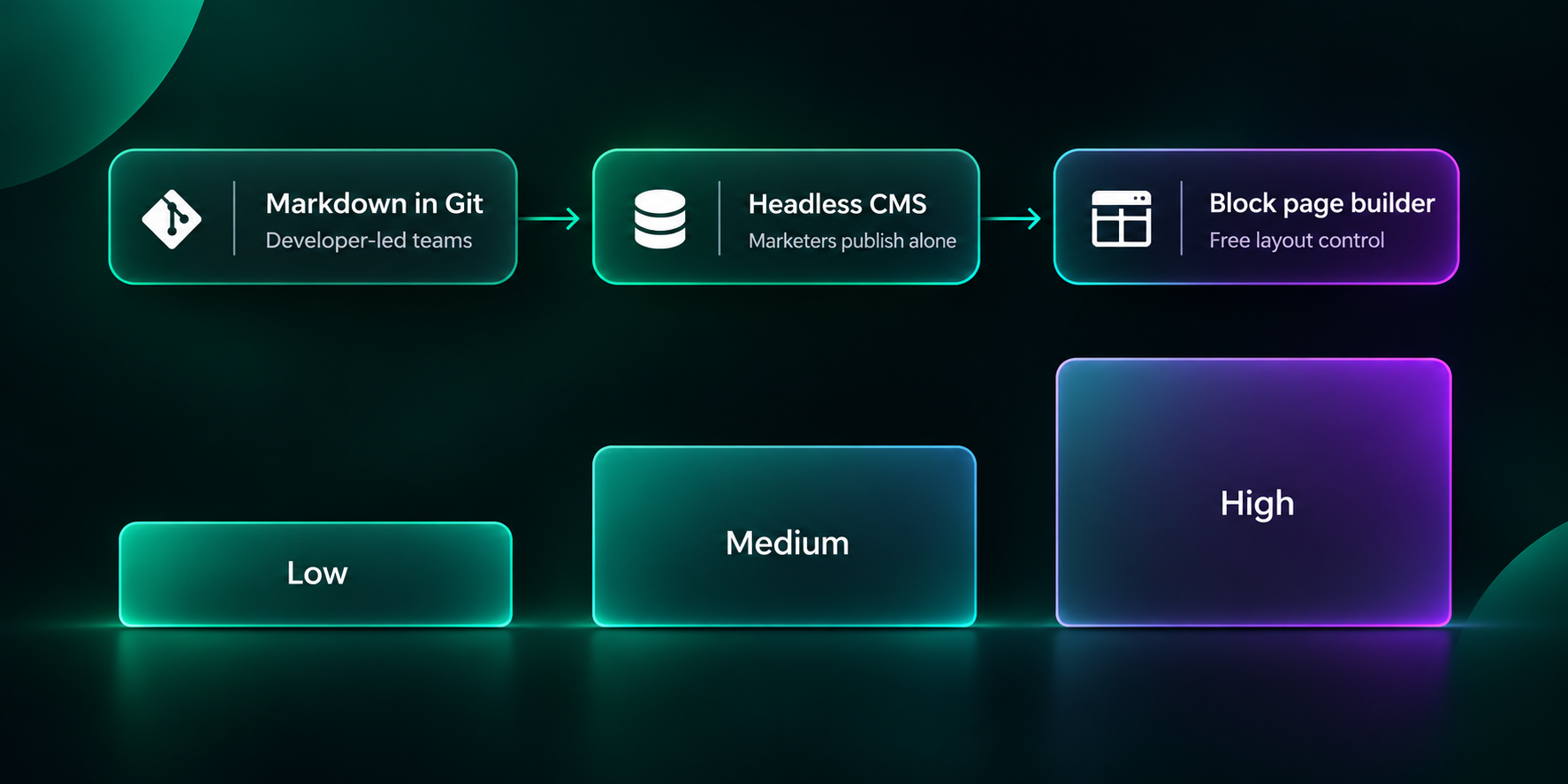
Markdown files in a Git repo are the cheapest option and perfectly good for developer-led teams. A headless CMS such as BetterCMS, Sanity, Contentful, or Storyblok costs more to model and configure, but marketers can publish without a developer. The hidden question is how much visual control editors expect. If they want to rearrange page sections freely, you’re building a block-based page builder, and that’s real scope.
Integrations
Each integration looks small. A HubSpot form, a Stripe link, a Calendly embed. But each carries authentication, error states, testing, and ongoing maintenance. We estimate a simple integration at a few hours and a bi-directional CRM sync at several days.
Dynamic functionality
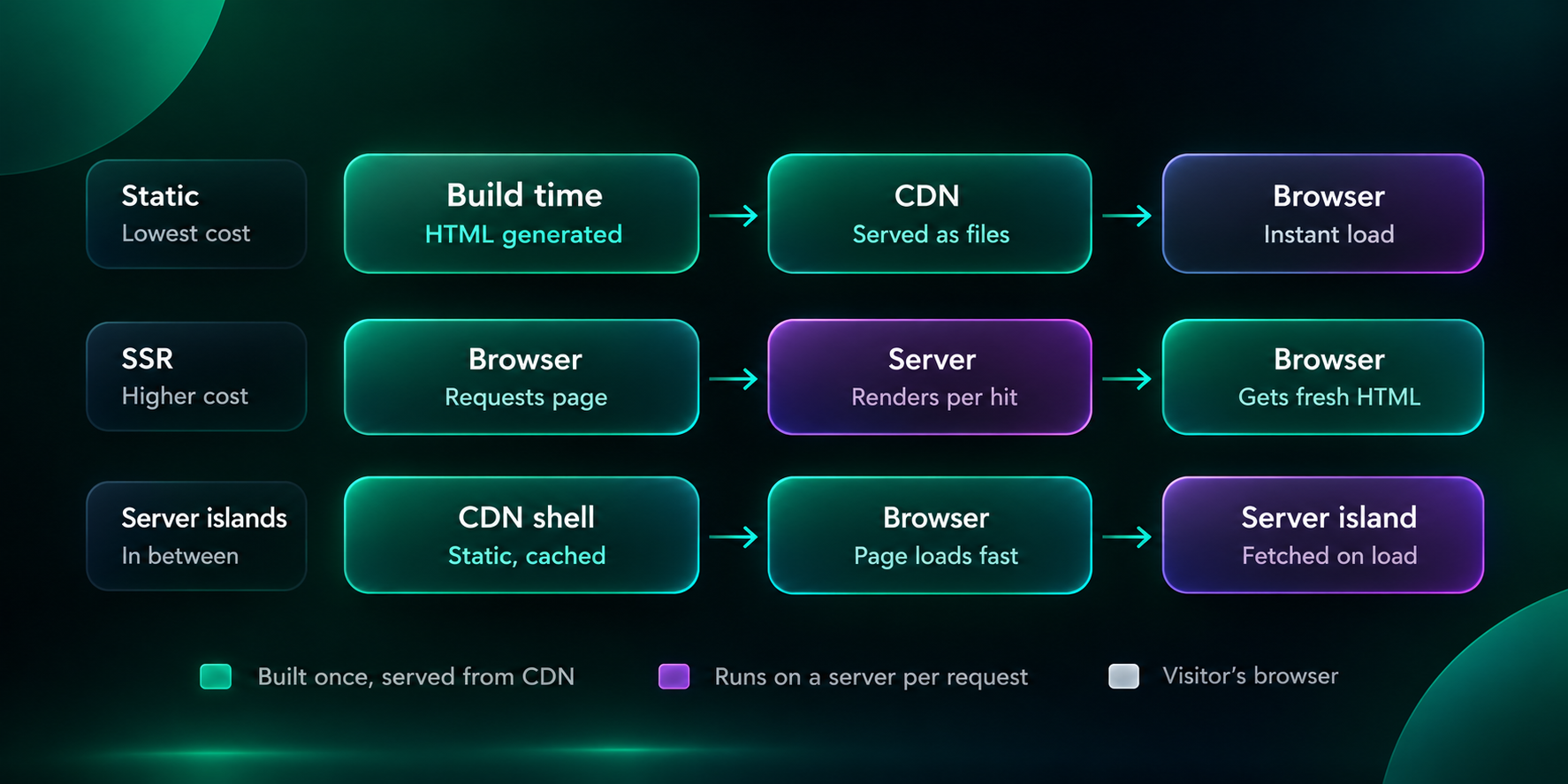
Astro is static-first, but it supports server-side rendering, API endpoints, and server islands for personalized or frequently changing sections. Adding user accounts, gated content, or real-time inventory moves you from a content site toward an application, and the budget follows.
Content volume and migration
Moving 40 well-structured pages is an afternoon of scripting. Moving 1,200 blog posts with inconsistent formatting, embedded shortcodes, and broken images is a project. Always ask how migration is being handled and whether it is automated or manual.
Internationalization
Astro supports i18n routing well, but each language multiplies content, QA, translation workflow, and hreflang management. Budget roughly 25 to 40 percent extra per additional language for the first one, less for subsequent ones.
Performance, accessibility, and SEO requirements
Astro gives you a strong baseline, but meeting a specific bar (WCAG 2.2 AA, Core Web Vitals in the green on real devices, structured data across templates) takes deliberate work. Treat these as scope items, not assumptions.
Astro website cost vs WordPress vs Next.js: Cost comparison
Development cost is only the first chapter. The table below shows how the three platforms typically compare for a mid-sized marketing and content website.
Our observation:
- WordPress wins on initial cost and editor familiarity
- Next.js wins when the site is really an application
- Astro tends to win on total cost for content-led sites because hosting is cheap
Astro website costs that are often skipped from a quote
Even the best Astro development agencies do not mention several aspects within a quote. Always ask your vendor whether the following are included, excluded, or your responsibility:
- Content creation and editing: Developers build containers; someone still has to fill them. New copy, photography, and illustration are usually separate.
- Redirects and SEO preservation: A migration without a redirect map can erase years of ranking. This takes real hours, and it protects your most valuable asset.
- Analytics and tag rebuild: GA4 events, conversion tracking, consent management, and ad pixels rarely transfer cleanly.
- CMS seats and API limits: Free tiers are generous until a third editor arrives or traffic spikes.
- Image and video optimization at scale: Astro’s image tooling helps, but large media libraries may need a CDN or DAM.
- Training and documentation: A two-hour editor workshop and a short guide cost little and save a lot of support requests.
- Post-launch stabilization: The first 30 days always surface edge cases. Good quotes include a warranty window.
- Third-party design assets: Stock imagery, icon sets, premium fonts, and theme licenses.
- Internal time: Your team will spend hours on feedback, content, and approvals. This is the most common reason timelines slip, and it costs real money even though it never appears on an invoice.

Ongoing Astro website cost that you must consider
Design and development are not the only costs that you have to incur. There are several ongoing Astro website costs that you must consider when making a decision:
Hosting
Astro outputs static HTML by default, which makes hosting cheap. Cloudflare Pages, Netlify, and Vercel all offer free tiers that cover many small sites, and paid plans commonly start around $20 per user per month. Sites using SSR or heavy bandwidth can climb into the low hundreds monthly. Check current plan limits before committing, as providers adjust pricing.
CMS
Markdown and Git are free. Open-source or generous free-tier options include Keystatic, Decap, and Sanity’s free plan. Paid plans for Storyblok, Contentful, and similar platforms commonly run from roughly $100 to several hundred dollars per month depending on seats, locales, and API usage.
We've created BetterCMS to offer structured content that editors manage without developer help. On the Javelin ITCS site, the team publishes company profiles, solutions, industries and jobs through the CMS. Because those are content types rather than hand-built pages, the next acquisition takes minutes, not a project.
Maintenance
Plan for 10 to 20 percent of build cost per year. That covers dependency updates, Astro version upgrades, security patches, uptime monitoring, small content changes, and performance checks. Astro releases move fast, so skipping upgrades for two years can turn a routine job into a mini-migration.
Domain, email, and tooling
Typically $20 to $50 per year for the domain, plus analytics, uptime monitoring, and form tools that may be free or $10 to $60 monthly.
When is Astro not the right choice for you?
You should rather spend your money well than spending it on the wrong stack. Despite being one of the best frameworks, Astro may not be the best fit for your website in the following cases:
- The product is an app, not a site: Authenticated dashboards with rich client-side state are better served by Next.js, Remix, SvelteKit, or similar.
- Editors need full drag-and-drop control and have no developer support: WordPress with a good page builder, Webflow, or Framer may serve them better and cheaper.
- You need a large plugin ecosystem on day one: WordPress and Shopify have deeper off-the-shelf options.
- The team has no front-end capacity at all: Even an efficient Astro site needs someone to own it after launch, whether that’s an agency retainer or an internal developer.
- The site is small and short-lived: A campaign microsite for three months rarely justifies a custom build.
A good vendor/agency will push back on this list and ask questions you hadn’t considered. That’s a green flag.
How to lower your Astro website cost without lowering quality?
- Start with a template, then evolve: A customized premium theme can cover 70 percent of a marketing site for a fraction of bespoke pricing.
- Phase the build: Launch core pages first; add resource hubs, calculators, and secondary languages in later phases.
- Prepare content early: Late copy is the number one cause of timeline and budget slip.
- Choose the simplest CMS that fits: Don’t buy an enterprise CMS for a five-person editorial team.
- Reduce design variation: Fewer unique layouts means fewer templates to build and test.
- Make decisions fast: A consolidated feedback round beats five fragmented ones.
- Defer nice-to-haves: Animations, custom illustrations, and advanced filtering are usually best added after you’ve seen real user behavior.
Javelin ITCS brings specialist consulting and staffing firms under one operating model. Its original sitemap listed 35 pages, nearly one for every service, technology and industry.
We consolidated them into 10 focused pages, built in Astro from signed-off Figma designs, with BetterCMS for content and Vercel for hosting. The team published four companies, solutions, industries and job listings through the CMS without developer help. Read full case study →
Take the next step with Flowtrix
So, what should you budget? For most businesses, $8,000 to $25,000 buys a custom, fast, maintainable Astro marketing site, with $50 to $300 per month in running costs and 10-20% a year for maintenance.
Go lower if you’re happy with a template and Markdown. Go higher if you’re migrating a large site, serving multiple languages, or integrating deeply with your stack.
The better question isn’t what does Astro website cost, it’s what do you need the site to do, and what is each requirement worth?
Not sure what you need and how much it may cost? Let us do the first audit for you!