



Use to summarize this article


- Start with the AI Assistant channel: GA4 added it in May 2026. It groups visits from tools like ChatGPT, Gemini and Copilot, but only from the day it went live.
- Add one custom channel: a regex rule on Session source catches Claude, Perplexity and the rest, and it works on past data too.
- Expect some AI traffic in Direct: on our site, 201 of 416 AI visits in 90 days arrived with no referrer. A "How did you hear about us?" field fills the gap.
- AI Overviews stay inside Google organic: GA4 cannot split them out. Search Console and Bing Webmaster Tools now show AI citations, but not clicks.
- Measure pipeline, not sessions: pass the AI source into your form and CRM, then compare AI and organic conversion on your own data.
- Where Flowtrix comes in: we set up this tracking on the B2B websites we build, from the GA4 channel to the CRM field, so AI leads get counted.
AI search traffic is the visits your website gets when someone clicks a link inside an AI answer, in tools like ChatGPT, Claude, Perplexity, Gemini and Microsoft Copilot. Clicks from Google's AI Overviews and AI Mode count too, even though GA4 files them under normal Google traffic.
GA4 can now track most of it on its own: since May 2026 it has a built-in AI Assistant channel, and a few extra steps catch the visits it misses. The harder part is the next question your CEO will ask: did any of those visits turn into pipeline?
This guide covers both. You will see where ChatGPT, Claude, Perplexity and Gemini visits show up in GA4, why some of them hide in Direct, what you can and cannot see for Google AI Overviews, and how to connect AI visits to leads and deals in your CRM. Where it helps, we share real numbers from our own site, flowtrix.co.
What Is AI Search Traffic?
There are two kinds of AI search traffic, and GA4 treats them very differently.
The first is a click from an AI tool such as ChatGPT, Claude, Perplexity, Gemini or Microsoft Copilot. The buyer asks a question, the tool cites your page, and the buyer clicks. These visits usually carry a referrer like chatgpt.com, so you can track them.
Here is what that looks like. When we asked ChatGPT "Best AI product photography tool for commerce brands" on November 17, 2026, ChatLabs, a Flowtrix client, was the first name on its list.

The second is a click from Google's own AI features: AI Overviews and AI Mode. These clicks come from google.com, so GA4 counts them as normal Google organic traffic. You cannot pull them apart in GA4, which we cover in more detail further down.
For most B2B SaaS sites, the first kind is still small next to Google. A TripleDart study of 64 B2B SaaS and tech companies found that the median company gets AI traffic equal to about 3% of its organic traffic, and that share more than doubled between April and June 2026.
Small, but not worth ignoring. These visitors tend to arrive later in their research, which is why the setup in the rest of this guide ends in your CRM, not in a traffic chart.
How to Track ChatGPT Traffic in GA4
The quickest way to track ChatGPT traffic in GA4 is the AI Assistant channel. Then check Session source for anything it missed, and add a custom channel group so all AI tools sit in one row, including your older data.
Step 1: Open the AI Assistant channel
Go to Reports, then Acquisition, then Traffic acquisition. Make sure the table uses Session default channel group, and look for the row called AI Assistant.
Google describes this channel as visits "from sources like ChatGPT, Gemini, Deepseek, Copilot, or Grok". When GA4 spots one of these referrers, it sets the medium to ai-assistant. Two limits to know: it rolled out from May 13, 2026, and it does not apply to older data. Anything before that date still sits in Referral or Direct.
Step 2: Check Session source for the full picture
To check ChatGPT traffic by its source, switch the table's main dimension from channel group to Session source. Search the table for chatgpt. You should see chatgpt.com, and you may also see visits tagged with utm_source=chatgpt.com, because ChatGPT adds that tag to many of the links it shows.
Repeat the search for claude, perplexity, gemini and copilot. This is also how you find ChatGPT traffic in GA4 from before May 2026, since those visits never made it into the AI Assistant row.
Step 3: Build one AI channel that covers every tool
A custom channel group fixes both gaps. It can include tools Google does not list, and Google says custom groups can be applied to your reports retroactively.
In Admin, open Data display, then Channel groups. Click Create new channel group, which starts from a copy of the default. Add a channel called AI Search with the condition Session source matches regex, and add a second condition with OR: Default channel group exactly matches AI Assistant.


A standard GA4 property allows two custom channel groups, so this uses one of them. Once saved, pick it from the channel group dropdown in Traffic acquisition and your AI Search row appears next to Organic Search.
How to See Traffic From Perplexity, Gemini and Claude
To see traffic from ChatGPT and Perplexity side by side, look at Session source, not the channel. Each AI tool sends a different source value, and Google's list for the AI Assistant channel does not name every tool.
| AI tool | What to look for in Session source | Named in Google's AI Assistant list? |
|---|---|---|
| ChatGPT | chatgpt.com, or utm_source=chatgpt.com | Yes |
| Gemini | gemini.google.com | Yes |
| Microsoft Copilot | copilot.microsoft.com | Yes |
| DeepSeek and Grok | chat.deepseek.com, grok.com | Yes |
| Claude | claude.ai | Not named. Check Session source |
| Perplexity | perplexity.ai | Not named. Check Session source |
Do not assume ChatGPT is the only tool that matters. On flowtrix.co, Webflow Analyze counted 416 AI visits between August 18 and November 16, 2026. ChatGPT sent 113 with a referrer, Claude sent 45 and Perplexity sent 6. Claude was our second biggest AI source, and Google's list does not even mention it.
Data from Octane11's Q3 2026 B2B AI search report points the same way: Claude drove 13.5% of AI-touched deals from just 2.3% of AI traffic. A channel that leaves out Claude can hide some of your best visits.
Why Some AI Traffic Shows Up as "Direct"
If you are asking how you know if ChatGPT is sending you traffic, the short answer is that GA4 only sees part of it. When an AI tool sends no referrer and no tag, GA4 has nothing to go on, so the visit lands in Direct or Unassigned.
This happens more than most teams think. Mobile apps often strip the referrer, people copy a link from an answer and paste it into a new tab, and some tools pass nothing at all. On our own site, 201 of the 416 AI visits Webflow Analyze recorded came with no referrer. That is almost half.
Sometimes the tool itself breaks. Between October 8 and 15, 2026, ChatGPT stopped adding its utm_source tag to links. Adobe's Cedric Huesler looked at more than 500 sites and saw ChatGPT visits drop by about 31,000 a day while Direct rose by about 26,000. OpenAI confirmed it was a technical error and rolled out a fix within about a day.
You cannot fix missing referrers inside GA4. You can ask the buyer instead. Add a "How did you hear about us?" field to your demo and contact forms, with options like ChatGPT, Claude, Perplexity, Google, LinkedIn and Referral.
It works. Sentry found that AI tools sent only about 10% as many visits as Google, yet AI chat was the number one way new signups said they found Sentry. Their analytics said one thing and their signups said another.

AI Bots vs AI Visitors: What GA4 Never Shows You
GA4 counts people. It does not count the bots that AI companies send to read your site. Google says traffic from known bots and spiders is automatically excluded from GA4, and you cannot turn that off or see how much was removed.
That matters because AI tools touch your pages in two ways before anyone clicks. Their bots crawl your site to train models or build a search index. And when a person asks a question, the tool may fetch your page live to answer it. Neither of these shows up in GA4. Only the click that follows does.
OpenAI is a good example. It runs a separate bot for each job and lists them in its crawler documentation:
| What visits your page | What it does | Shows up in GA4? |
|---|---|---|
| GPTBot | Crawls content that may be used to train OpenAI's models | No |
| OAI-SearchBot | Finds pages to show in ChatGPT search answers | No |
| ChatGPT-User | Opens a page when a ChatGPT user asks about it | No |
| A person clicking a link in ChatGPT | A real visit to your site | Yes, as chatgpt.com |
To see the bots, you need your server logs or your CDN's bot reports, such as Cloudflare's. Look for user agents like GPTBot, OAI-SearchBot, ChatGPT-User, ClaudeBot and PerplexityBot.
The gap between crawling and clicking is big. Cloudflare Radar data for October 2026, compiled by SEOmator, shows Anthropic crawled about 482 pages for every visit it sent back, and Perplexity about 4,056. Google crawled about 4.8 pages per visit.
Can You Track Google AI Overviews Traffic?
Not separately, no. When it comes to AI search traffic vs Google, AI Overviews and AI Mode are part of Google, so GA4 records those clicks as google / organic, the same as a normal blue link.
Search Console is getting closer. On June 3, 2026, Google introduced generative AI performance reports that show how often your pages appeared in AI Overviews, AI Mode and Discover's AI features. You can break them down by page, country, device and date.
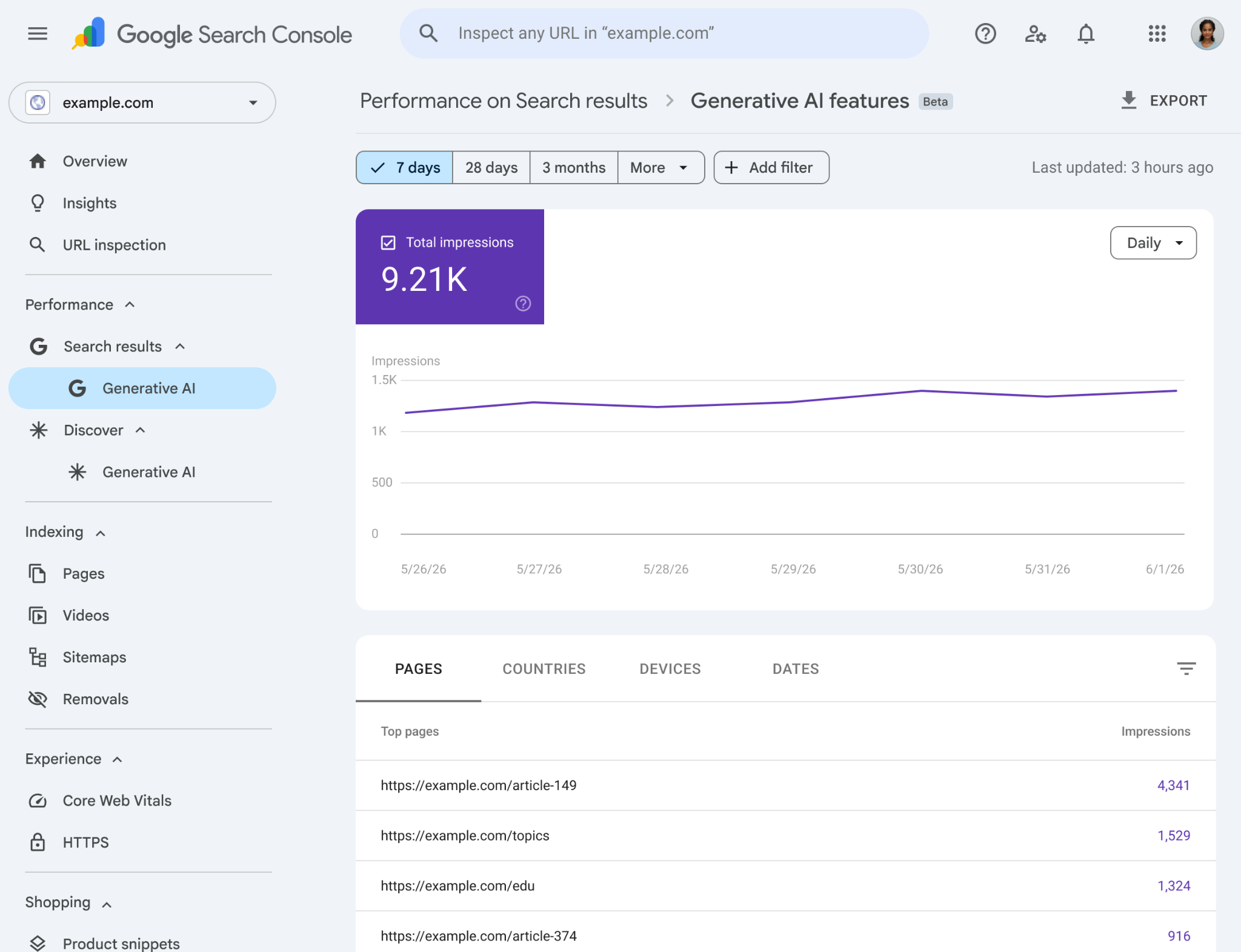
Three limits matter. The reports show impressions, not clicks. Those impressions are already counted in your normal performance totals. And Google is rolling the reports out to a subset of sites first, so your property may not have them yet.
What you can do today: if you have access, compare the pages that get AI impressions with the pages whose Google clicks are falling. That is the clearest signal you will get on AI Overviews until Google shares click data. Our guide to Google AI Overviews covers how to earn those placements in the first place.
How to Track AI Citations in Bing Webmaster Tools
Clicks are only part of the story. Plenty of buyers read an AI answer, note your name and never click. Bing gives you a closer look at that side than Google does today.
On February 10, 2026, Microsoft added AI Performance to Bing Webmaster Tools as a public preview. It shows how often your site is cited as a source in Microsoft Copilot, in AI summaries on Bing and in some partner tools.
The report gives you four things: total citations, the average number of your pages cited each day, the grounding queries the AI used to find your content, and citation counts for each URL.
In June 2026, Bing added four more views. Intents sorts grounding queries into types like informational or commercial. Topics groups related queries together. Citation Share shows your share of all citations for a query. Compare puts two date ranges side by side.
Microsoft's announcement does not mention click data, so treat this as a visibility report. Use it next to GA4: Bing tells you which pages AI cites, and GA4 tells you which of those citations turn into visits and leads.
Which Pages Get the Most AI Traffic?
Usually not the pages you expect. In most AI search traffic analytics we have seen, including our own, AI visits go to homepages, service pages, product pages and case studies more than to blog posts.
To run your own ChatGPT traffic analysis, open Reports, then Engagement, then Landing page. Add a filter for your AI Search channel, or for Session source containing chatgpt. Sort by sessions, then by key events.
Here is what that looked like for flowtrix.co over 90 days in Webflow Analyze. Our homepage got the most AI visits, at 93. Next came job pages, the careers page and case studies such as Amazon Signage. Our most visited blog from Google, the B2B landing page examples post, got only 17 AI visits.
A Search Engine Land study of 10 websites found the same pattern at a larger scale. Among their top 100 organic pages, 49 got zero AI visits. Service and product pages earned 29.4 AI visits for every 1,000 organic visits, the highest of any page type, while articles earned 23.4.
This changes where you should spend effort. If AI buyers land on your service pages, those pages need to explain what you do, who it is for and why you are different in the first few lines. That is the work we did on Wayground's website, where traffic grew 30% and RFQs rose 67% after the rebuild.
Free website audit
Are your AI landing pages ready for buyers?
Get a scored breakdown of your positioning, proof, conversion paths and technical health. Results in about a minute.
85/100
Overall score
How to Connect AI Traffic to Leads and Pipeline
To attribute traffic from AI search, the AI source has to travel with the lead: from the visit, into your form, into your CRM and onto the deal. GA4 alone stops at the session.

Mark the actions that matter as key events
In GA4 Admin, open Events and mark your demo request, contact form and signup as key events. Now your AI Search channel shows key events and a key event rate next to every other channel, which is your first, rough read on quality.
Pass the source into every form
Add hidden fields to your forms for first-touch source, medium and landing page. A small script stores these on the first visit and fills them in when the buyer submits, even if that happens three visits later. Add the "How did you hear about us?" field next to them, so you capture the AI visits GA4 put in Direct.
Give AI its own lead source in the CRM
HubSpot already does part of this. Its Original Traffic Source property now includes an AI Referrals value for visits from domains like chatgpt.com and claude.ai. In Salesforce, add AI Search as a Lead Source value, or map your hidden fields to a Lead Source Detail field.
AI Traffic to Pipeline Setup Checklist
- AI Search channel built in GA4 and placed above Referral
- Key events set for demo, contact and signup forms
- Hidden fields for first-touch source, medium and landing page
- "How did you hear about us?" field with ChatGPT, Claude and Perplexity as options
- AI lead source in HubSpot or Salesforce, mapped from the form
- Monthly report of AI leads, opportunities and closed deals
Once this is live, you can measure ROI from AI search traffic the same way you measure any channel: pipeline created and revenue won, against the time you spend on AI visibility.
The website is where most of this breaks. Forms without hidden fields, demo pages that do not pass the source, and CRMs with no AI option all leak data. When we rebuilt ChatLabs' website, the redesign was tied to pipeline from day one, and pipeline grew 3.5x.
How to Build a Monthly AI Traffic Report in GA4
The standard reports are fine for a quick check. For a report you can share every month, build one exploration and save it. Google's guide to free form explorations covers the basics. Here is the setup we use:
- In GA4, open Explore and pick the Free form template.
- Add Session source and Landing page + query string as dimensions, and drag both into Rows.
- Add Sessions, Engaged sessions, Key events and Session key event rate as metrics, and drag them into Values.
- Add a filter where Session source matches regex, and paste the same regex you used for your AI Search channel.
- Set the date range to last month and save the exploration with a clear name, like "AI traffic monthly".
Each month, look at three things: which AI tools are growing, which pages they land on, and which of those pages lead to key events. Then add the CRM numbers from the section above: AI-sourced leads, opportunities and closed deals. That is the report your CEO actually wants to see.
Does AI Search Traffic Convert Better?
Sometimes, and it depends on how you measure it. Studies on AI search traffic conversion disagree, so the only number that should guide your budget is your own.
Here is what the published data says:
- Octane11 found that B2B visitors from AI search became won deals at 1.22%, against 0.49% for organic search, about 2.5x higher.
- Seer Interactive saw ChatGPT convert at 15.9% against 1.76% for Google organic. That was for a single client.
- Amsive looked at 54 sites and found 4.87% for AI against 4.6% for organic. The gap was not statistically significant.
- SALT.agency found SaaS sites converting at 6.69% from AI and 6.71% from organic. Nearly identical.

The studies differ because they measure different things. Some count any key event, some count won deals, and some look at one company. Deal-level data, like Octane11's, tends to show the biggest gap, because AI visitors often arrive with a shortlist already in hand.
So run the comparison on your own site. In GA4, compare the key event rate of your AI Search channel with Organic Search over 90 days. In your CRM, compare the share of AI-sourced leads that become opportunities. If AI wins on both, it deserves more of your content and website budget.
How to Check Your Competitors' ChatGPT Traffic
You cannot see a competitor's GA4, but third-party tools can estimate their AI traffic. Treat the numbers as directional, not exact.
Similarweb's AI Chatbot Traffic report is the closest thing to Similarweb ChatGPT traffic data for any domain. In Website Research, go to Website Analysis, then Referral Traffic, then AI Chatbot Traffic. It shows visits from ChatGPT, Perplexity and other chatbots, splits them across competitors, and tracks the trend over time.
Ahrefs Brand Radar answers a different question. It shows how often your brand and your competitors get mentioned in AI answers, not how many clicks follow. Use both together: mentions tell you who AI recommends, traffic tells you who gets the visit.
If a competitor gets far more AI traffic than you, look at which of their pages it lands on. That usually points to the comparison pages, service pages or guides you are missing.
Common Mistakes When Tracking AI Search Traffic
Most broken AI tracking setups we see come down to a few small mistakes:
- Leaving the AI channel below Referral. GA4 uses the first rule that matches, so AI visits get counted as Referral and your AI row stays empty.
- Trusting the AI Assistant channel alone. It only starts on May 13, 2026, and Google's list does not name Claude or Perplexity.
- Reading the October 8 to 15 dip as real. That week's drop in ChatGPT visits was a tagging bug on OpenAI's side.
- Mixing up bot hits and visits. A log full of GPTBot requests is not traffic. Only clicks from people show up in GA4.
- Judging AI by sessions. AI sends fewer visits than Google, so count leads, opportunities and deals before you decide what it is worth.
- Stopping at GA4. If the source never reaches your form and CRM, you will never know which deals AI helped close.
Start With One Channel, End With Pipeline
Tracking AI search traffic is not one report. You need a few pieces working together: the AI Assistant channel, a custom AI channel for the tools Google misses, a form field for the visits that hide in Direct, and a CRM source that carries all of it to the deal.
Set it up once, give it 90 days, and you will know whether AI search is a side channel or a real source of pipeline for your company. At Flowtrix, we build this measurement into the websites we design and develop, alongside the SEO and AI search visibility work that gets those pages cited in the first place.
Flowtrix has worked with 100+ B2B, SaaS and AI companies. Here is what changed after a few of our rebuilds.

45% more traffic, 37% more demo bookings and 62% more quality leads for an AI sales platform.

5x traffic and a 35% conversion rate after rebuilding an AI data pipeline platform's website.


FAQ's
Quick answers to the questions B2B teams ask most when they start tracking AI search traffic in GA4.