



Use to summarize this article


- The short answer: HubSpot is a CRM with a website builder. Webflow is a website builder that connects to a CRM. Most B2B SaaS teams use Webflow for the site and HubSpot for the leads.
- Where Webflow wins: Building pages, structuring content and the cost of the website itself.
- Where HubSpot wins: CRM, email workflows, personalizing pages with contact data and tying page views to revenue.
- What it costs: Content Hub Professional is $450 a month billed yearly. Webflow's Premium site plan is $25 a month billed yearly. You pay for Marketing Hub in both setups if you need automation.
- The bridge: The HubSpot app for Webflow syncs your Webflow forms into HubSpot, adds tracking and embeds HubSpot forms and chat.
HubSpot or Webflow? If you want the short answer: build your marketing website in Webflow and run your leads in HubSpot. HubSpot is a CRM that can host a website. Webflow is a website platform that connects to a CRM. Most B2B SaaS teams get the best of both by using each one for its own job.
That's the short version. But "use both" isn't right for everyone, and the details matter when you're paying for it every month.
So instead of a feature list, we scored the two platforms on the eight things a B2B marketing team actually does with its website. Building pages. Managing content. Capturing leads. Personalizing. Staying fast. Getting found. Paying for it. Proving revenue.
Every price and feature below was checked on 3 November 2026. If you're already planning a move, our SaaS Webflow migration guide covers the step-by-step plan.
First, they aren't the same kind of tool
This is where most comparisons go wrong. They line up HubSpot and Webflow feature by feature, as if they were two versions of the same thing. They aren't.
HubSpot started as a marketing and CRM platform. Its website builder, now called Content Hub (it was CMS Hub until 2024), is one of several "hubs" that sit on top of the same CRM. The website exists to feed the CRM.
Webflow started as a visual website builder. Its CMS, hosting, SEO tools and testing all exist to make the website better. Leads go to whatever CRM you connect.
| HubSpot | Webflow | |
|---|---|---|
| What it is at heart | A CRM and marketing platform | A website platform |
| Website product | Content Hub | Site plans, plus Optimize, Analyze and Localization |
| How pages are built | Themes with drag-and-drop sections and modules | A visual canvas with components |
| Custom code language | HubL, HubSpot's own template language | HTML, CSS and JavaScript |
| Lead management | Built in | Through apps like HubSpot, Salesforce or Zapier |
| Share of all websites | 0.2% | 0.8% |
The last row comes from W3Techs, which tracks which platforms websites run on. As of 2 November 2026, Webflow runs about four times as many websites as HubSpot CMS. Both are small next to WordPress, at 39.5%.
Round 1: Designing and building pages
This is the round marketers feel every week. How long does it take to launch a new landing page, and do you need a developer to do it?
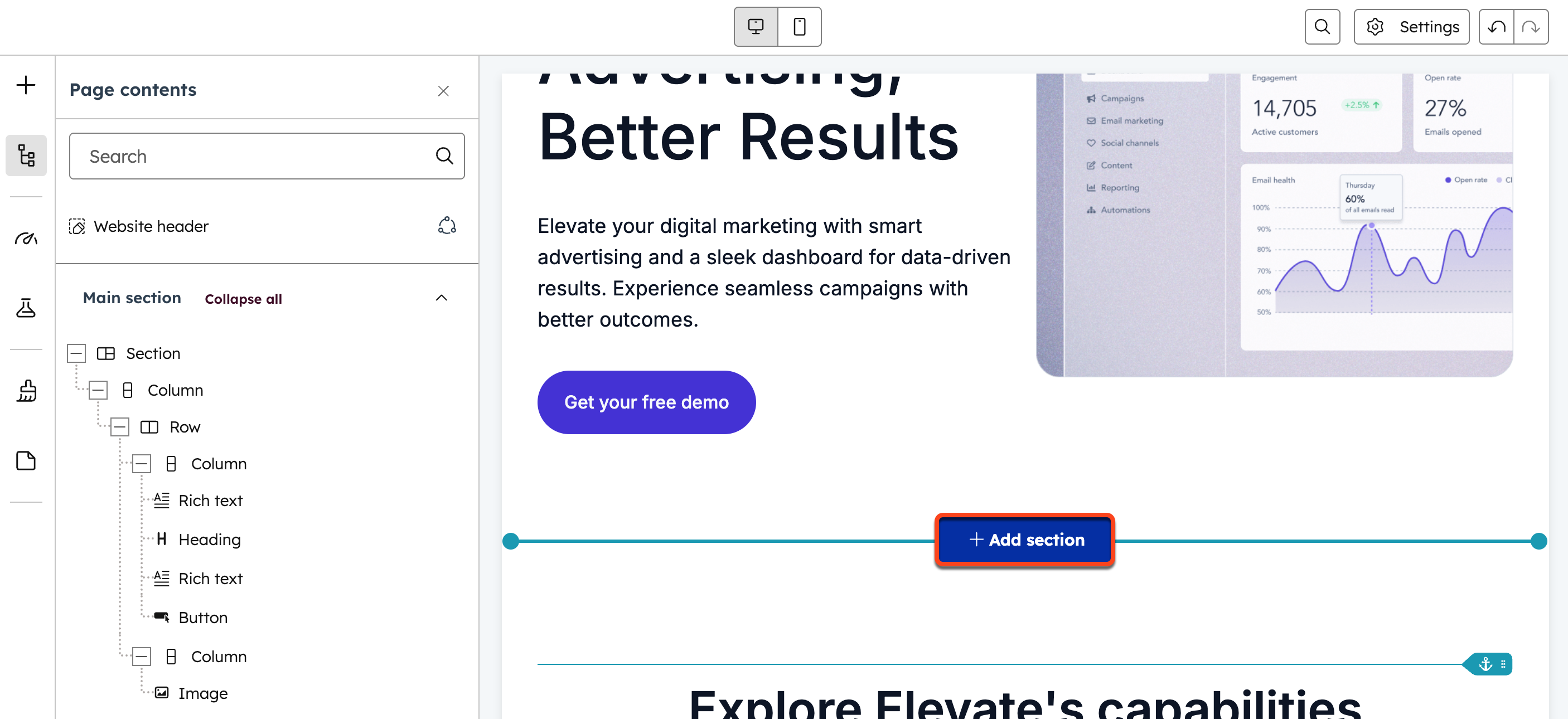
In HubSpot: You build pages from sections and modules inside a theme. It's quick for simple pages, and the editor is friendly. But the theme sets the limits. HubSpot's own help docs say it plainly: "Available style options for custom modules and themes are set by the creating developers." Anything new needs a developer who knows HubL.
In Webflow: You work on a visual canvas that writes real HTML and CSS. Your team builds pages from components, like heroes, logo bars and CTA blocks, and can change layouts without filing a ticket. Since Webflow Conf 2026, those components can also go inside CMS rich text, so blog posts and case studies stay on brand. That's according to Webflow.
Round winner: Webflow. More design freedom, and fewer requests that end up with a developer.
Round 2: CMS and content structure
A B2B site isn't just a blog anymore. It's case studies, integrations, use cases, comparison pages, job posts and glossary pages. All of them need structure.
| What you need | HubSpot Content Hub | Webflow CMS |
|---|---|---|
| Blog | Built in, with a good writing experience | A CMS Collection you design yourself |
| Other content types | HubDB tables and dynamic pages, usually set up by a developer | As many Collections as your plan allows, with custom fields |
| Linking content together | Possible, but developer-led | Reference fields, set up in the Designer |
| Limits | Starter: up to 30 website pages. Professional: up to 10,000 | Premium plan: 20,000 CMS items across 40 Collections |
HubSpot's blog is good, and a lot of teams like writing in it. The gap shows up with everything else. In Webflow, a marketer can create a "Case Studies" Collection, link each case study to an industry and a product, and have those pages update across the site on their own.
Round winner: Webflow. It handles content types beyond the blog without a developer.

Round 3: CRM, email and workflows
Here, it isn't close. HubSpot was built for this.
When a visitor fills out a form on a HubSpot page, they become a contact. A workflow can score them, assign an owner, send a nurture email and create a task for sales. All of it happens in one system, with no syncing.
Webflow has no CRM or email automation of its own. That's on purpose. Instead, the HubSpot app for Webflow connects the two. When someone books a demo, the form keeps your Webflow design, and HubSpot gets the contact, runs the workflow and pings sales.
A few details matter when you set this up. According to Webflow's setup guide:
- Form mapping works on free HubSpot accounts: Webflow form submissions sync into HubSpot through its "non-HubSpot forms" feature.
- Field names must match exactly: Each Webflow field name must match the HubSpot property's internal name, like firstname or email. It's case-sensitive.
- Only plain text fields map: Dropdowns, radio buttons, checkboxes and text areas don't. If you need them, embed a HubSpot form instead.
- The tracking code does the work: Without it, HubSpot doesn't capture the submission. The app can add it for you.
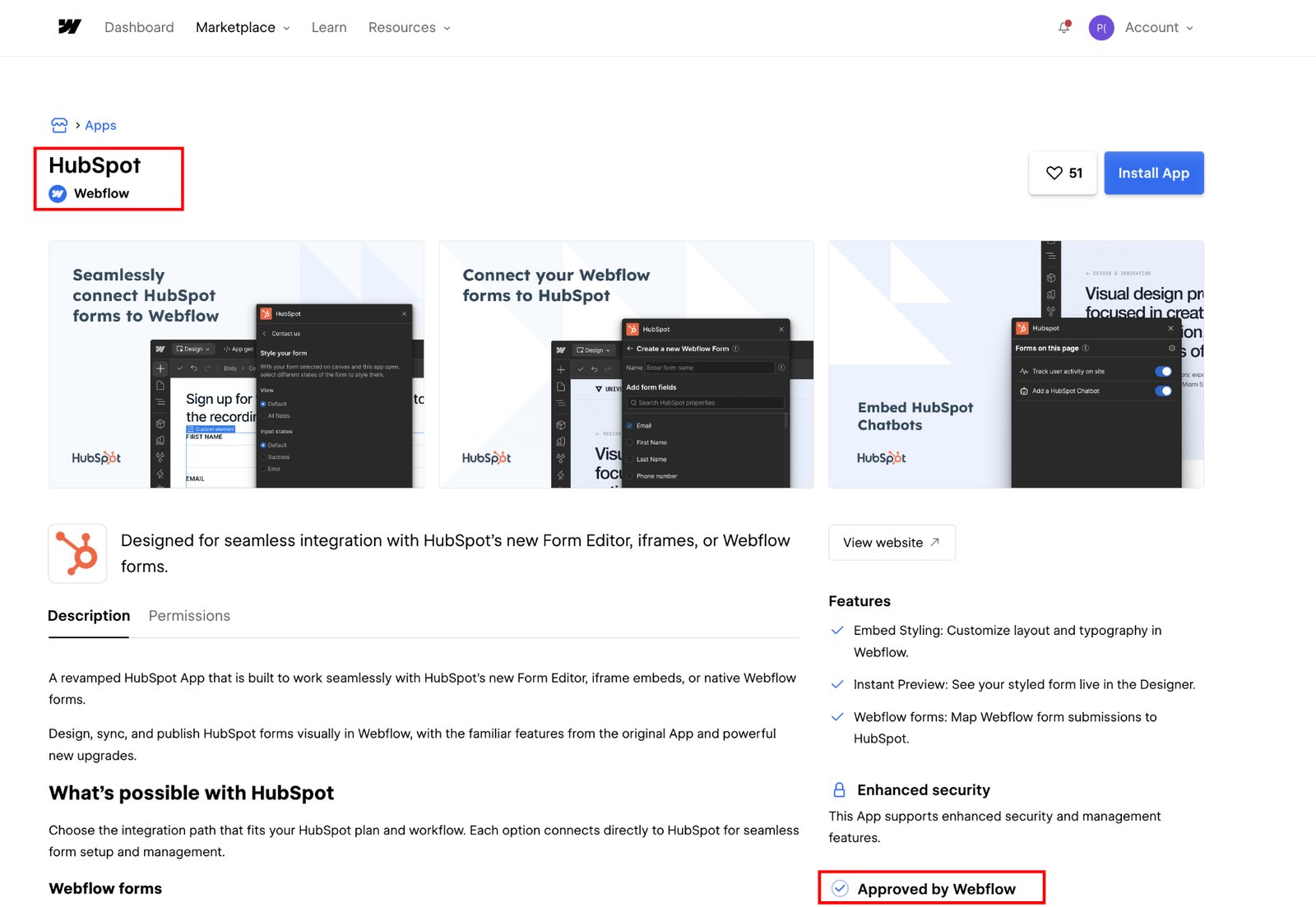
Round winner: HubSpot. But with the app, a Webflow site can feed HubSpot just as well.
Round 4: Personalizing pages with CRM data
Personalization means showing different content to different visitors. A returning customer sees an upgrade offer. A visitor from Germany sees German proof points. A lead in the "evaluating" stage sees a case study instead of a newsletter signup.
HubSpot calls this smart content. It's included with Content Hub Professional and Enterprise, according to HubSpot's help docs. You can set rules by:
- Country, device type and preferred language
- Referral source, ad source and query parameter
- Contact list membership and lifecycle stage
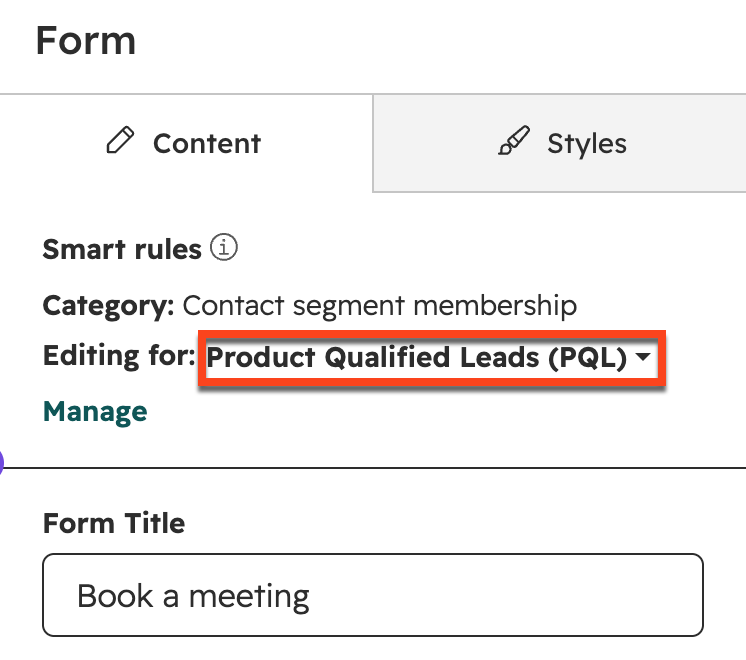
Those last two are the big ones. Because the website and CRM are the same system, HubSpot knows who the visitor is and where they are in your funnel.
Webflow's answer is Optimize. It runs A/B tests and shows different page versions by device, location, new or returning visitor, traffic source and UTM parameters. It can also let AI pick the best version for each visitor. Targeting by CRM or firmographic data, through HubSpot, Salesforce, 6sense, Demandbase or Marketo, needs a Webflow Enterprise plan.
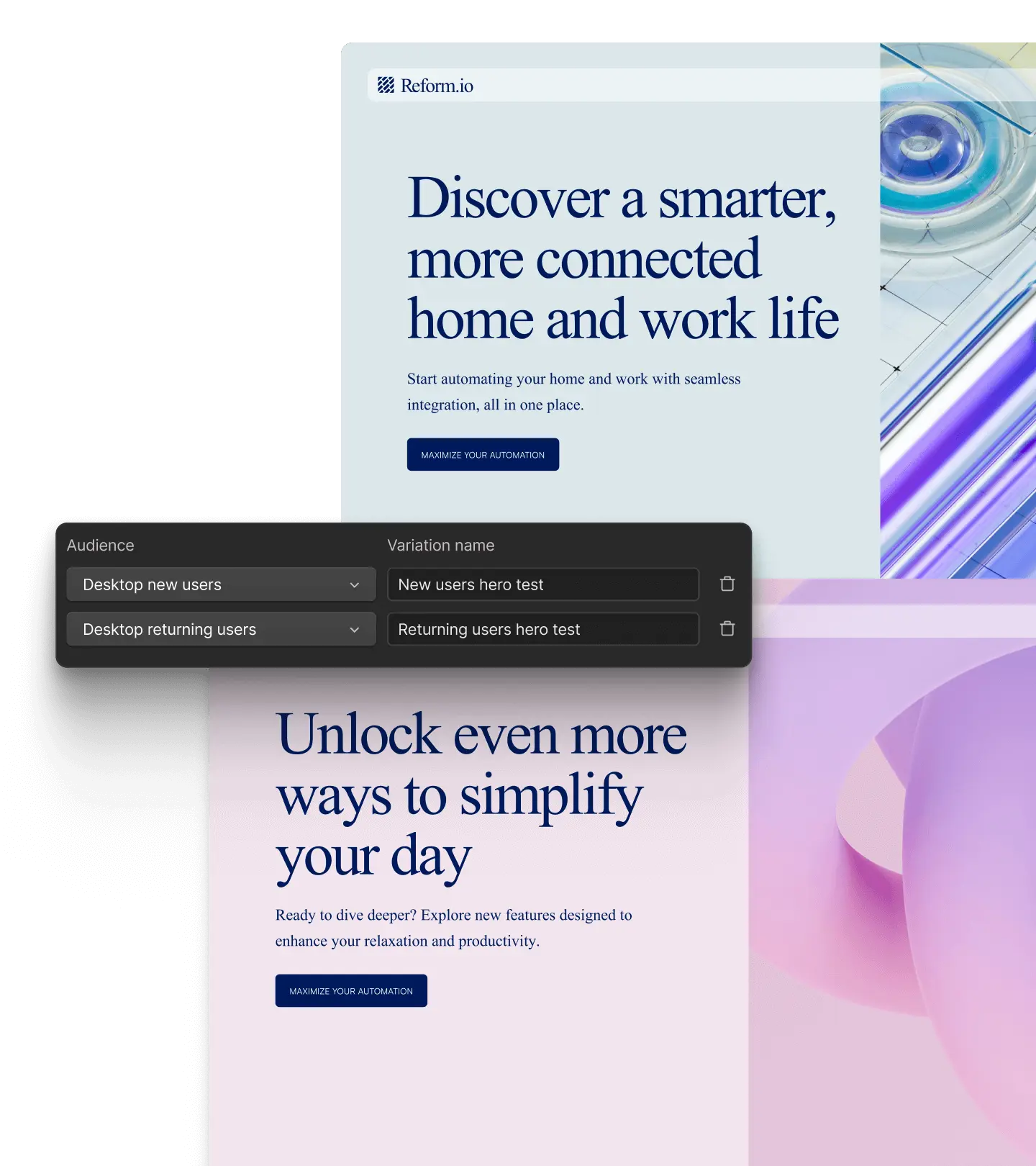
Round winner: HubSpot. For CRM-based personalization on a mid-tier plan. Webflow Optimize is stronger for testing.

Round 5: Speed and hosting
You'll read a lot of claims that one platform is much faster than the other. Be careful with them. Both host your site on a global CDN, both handle SSL and both serve pages quickly when the build is clean.
Webflow did make a real gain this year. At Webflow Conf 2026, it said published sites now render up to 43% faster and publish up to 80% faster.
In practice, what slows B2B sites down is usually what gets added on top. Chat widgets, tag managers, ad pixels, heatmaps, video embeds and oversized images. And here's the catch: the HubSpot tracking code and chat load on your site in both setups.
Round winner: Draw. A clean build is fast on either platform. A heavy one is slow on both.
Round 6: SEO and AI search
Both platforms cover the basics. You can edit titles and meta descriptions, set canonical tags, add 301 redirects and get an automatic sitemap. The differences are in the extras.
| HubSpot | Webflow | |
|---|---|---|
| On-page SEO help | SEO recommendations in the editor, plus topic cluster planning | Full control of every SEO field, set per CMS item |
| Schema markup | Through theme code or modules | Custom code, or the Flowtrix Schema App without code |
| AI search tracking | HubSpot AEO, launched April 2026. Included in Marketing Hub Professional and Enterprise, or $50 a month on its own | Webflow AEO, launched May 2026. Enterprise plans only |
| What the AI tool does | Tracks how you show up in ChatGPT, Gemini and Perplexity, and suggests prompts from your own CRM data | Tracks AI visibility and uses agents to fix broken links, outdated metadata and missing schema |
HubSpot's version is easier to get, since it's included with Marketing Hub Professional. Webflow's goes further on fixing the site itself, but only on Enterprise.
Both companies are clearly taking AI search seriously. HubSpot even shared that its own organic traffic fell 27% year over year as more people search through AI tools.
Round winner: Draw. Strong basics on both. The better AI search tool depends on which plan you're on.
Free website audit
Is your website pulling its weight?
Get a scored breakdown of your positioning, proof, conversion paths and technical health, before you talk to an agency. Results in about a minute.
85/100
Overall score
Round 7: The cost of the website layer
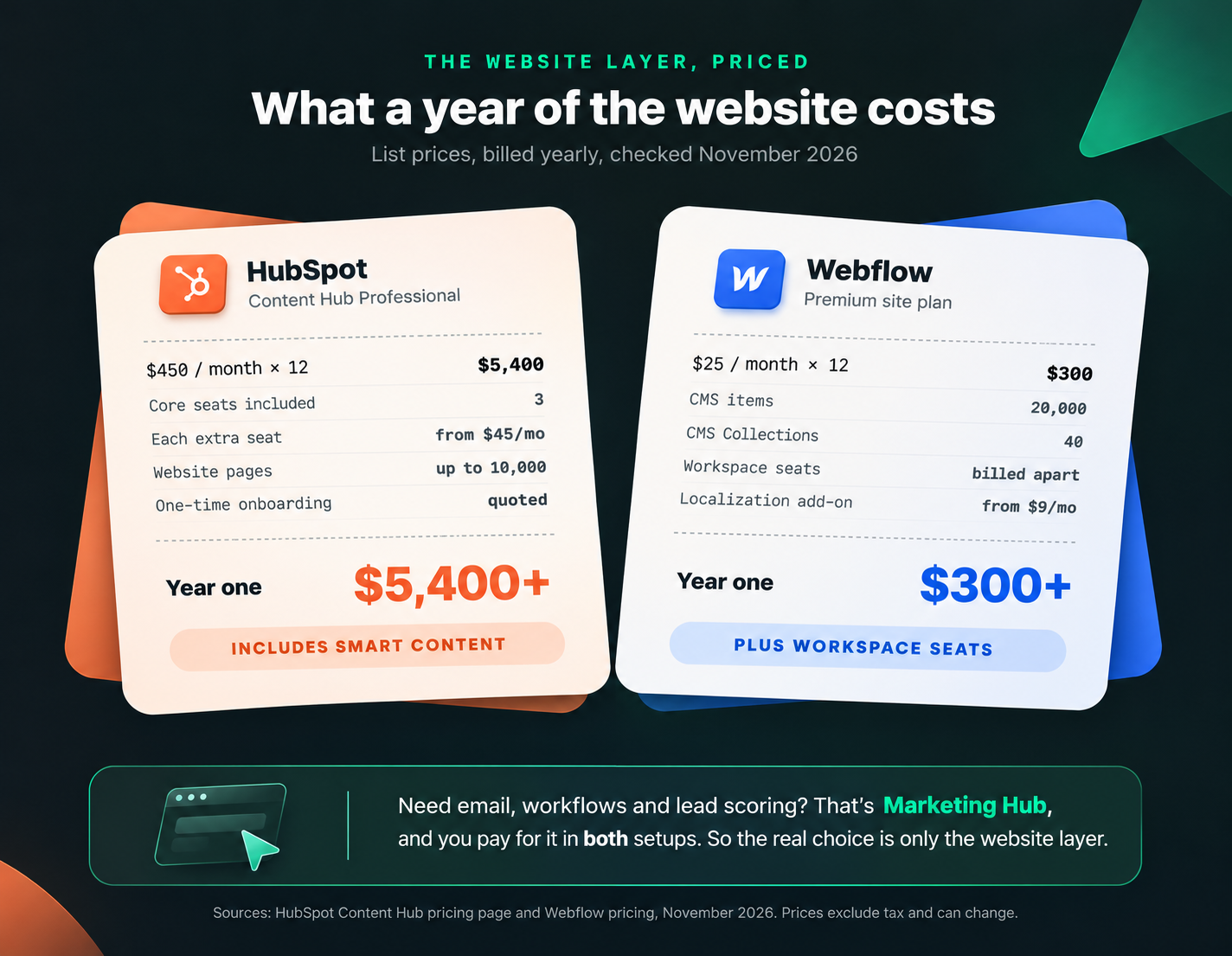
Here's the thing most cost comparisons miss. If you want email, workflows and lead scoring, you'll pay for HubSpot Marketing Hub either way. Marketing Hub Professional is listed at $890 a month in Webflow's own setup guide, and Enterprise at $3,600.
So the real question is what you pay for the website itself.
| Plan | Price | What's included |
|---|---|---|
| HubSpot Content Hub Starter | $20 a month per seat billed monthly, with a limited-time discount for new customers | Up to 30 website pages |
| HubSpot Content Hub Professional | $450 a month billed yearly, or $500 billed monthly | 3 core seats, up to 10,000 pages, smart content |
| HubSpot Content Hub Enterprise | $1,500 a month | 5 core seats, up to 10 root domains |
| Webflow Basic site plan | $15 a month billed yearly | Static pages, no CMS |
| Webflow Premium site plan | $25 a month billed yearly | 20,000 CMS items, 40 Collections |
| Webflow Enterprise | Custom pricing | SSO, advanced permissions, Optimize integrations, AEO |
HubSpot prices come from its Content Hub pricing page. HubSpot also charges a one-time onboarding fee on Professional and Enterprise plans, unless a partner waives it. Webflow prices come from Webflow's pricing page, with Workspace seats billed separately. For the full breakdown, see our Webflow pricing guide.
Round winner: Webflow. The website layer costs a fraction of Content Hub Professional, though you give up smart content to save it.
Round 8: Tying the website to revenue
Every head of marketing gets asked the same question: which pages actually bring in pipeline?
HubSpot answers this best when everything lives inside it. Page views, form fills, emails and deals sit on one contact record, so you can follow a buyer from first visit to closed deal.
The good news is that you keep most of this with Webflow. The HubSpot tracking code logs page views on your Webflow site to the same contact timeline. What you lose are the features that need HubSpot to host the page, like smart content and HubSpot-hosted CTAs.
Round winner: HubSpot. Though a Webflow site with HubSpot tracking gets you most of the way.
The final score, and why most teams run both
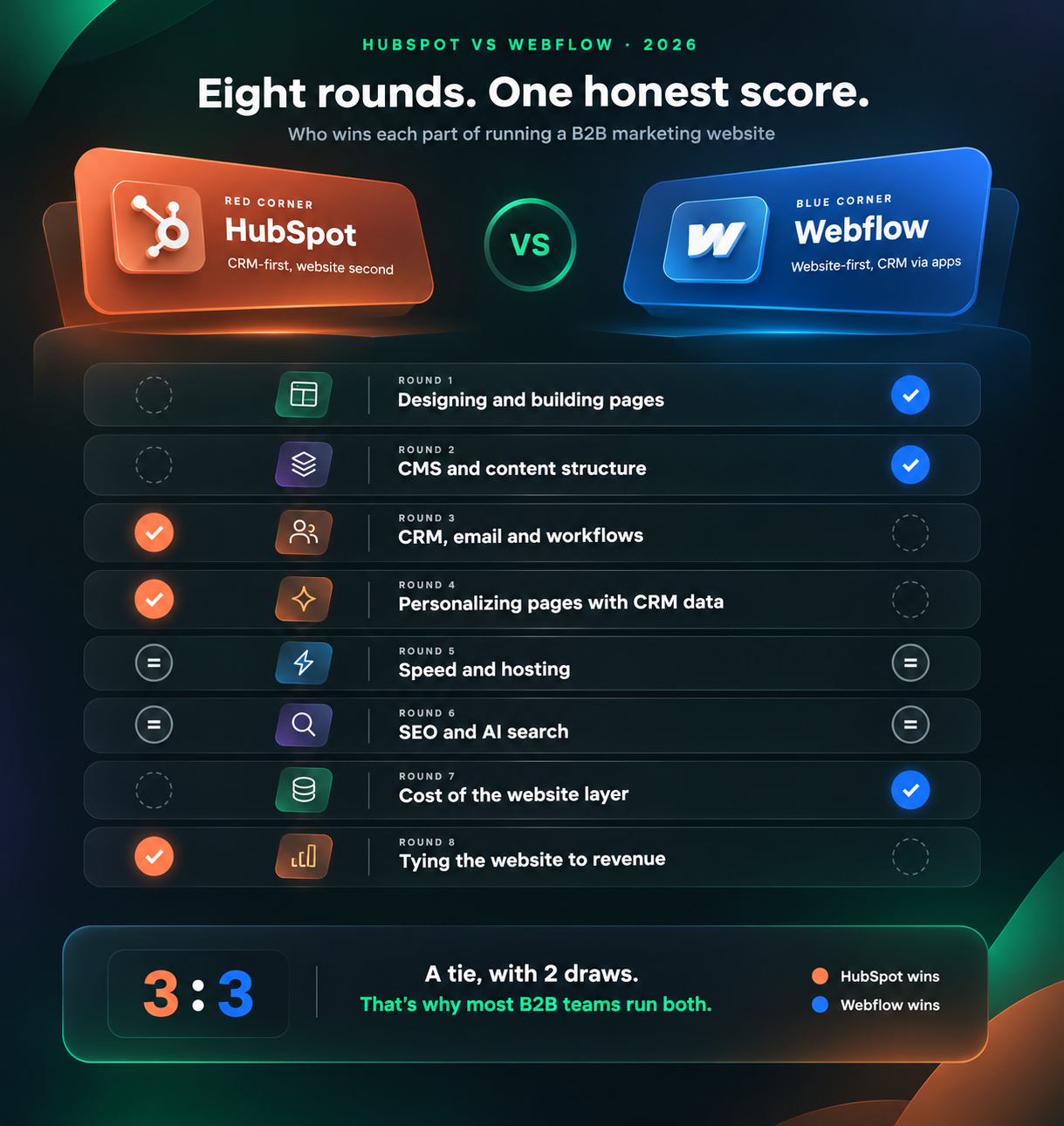
Add it up and it's 3 to 3, with two draws. Webflow wins the website. HubSpot wins the CRM. Neither is trying very hard to beat the other at its own job.
That's why the setup we see most often with B2B SaaS teams looks like this:
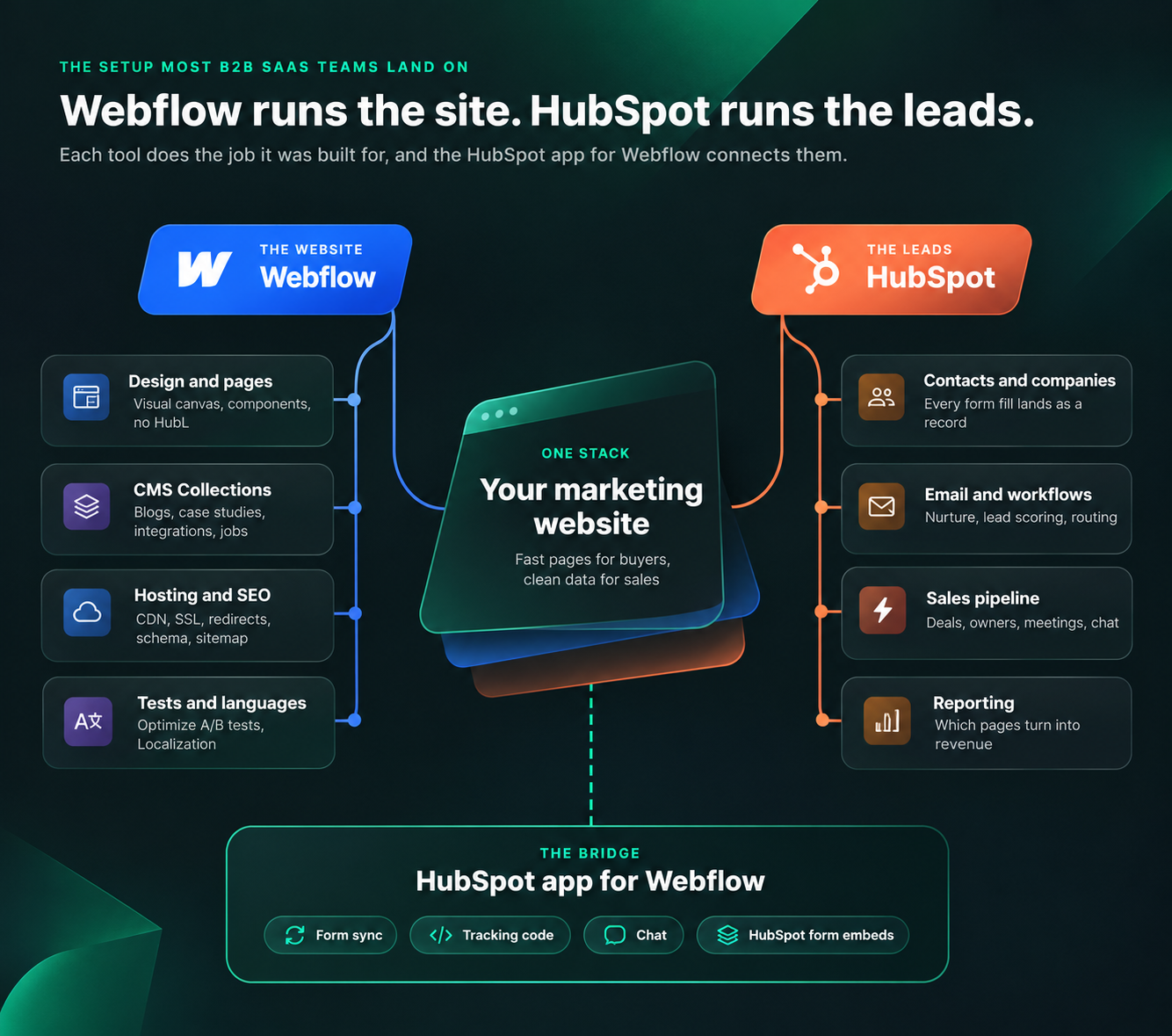
- Webflow runs the site: Pages, CMS, hosting, SEO settings, schema, A/B tests and languages.
- HubSpot runs the leads: Contacts, lead scoring, email nurture, sales pipeline and reporting.
- The HubSpot app connects them: Forms sync, tracking works across the site and chat embeds cleanly.
Marketing gets a site it can change in an afternoon. Sales keeps the CRM it already knows. Nobody has to give anything up.
So which setup should you pick?
Answer three questions and follow the arrows.
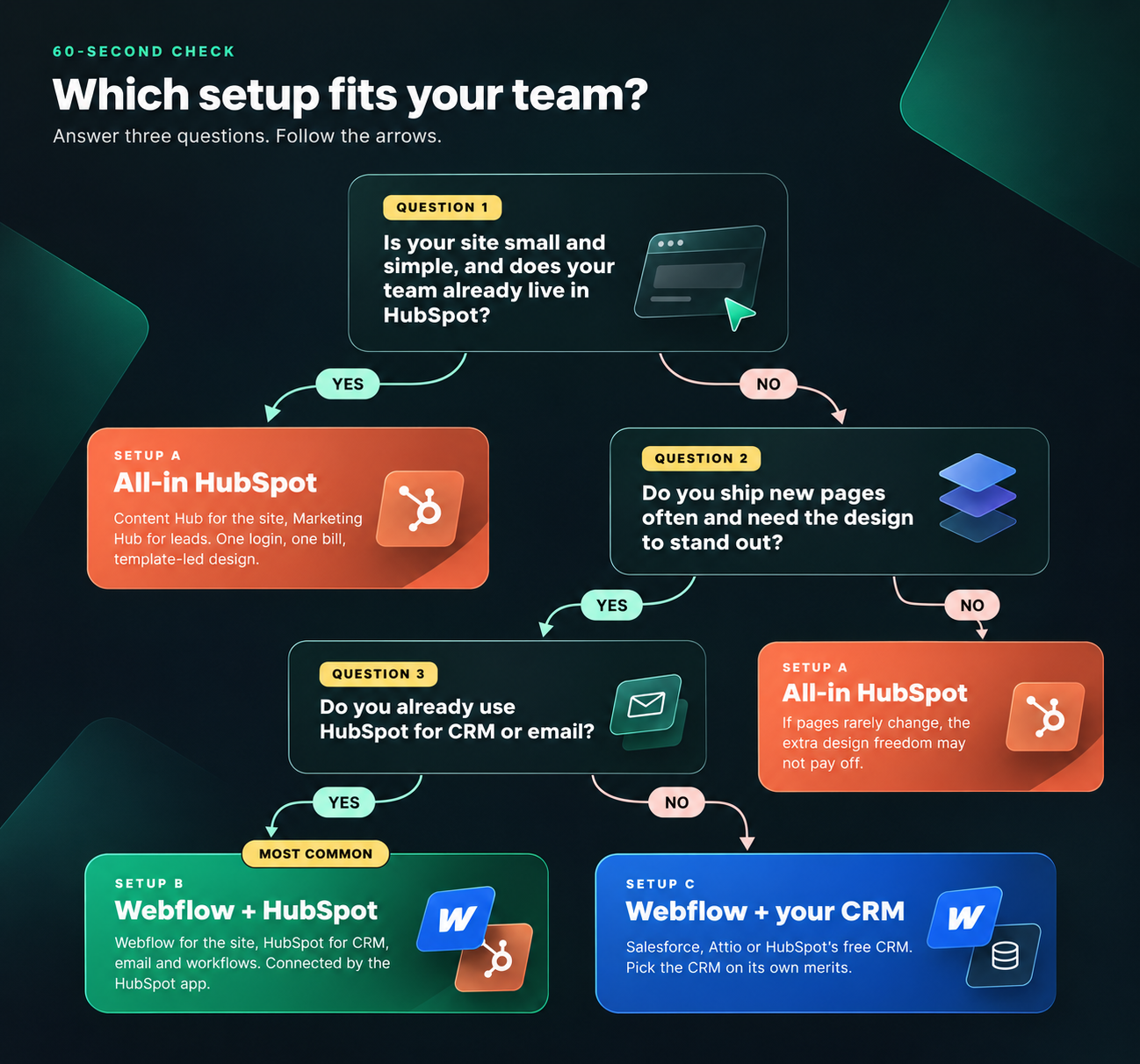
| Setup | Best for | Watch out for |
|---|---|---|
| All-in HubSpot | Small sites with simple pages, where the team already lives in HubSpot and design isn't a priority | Theme limits, developer reliance for new layouts and a higher website cost |
| Webflow + HubSpot | B2B SaaS teams that ship pages often and run CRM and email in HubSpot | Mapping form fields carefully, and losing HubSpot smart content on Webflow pages |
| Webflow + another CRM | Teams on Salesforce, Attio or no CRM yet | Picking the CRM on its own merits, not just because the website needs one |
Moving from HubSpot CMS to Webflow? Here's what changes
Plenty of teams start on HubSpot CMS because it came with the CRM, then outgrow it. If that's you, here's how each HubSpot website feature maps to Webflow.
| On HubSpot today | In Webflow | Note |
|---|---|---|
| Blog posts | A Blog CMS Collection | Export posts, import them as CSV, then clean up images and links |
| HubSpot forms | Webflow forms synced to HubSpot, or embedded HubSpot forms | Embed HubSpot forms if you rely on dropdowns, checkboxes or progressive fields |
| Smart content | Webflow Optimize | CRM-based targeting needs Webflow Enterprise |
| HubDB tables | CMS Collections | Usually simpler to manage after the move |
| Landing pages for campaigns | Webflow pages built from components | Some teams keep campaign pages on a HubSpot subdomain |
| Blog on a subdomain, like blog.yoursite.com | A /blog folder on the main domain | 301 redirect every old post URL |
Before you switch DNS
- Every old URL has a 301 redirect to its new page, in one hop.
- Every form sends a test lead into HubSpot with the right fields filled in.
- The HubSpot tracking code is in the site's head code and shows page views on a test contact.
- Chat and meeting links work on the pages that matter most.
- Titles, meta descriptions and schema carried over for every page that ranks.
- Workflows that used to trigger on HubSpot forms now trigger on the new forms.
That last one catches a lot of teams. If a workflow was set to fire on a specific HubSpot form, it won't fire on a synced Webflow form until you update the trigger.
What changed for teams after a rebuild
A platform is only worth switching to if the new site does more for the business. Here's what some of our clients reported after moving to their new Webflow sites:
ChatLabs is a good example of the website and the funnel working together. The new site had to explain an AI product clearly and turn that attention into sign-ups and pipeline.
Do you need a partner to make the call?
Not always. If your site is small and your team knows both tools, the scorecard above should be enough to decide.
A partner helps when the website drives most of your pipeline, when you're moving off HubSpot CMS with a big blog, or when you need the redesign, CRM connection and SEO planned together.
Flowtrix has delivered 120+ projects for B2B SaaS, AI and cybersecurity companies. Strategy, design, Webflow development and SEO sit in one team, so the site, the HubSpot connection and the redirect plan get built together.
If you want the longer story of how we work, our founder Himanshu talked through it on this podcast:
The bottom line
HubSpot and Webflow aren't really rivals. HubSpot is the better CRM. Webflow is the better website platform.
If your site is simple and your team lives in HubSpot, keeping everything in one place is a fair choice. If your website is how buyers judge your product, and your team ships pages every week, build it in Webflow and connect it to HubSpot.
Either way, decide based on who edits the site, what content you'll need next year and what you already pay for. Not on a feature list.
Weighing a move? Talk to Flowtrix, or start with our Webflow migration checklist.
Flowtrix has delivered 120+ projects for B2B SaaS, AI and cybersecurity teams, with SEO and AEO built into every build.


FAQ's
Quick answers to what marketing teams ask when they choose between HubSpot and Webflow.