


Use to summarize this article


- How long it takes: About 8 weeks for a SaaS site with around 30 pages and a blog. Small sites can go live in 4 to 6 weeks.
- What decides your SEO: The redirect map. Every old URL needs a new home, tested before launch.
- Biggest risk: Changing your domain, URLs and design all at once. Change as little as you can in one go.
- Don't forget AI search: Keep content in the page HTML, carry over your schema and track AI referrals before and after.
- What it costs: Webflow site plans start at US$15 a month billed yearly. An agency rebuild usually costs US$25,000 to US$75,000+.
A SaaS Webflow migration takes about 8 weeks for a typical marketing site with around 30 pages and a blog. The part that decides whether you keep your Google rankings is the redirect map: every old URL needs a new home, tested before launch. Plan it in five stages: inventory, plan, build, redirects and QA, then launch and watch.
Most teams don't move to Webflow because they love migrations. They move because a headline change takes a developer ticket, a plugin update breaks the pricing page, or the blog is stuck on a setup nobody wants to touch.
The move itself is where things go wrong. Not because Webflow is hard, but because small details get skipped. A forgotten redirect. A form that stops sending leads to the CRM. A blog post that loses its images.
This guide is the plan we follow at Flowtrix, week by week, with what "done" looks like at each stage. We last checked every number in it on 2 November 2026.
First, should you move at all?
A migration costs time and money, and it carries some SEO risk. So it should fix a real problem. Here's a quick way to tell.
| You'll probably gain from moving if... | You can probably wait if... |
|---|---|
| Marketing needs a developer for most page changes | Your team already ships pages without help |
| Plugin updates or security patches eat up time every month | Your current setup is stable and patched |
| You want to rebrand or redesign anyway | You redesigned in the last 12 months and it works |
| Your blog or CMS is hard to edit or slow to publish | Content publishing isn't a bottleneck |
| You're adding languages or regions soon | You only sell in one market for now |
If most of your answers sit in the left column, keep reading. If they're on the right, a migration probably won't pay off yet. Fixing the current site may be the cheaper move.

The numbers that matter before you decide
| What | Number | Source |
|---|---|---|
| New WordPress vulnerabilities found in 2025 | 11,334, and 91% were in plugins | Patchstack, 2026 |
| WordPress vulnerabilities with no fix by the time they were made public | 46% | Patchstack, 2026 |
| Average time for traffic to recover after a domain change | 523 days, across 892 domain moves | Search Engine Journal, 2025 |
| Domain moves still below their old traffic after 1,000 days | 17% | Search Engine Journal, 2025 |
| How long Google says to keep redirects in place | At least a year | Search Engine Land |
| Return on investment in a Forrester study commissioned by Webflow | 332% over three years | Webflow, 2024 |
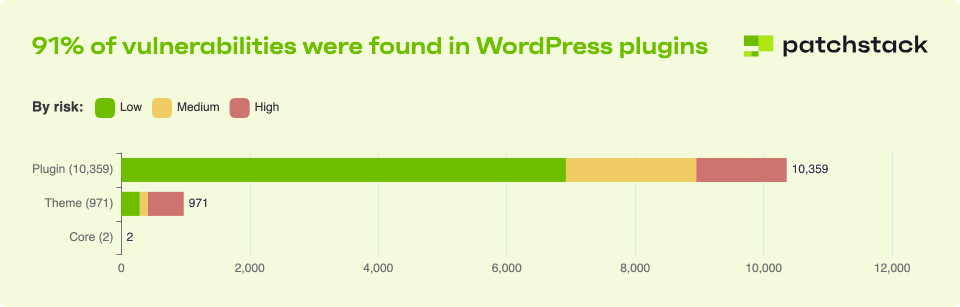
Two things stand out. First, most WordPress risk sits in plugins, so the fewer plugins you depend on, the less you have to patch. Webflow hosts and updates the platform for you, so there's no plugin layer to maintain.
Second, the 523-day number is about domain moves, where the whole site gets a new address. Most SaaS migrations keep the same domain, which is far less risky. That's the main lesson: if you can avoid changing your domain at the same time, do.
The Forrester number is worth reading with care, too. Webflow paid for the study, and it's based on interviews with five Webflow customers. It's useful as a direction, not a promise for your site.
What usually breaks in a migration
Before you plan the steps, it helps to know where migrations go wrong. These are the issues we see most often, how you'd spot them, and how to stop them.
| What breaks | How you'd notice | How to prevent it |
|---|---|---|
| Old URLs return 404 | Traffic drops on pages that used to rank. 404s pile up in Search Console | Map every old URL before launch and test the redirects on staging |
| Redirect chains | Pages load slowly or Google drops some of them | Point each old URL straight to its final page, in one hop |
| Forms stop sending leads | Demo requests drop, but traffic looks normal | Test every form end to end, all the way into your CRM |
| Tracking goes missing | Analytics shows a sudden drop or zero conversions | Check that GA4, tag manager and ad pixels all fire on the new site |
| Blog posts lose images or formatting | Posts look broken, and time on page drops | Spot-check imported posts and fix image links before launch |
| Titles, descriptions and schema vanish | Search snippets change and rich results disappear | Carry SEO fields into the CMS and check them page by page |
| Content gets cut in the redesign | Rankings slip on pages that look fine | Keep the sections that rank, even if the design changes |
Every item on this list is preventable. None of them needs special tools. They just need someone to own them.
Weeks 1 and 2: Take inventory
You can't protect what you haven't listed. This stage is about writing down everything the current site does.
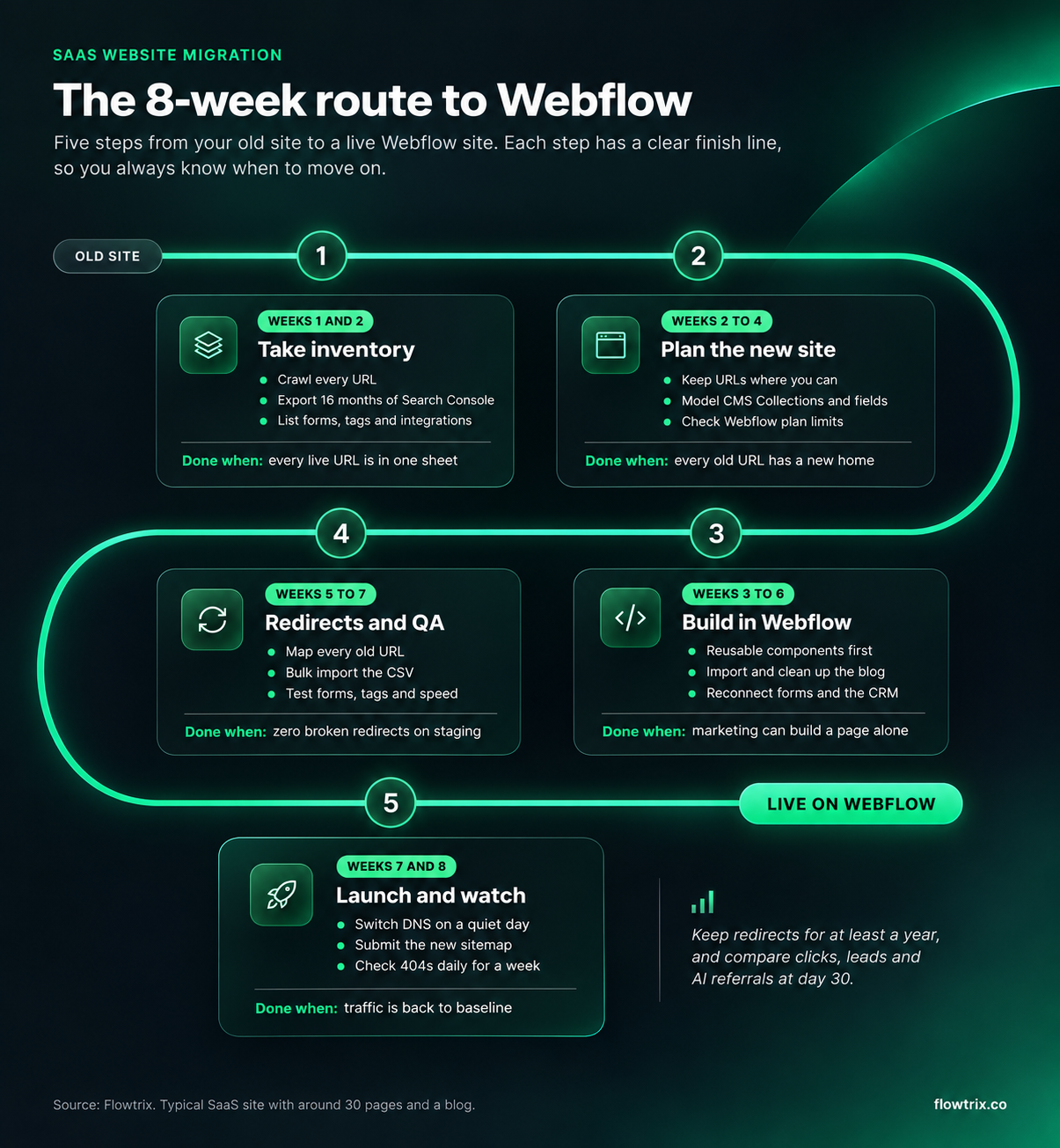
What to collect:
- Every URL: Crawl the site with a tool like Screaming Frog. Add URLs from your XML sitemap and Search Console, since crawlers miss orphaned pages.
- Your top pages: Export 16 months of Search Console data. Note which pages bring clicks, and which ones have links from other sites.
- Every form and integration: Demo forms, newsletter forms, chat widgets, CRM syncs, scheduling tools and analytics tags.
- SEO fields: Page titles, meta descriptions, canonical tags, Open Graph images and schema for each page.
- A baseline: Clicks, rankings for your main keywords, leads per week and visits from AI tools like ChatGPT and Perplexity in GA4.
Done when: Every live URL is in one sheet, with its traffic and links next to it.
Weeks 2 to 4: Plan the new site
This is where you decide what moves, what merges and what goes. It's also where most of the SEO risk gets removed, long before anything is built.
Keep URLs the same where you can
Every URL you keep is one less redirect to manage. If your blog lives at /blog/post-name today, keep that pattern in Webflow. Change URLs only when there's a clear reason, like merging two thin pages into one.
Model your content before you design it
Webflow stores blogs, case studies, integrations and job posts as CMS Collections. Each one needs fields: title, slug, summary, author, SEO title, meta description and so on.
Plan these fields first. It's much easier to design around a clear content model than to squeeze content into a finished design.
Check your plan limits
Webflow's Premium site plan includes 20,000 CMS items across 40 Collections, according to Webflow's pricing page. Most SaaS sites fit easily. If you have thousands of blog posts, help articles or programmatic pages, check the numbers before you commit.
Done when: Every old URL has a planned new home, and every CMS Collection has its fields agreed.
Weeks 3 to 6: Build in Webflow
Now the site gets built. The goal isn't just to copy the old pages. It's to give marketing a site they can run without a developer.
- Components first: Build the hero, feature blocks, logos, CTAs and FAQs as reusable components. New pages then take hours, not days.
- Bring in the content: Export WordPress posts, convert them to CSV and import them into a Webflow Collection. Webflow's WordPress migration guide walks through it.
- Clean up after the import: Check images, internal links, headings and embeds in the imported posts. This is the slow part, so budget time for it.
- Rebuild forms and integrations: Connect forms to your CRM, add chat, scheduling and analytics, and test each one.
- Add SEO fields to every template: Titles, descriptions, Open Graph images and schema should come from CMS fields, not be typed by hand.
Since Webflow Conf 2026, you can also place components inside CMS rich text and set them per item, according to Webflow. That makes long blog posts and case studies much easier to keep on brand.
Done when: A marketer can build a new landing page from existing components without asking for help.

Weeks 5 to 7: Map redirects and test everything
If you only get one stage right, make it this one. Redirects are how Google, other websites and your old bookmarks find the new pages.
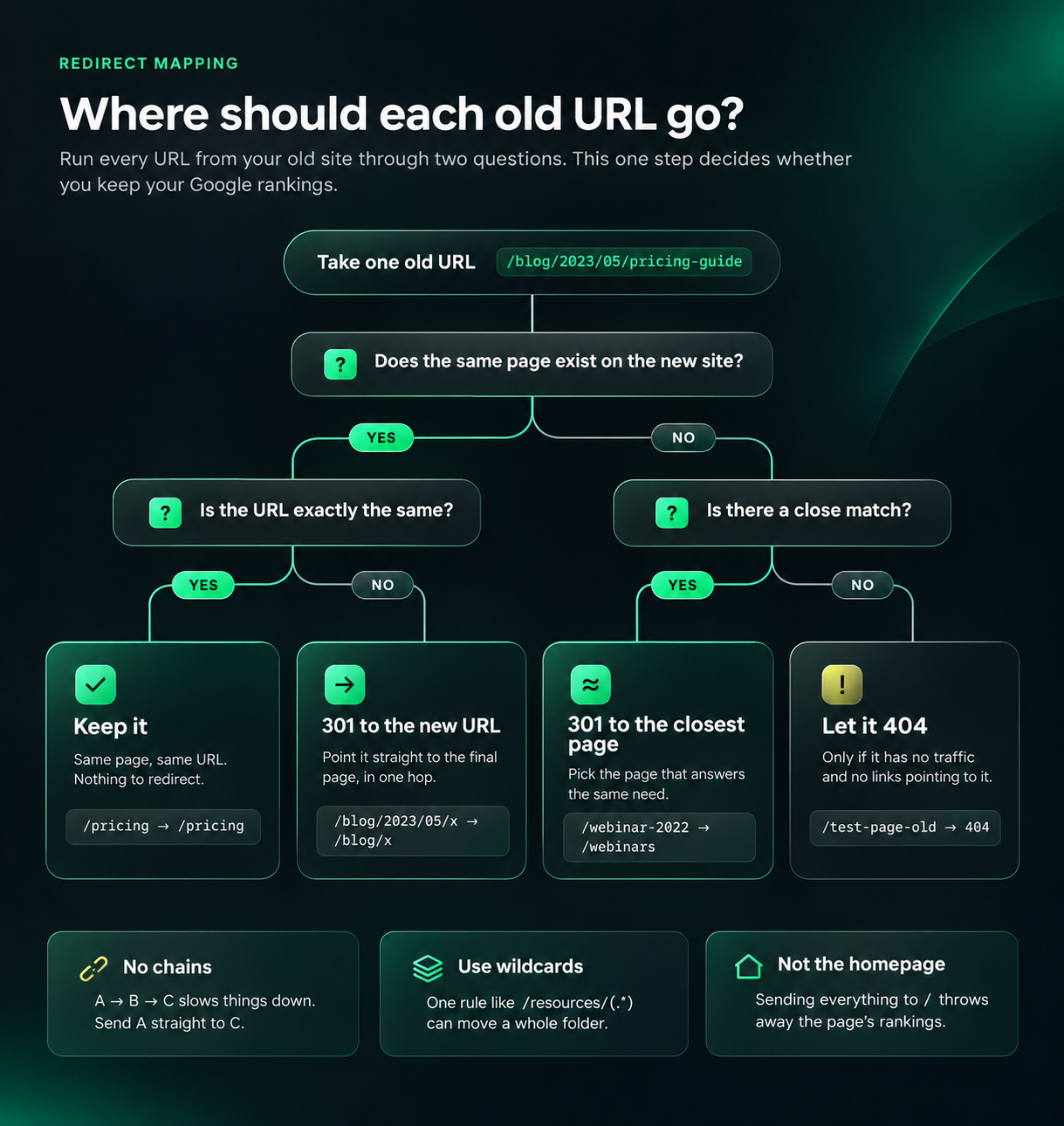
How redirects work in Webflow
You add 301 redirects under Site settings, then Publishing. A few things are worth knowing:
- Bulk import: You can import a two-column CSV of old and new paths, up to 16MB. Each import replaces all existing redirects, so export first. That's from Webflow's help docs.
- Wildcards: Webflow supports capture groups, written as (.*), so one rule can redirect a whole folder.
- Keep the list lean: Webflow has no hard cap, but it recommends about 1,000 redirects as a best practice, because every rule adds to what browsers download. Use wildcards where you can.
Here's what a few rows of a redirect sheet look like:
| Old path | New path | Why |
|---|---|---|
| /blog/2023/05/pricing-guide | /blog/pricing-guide | Dates removed from blog URLs |
| /features/integrations-hubspot | /integrations/hubspot | Integrations moved to their own Collection |
| /resources/(.*) | /blog/%1 | Whole folder renamed, one wildcard rule |
| /old-webinar-2022 | /webinars | No exact match, so the closest page |
What to test on staging
Before you switch DNS
- Redirects: Every old URL returns a 301 and lands on the right page in one hop.
- Forms: Every form sends a test lead into your CRM.
- Tracking: GA4, tag manager and ad pixels fire on key pages.
- SEO fields: Titles, descriptions, canonicals and schema are on every template.
- Indexing: No page that should rank has a noindex tag left on it.
- Speed: Your top pages pass Core Web Vitals in PageSpeed Insights.
Done when: Zero broken redirects on staging, and every form has delivered a test lead.
Don't lose AI search in the move
A few years ago, a migration plan only had to protect Google rankings. Now it also has to protect how ChatGPT, Gemini and Perplexity see you.
The good news is that Webflow serves pages as ready-made HTML. That matters, because most AI crawlers don't run JavaScript. If your old site was a JavaScript-heavy build, a clean Webflow site can be easier for them to read.

Three things to carry over:
- Schema: Organization, Article, FAQ and Product schema help search engines and AI tools understand your pages. The Flowtrix Schema App adds it in Webflow without code.
- Answer-ready content: Keep the FAQs, comparison tables and clear definitions that already get quoted. Redesigns often cut these first.
- llms.txt: If you have one, upload it again. Webflow lets you add it in site settings.

Then compare AI referral traffic in GA4 before and after launch, the same way you compare Google clicks.
Free website audit
Is your site ready to move?
Get a scored breakdown of your positioning, proof, conversion paths and technical health, before you talk to an agency. Results in about a minute.
85/100
Overall score
Weeks 7 and 8: Launch, then watch closely
Launch day itself should be boring. If the first four stages were done well, it's mostly flipping DNS and checking that things still work.
- Pick a quiet day: Avoid launching right before a big campaign, a holiday or a product release.
- Keep the old site reachable: Keep a copy on a staging domain for a few weeks, in case you need to check what a page used to say.
- Submit the new sitemap: Do it in Google Search Console and Bing Webmaster Tools on day one.
- Watch 404s daily for a week: Add any missing redirects the same day you find them.
- Keep redirects for at least a year: Google's own advice, and longer is fine.
Done when: Clicks, leads and AI referrals are back to your baseline, usually within a few weeks for a same-domain move.
Moving from WordPress, HubSpot, Framer or custom code
The plan above works for any platform. But each one has its own catch.
| Moving from | Watch out for | Our tip |
|---|---|---|
| WordPress | Plugin features you forgot you had, like popups, schema plugins and redirects managed by a plugin | Export the plugin redirect list too, not just the page URLs |
| HubSpot CMS | Forms, smart content and landing pages tied to HubSpot. Blog URLs often sit on a subdomain | Keep using HubSpot forms in Webflow if your team relies on its workflows |
| Framer | Animations and interactions that need rebuilding, and CMS limits that shaped your old structure | Rebuild the content model first, then the motion |
| Custom code (React, Next.js and others) | Pages that depend on JavaScript to show content, and routes that only exist in code | Ask your developers for a full route list. Crawlers can miss pages that only load on click |
| An older Webflow site | Messy classes and a CMS that grew without a plan | Treat it like a migration anyway. Map URLs and SEO fields before rebuilding |
What it costs, and how long it really takes
A migration has two kinds of cost: the platform and the rebuild.
| Cost | What to expect |
|---|---|
| Webflow Basic site plan | US$15 a month, billed yearly. No CMS |
| Webflow Premium site plan | US$25 a month, billed yearly. 20,000 CMS items and 40 Collections |
| Localization | From US$9 a month for up to 3 locales, or US$29 a month for up to 10 |
| Enterprise plan | Custom pricing, for SSO, advanced permissions and higher limits |
| Agency rebuild with Flowtrix | Usually US$25,000 to US$75,000+, depending on pages, CMS and integrations |
Prices are from Webflow's pricing page in November 2026. Workspace seats are billed separately. See our Webflow pricing guide for the full picture.
As for time, here's how long some of our recent builds took from start to launch:
| Client | What we built | Time to launch |
|---|---|---|
| TripleDart | 8+ pages, modular CMS, rebuilt for new positioning | 4 weeks |
| Lyric | 10+ pages for a B2B AI company | 4 weeks |
| Amazon Signage | 20+ pages, industry pages and localized content | 5 weeks |
| Owlery | 10+ pages, solution pages and blog CMS | 6 weeks |
Sites with hundreds of blog posts, several languages or complex integrations take longer. Content cleanup is usually what stretches the timeline, not the design.
What changed after these rebuilds
A migration is only worth it if the new site does more for the business. Here's what our clients reported after moving to their new Webflow sites:
| Client | What changed |
|---|---|
| Databahn | 5x traffic, a 35% conversion rate and 40% more demo bookings |
| Salesken | 45% more traffic, 37% more demo bookings and 62% more quality leads |
| Owlery | 42% more demo bookings, and the team updates content without a ticket |
| akirolabs | 2.5x conversion rate and 40% lower bounce rate |
| Wayground | 30% more traffic and 2.5x engagement after the rebrand from Quizizz |
Wayground is a good example of a migration with a lot riding on it. The company rebranded from Quizizz, and the new site had to carry a new name without losing the audience the old one had built.
TripleDart is the other kind: a rebuild on a tight timeline. We rebuilt its site for its new AI-native GTM positioning in 4 weeks, with a CMS the marketing team now runs on its own.
Do it yourself, or bring in a partner?
Small sites with a simple blog can be moved in-house, especially if someone on the team knows Webflow and SEO. Use the plan above and don't skip the redirect stage.
A partner makes more sense when the site drives most of your pipeline, has hundreds of URLs, runs in several languages, or needs a redesign at the same time.
Flowtrix has delivered 120+ projects for B2B SaaS, AI and cybersecurity companies. Design, Webflow development and SEO sit in one team, so the redirect map, the content model and the design get planned together instead of handed between agencies.
Whoever you work with, ask them three things: How will you map our URLs? Who tests forms and tracking? What do you check in the first 30 days after launch?
The short version
A good migration isn't about speed. It's about not losing what already works while you fix what doesn't.
Take inventory before anything else. Keep URLs and your domain the same where you can. Map and test every redirect. Carry over your SEO fields and schema. Then watch Search Console, leads and AI referrals closely for the first month.
Do that, and most SaaS teams end up with a site that's faster to update, easier to grow and just as visible as before, often more.
Planning a move? Talk to Flowtrix about your site, or see more of our case studies.
Flowtrix has delivered 120+ projects for B2B SaaS, AI and cybersecurity teams, with SEO and AEO built into every build.


FAQ's
Quick answers to what SaaS teams ask before they move their website to Webflow.