




Use to summarize this article


- Most B2B SaaS marketing sites fail WCAG, and the same seven issues account for nearly all of it.
- The Scan, Fix, Prove model maps directly onto how enterprise procurement actually tests a site.
- Five of the seven failures need no design work, only implementation fixes.
- Procurement now reviews the marketing site, not just the product, especially in finance, healthcare, education, and government.
- An accurate VPAT with a remediation plan beats one that overclaims compliance, every time.
There is a moment in an enterprise deal that almost no SaaS founder sees coming. Legal is done. Security review is done. The economic buyer is nodding along. Then procurement sends one email: can you share your VPAT and confirm your site meets WCAG 2.1 AA.
The room goes quiet, because most companies at seed or Series A have never heard the acronym, never run an audit, and have no idea their marketing site is about to get scored against a checklist they have never read.
Here is the uncomfortable part. If they ran that audit today, it would surface the same handful of failures that show up on nearly every B2B SaaS site. The pattern repeats so often that after reviewing hundreds of SaaS marketing sites, we can predict which seven checks a site will fail before we even open DevTools.
At Flowtrix we revamp B2B SaaS, AI, and cybersecurity websites for exactly this moment, the one where a good product almost loses a good deal over a homepage nobody thought to check.
Why does procurement suddenly care about your marketing site?
Five years ago, enterprise accessibility reviews looked at the product and ignored the marketing site. That has flipped, for three reasons.
Legal exposure got wider. WCAG applies to public websites, not just the logged-in app, and ADA-based digital accessibility lawsuits have become one of the fastest-growing categories of civil litigation in the US. Most of those target ecommerce, but the precedent has made every legal and compliance team nervous about the vendor sites they sign off on.
The checklists got systematic. Banks, hospitals, universities, and government contractors have all standardized vendor onboarding, and an accessibility attestation is now a line item in it. The question is no longer "is your product accessible." It is "has this company shown it takes accessibility seriously across everything it puts in public."
It reads as a quality signal. Experienced procurement reviewers have noticed that companies who ignored accessibility on the marketing site usually ignored it in the product too. A homepage full of contrast failures gets treated as a proxy for how careful the rest of the engineering is. Fair or not, that is the read, and you do not get to argue with it mid-deal.
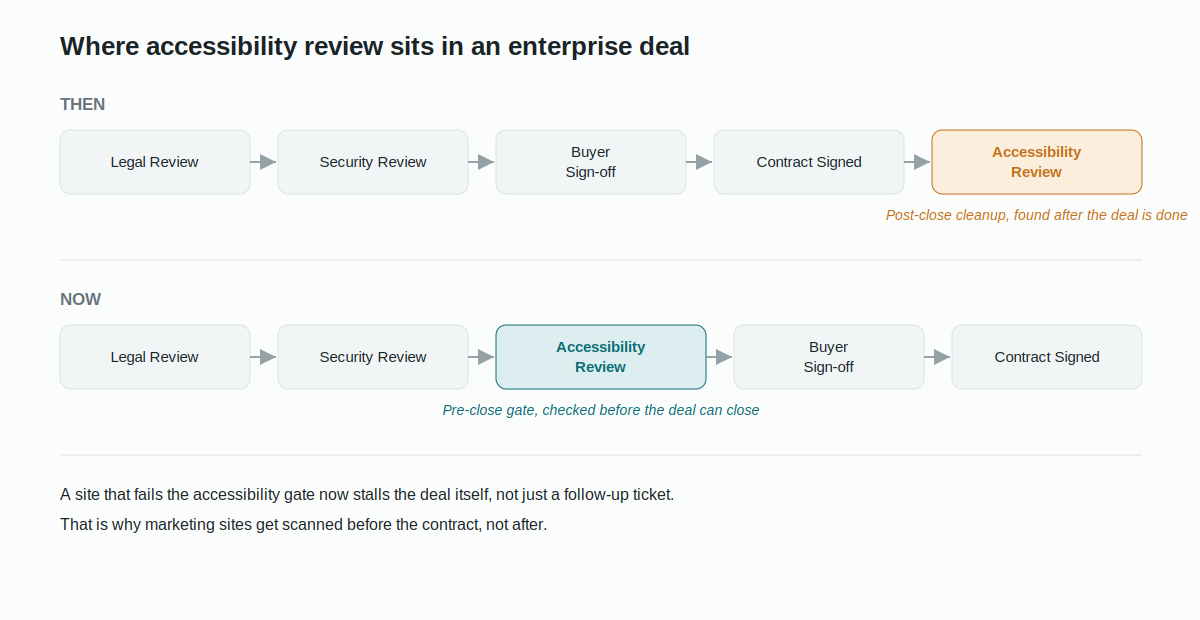
The Scan, Fix, Prove model
After running accessibility reviews across dozens of B2B SaaS revamps, we keep seeing the same three-stage pattern in how procurement actually tests a site, and the same three-stage pattern in how a site should get ready for it. We call it Scan, Fix, Prove.
Scan is the automated pass. Anyone on a procurement team can run axe, WAVE, or Lighthouse against your homepage in ten minutes, with zero accessibility training. This is the tier that catches contrast, alt text, form labels, and heading structure, and it is the tier that decides whether your deal moves forward or stalls before a human ever looks at your site.
Fix is the manual pass. A specialist, either in-house or hired, tabs through your site with a keyboard and a screen reader. This is where keyboard traps, missing focus indicators, and broken reading order surface. It catches everything Scan misses, and it is the tier most likely to produce a written blocker.
Prove is the attestation. You fill out a VPAT, and the buyer either trusts it or verifies it. An honest VPAT with a dated remediation plan is a stronger asset here than one that overclaims. Buyers who catch a gap between your VPAT and their own scan treat the whole document as unreliable.

| Stage | Who runs it | What it catches | Outcome |
|---|---|---|---|
| Scan | Anyone, using axe, WAVE, or Lighthouse | Contrast, alt text, form labels, heading structure, ARIA misuse | 10+ issues can delay approval |
| Fix | In-house specialist or hired audit firm | All seven failures, plus reading order, ARIA landmarks, focus management | Unresolved blockers can stop the deal |
| Prove | Vendor self-attests, buyer verifies | Conformance status for every WCAG 2.1 criterion | Honest VPAT builds trust |
WCAG itself is maintained by the W3C and rests on four ideas: content should be Perceivable, Operable, Understandable, and Robust. There are three conformance levels, A, AA, and AAA. Enterprise procurement almost always asks for 2.1 AA, which carries 50 success criteria total, 25 at Level A and 25 at Level AA. AAA is aspirational and nobody requires it across a full site. A-only will not clear a regulated buyer.
What Scan actually catches:
The seven failures below are the ones that break most often on SaaS marketing sites, and the ones tied most directly to whether a deal keeps moving.
1. Text without enough contrast (WCAG 1.4.3)
Normal text needs a contrast ratio of at least 4.5:1 against its background. Large text, 18pt or 14pt bold, needs 3:1. The most common violation in B2B SaaS is light grey body text on white. A hex like #999999 on white lands around 2.85:1, well under the line. Muted secondary buttons fail. Placeholder text fails almost universally, because it is designed to look faint.
Contrast is also the single most-checked criterion in automated procurement scans, because axe, WAVE, and Lighthouse flag it without any manual work. A report with multiple contrast failures reads, to a non-technical reviewer, like a company that has never run a single check.
Fix complexity: low. A palette audit and correction takes a few hours. Darken the affected values by 20 to 40% and move on.
2. Missing or useless alt text (WCAG 1.1.1)
Every non-decorative image needs a text alternative that conveys the same information. On SaaS sites this breaks in predictable ways: customer logos with alt text that just says "logo," product screenshots with no alt text or a raw filename, hero images described by appearance instead of purpose, and functional icons with nothing at all. A screen reader hitting a logo wall with missing alt attributes reads "image, image, image, image," which tells the user nothing.
In audits, alt text is the second most-flagged item, and it usually reads as systemic rather than isolated, because alt text comes out of a content process, not a page-by-page decision. Widespread gaps signal an accessibility-blind content workflow, which a procurement reviewer reads as "their documentation will need remediation before our team can use it."
Fix complexity: medium. Fixing existing alt text is quick. Building a process so new images get it too takes a small workflow change.
3. Form fields without real labels (WCAG 1.3.1 and 3.3.2)
Inputs need labels that are visible and programmatically tied to the field. The classic mistake is using placeholder text as the only label. It vanishes the moment someone starts typing, and the field is left with no label at all.
This one stings more than the others because forms are your conversion path. An enterprise buyer whose assistive tech cannot complete your demo form is a lost prospect before a sales conversation even starts, and "demo form is inaccessible" becomes a formal note in a procurement file.
Fix complexity: low to medium. Adding proper <label> elements, or aria-label where a visible label does not fit, is under a day of dev work on most sites.
4. Keyboard navigation that dead-ends (WCAG 2.1.1 and 2.4.7)
Everything you can do with a mouse has to work with a keyboard, and the focused element has to be visibly marked. Where it breaks: nav menus that will not open by keyboard, modals that do not trap focus so a keyboard user tabs behind them into dead content, custom dropdowns with no keyboard handling, and outline: none slapped on globally, which strips the focus ring entirely.
This is the failure procurement weights most heavily, because it affects the broadest group of users. A reviewer who tabs through your site and hits a wall is unlikely to approve you without a written remediation commitment.
Fix complexity: medium to high. It is CSS plus JavaScript, restoring focus indicators and adding keyboard handlers and focus trapping. A good front-end dev clears most of it in one to three days.

5. Videos without captions (WCAG 1.2.2)
Any prerecorded video with audio needs captions. That covers your homepage product demo, testimonial clips, and embedded webinar recordings. A deaf user lands on your product walkthrough and leaves with an incomplete picture of what you do, and so does anyone in an open office who has muted their browser, a far larger group than people with permanent hearing loss. One catch worth knowing: auto-generated captions alone do not satisfy 1.2.2. They need a human accuracy pass before they count.
Fix complexity: low for new content, since you build captioning into production. Medium for a back catalogue, since you auto-caption and then clean it up.
6. Broken heading structure (WCAG 1.3.1 and 2.4.6)
Headings have to reflect actual content hierarchy, not just font size, and they have to describe what follows. Screen reader users navigate by heading, so this is core to whether a page is usable at all with assistive tech. The usual mistakes: multiple H1s on one page, H2s used purely to make a line look big, skipped levels, and section headers built as styled divs with no heading markup at all.
Fix complexity: low. These are HTML changes with no visual redesign. A heading audit is usually under a day.
7. No skip navigation link (WCAG 2.4.1)
There has to be a way to skip past the blocks repeated on every page, in practice a "Skip to main content" link a keyboard user can hit to jump past the nav straight to the page content. It is missing from most SaaS sites, probably because it is invisible to sighted users and never gets caught in visual QA.
For a reviewer, this is the fastest tell there is. Press Tab on page load, see if a skip link appears. Thirty seconds. Its absence is treated as proof that keyboard accessibility was never considered, which casts doubt on everything else.
Fix complexity: very low. Ten to fifteen lines of HTML and CSS, zero visual impact on sighted users. The cheapest win available.

Flowtrix has delivered 120+ revamps for B2B SaaS, AI, and cybersecurity teams, several with enterprise procurement ahead of them. Explore the work behind the builds.




What changes between a Webflow build and a custom build
Accessibility failures are not random. They cluster around specific build decisions.
In Webflow, the markup is semantically clean by default, which handles a lot of the structural criteria for free. The failures that still creep in are predictable: global CSS that kills the focus ring, forms built with placeholder-as-label, and animations shipped without a prefers-reduced-motion fallback for people with vestibular disorders. A Webflow build that has been accessibility-reviewed almost always outscores a custom site that has not.
In custom builds, the damage usually happens at the component library. Dropdowns, modals, tooltips, and accordions built without keyboard handling, ARIA, or focus management. Fixing those after launch means refactoring at the component level. Building them right from the start, using the ARIA Authoring Practices patterns, costs roughly 20 to 30% more dev time and erases the remediation bill entirely.

At Flowtrix, accessibility is part of the Webflow build process, not an audit we run after launch. The sites we ship pass Scan-stage automated checks on day one, and they carry the structural foundations that a Fix-stage manual review looks for. For clients with enterprise procurement ahead of them, we produce a VPAT-ready conformance report as part of the launch deliverable, so the first time procurement asks, the answer already exists. It is the same approach behind the enterprise builds we have shipped for companies like Databahn and Akirolabs.
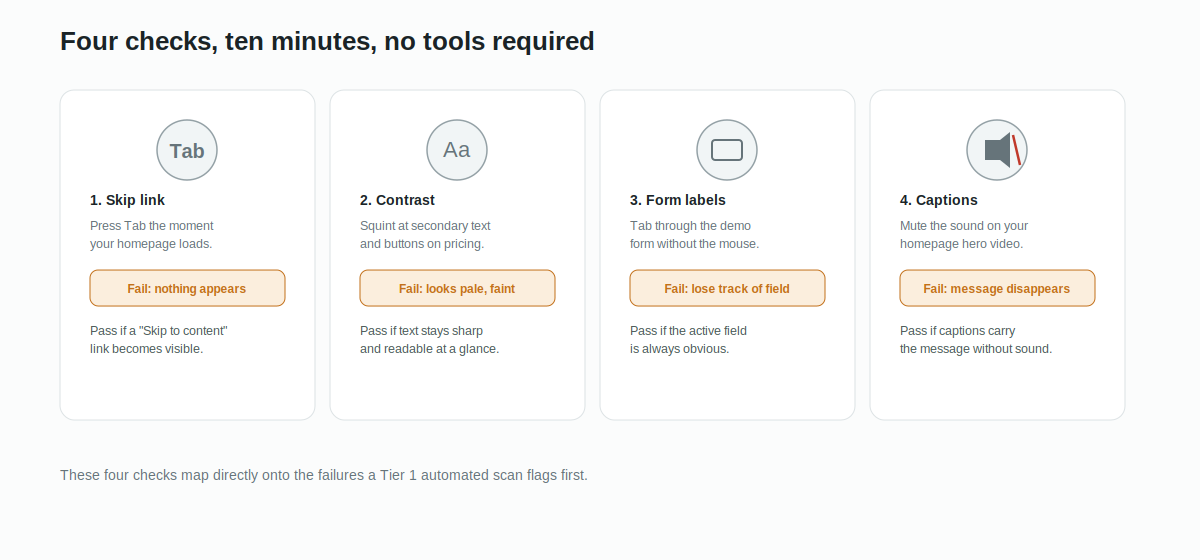
Four signs your site will get flagged before you send the VPAT
You do not need a formal audit to know roughly where you stand. Four quick checks tell you most of what a Tier 1 scan will find.
Press Tab the moment your homepage loads. If nothing visibly happens, you have no skip link and probably no visible focus state either. Open your pricing page and squint at the secondary text and buttons. If anything looks pale or "quiet by design," it is probably failing contrast. Tab through your demo form without touching the mouse. If you lose track of which field is active, the labels are not doing their job. Turn the sound off on your homepage hero video. If the message disappears, so does it for anyone relying on captions.
The one mistake that undoes all the others
Everything above is fixable, and five of the seven need no design work at all. The one mistake that turns a fixable gap into a real problem is treating the VPAT as a marketing document instead of an accurate one.
The seven failures in this post show up on almost every B2B SaaS site we look at, and almost none of them need a redesign to fix. The only real mistake is waiting until a procurement checklist forces the issue, because by then you are fixing under a deadline instead of building it in from the start.


FAQ's











.svg)

.svg)



%201.svg)


.svg)
.svg)

