



Use to summarize this article


- Governance: Enterprise adds custom roles, page branching, staging reviews, SSO with SCIM, and an audit log API.
- Scale: Since January 2026, Enterprise sites can hold over one million CMS items, with up to one million in a single Collection.
- Speed: A Webflow-commissioned Forrester study found 94% faster time to market and a 332% ROI over three years.
- New in 2026: Real-time collaboration on branches, a Branch API in beta, and site-wide Releases coming in beta.
- Not for everyone: Webflow's Team plan or a self-serve plan can be enough for smaller marketing sites.
Every enterprise website team eventually asks three questions:
- Who can change the live site? And can we prove it when someone asks?
- What happens when we have 10,000 pages? Or 50,000, or eight languages?
- Why does a new landing page still take three weeks?
Webflow Enterprise answers all three with custom roles, page branching, staging reviews and SSO for governance, a CMS that holds over one million items for scale, and visual building that lets marketing teams publish without waiting on developers. It's the right fit for most B2B marketing sites. It's the wrong fit if you need heavy personalization, logged-in product experiences or large-scale ecommerce.
We first wrote this guide in December 2025. Webflow has shipped a lot for enterprise teams since then, so we rewrote it on 30 October 2026 with the current features, limits and numbers.
What you actually get with Webflow Enterprise
Most of Webflow works the same on every plan. These are the parts that only Enterprise sites get, or get with higher limits.
| Feature | What it does | Enterprise only? |
|---|---|---|
| Custom roles | Set which sites, CMS Collections, locales and publishing environments each person can use | Yes |
| Page branching | Edit a copy of a page while the live page stays untouched | Yes |
| Branch staging | Give each branch its own staging URL for review and comments | Yes |
| Publishing workflows | See exactly what changes between Designer, staging and production | Yes |
| SSO and SCIM | Log in and add or remove people through your identity provider | Yes |
| Audit log API | Pull workspace activity into your own security tools | Yes |
| CMS and API limits | Set by your contract instead of fixed plan limits | Yes |
| Uptime SLA | Can include 99.99% uptime, depending on your agreement | Yes |
| SOC 2 Type II, ISO 27001, DDoS protection | Platform-wide security that every hosted site sits on | No, all plans |
Sources: Webflow University, Webflow, Webflow security and BRIX Templates.
Governance: who can change what
Governance sounds like a policy document. On a website, it's simpler. It's who can touch which page, and what has to happen before a change goes live.
Give each team only the access it needs
Custom roles replace Webflow's fixed Designer, Editor and Admin roles. You build a role, pick what it can touch, and assign it. Here's how that usually maps for a B2B company:
| Who | What they need | How the role is set |
|---|---|---|
| Content and blog team | Write and publish posts | Access to the Blog Collection only, no design access |
| Regional marketers | Update their own market's pages | One locale, not the full site |
| Product marketing | Launch feature pages | Page branches plus staging, approval needed to go live |
| Agency or contractor | Build new sections | Publish to staging, never to production |
| Legal or compliance | Review claims before launch | Free commenter role on staging links |
Webflow's own tutorial shows how to set one up, with examples for a junior designer, a growth marketer and a content editor:
Make every change go through the same path
Page branching and staging stop half-finished work from going live. Since July 2026, several people can also work in the same branch at once and review changes together before merging (Webflow).

Know who did what
Webflow's Site Activity log keeps up to one year of changes on a site, including branch events. On Enterprise, the workspace audit log API lets your security team pull that activity into its own tools.
Pass the security review
Your IT team will ask for proof before anything gets signed. Webflow holds SOC 2 Type II and ISO 27001, offers two-factor login, and protects all hosted sites against DDoS attacks (Webflow security). Enterprise adds SSO and SCIM, so people get access through your identity provider and lose it the day they leave.


Scale: the limits that changed in 2026
Older guides say Webflow's CMS tops out at 10,000 items. That hasn't been true for Enterprise since January 2026, when Webflow moved Enterprise sites to its next-gen CMS (Webflow).
| Limit | On Enterprise now | What it means |
|---|---|---|
| Items per site | Over 1 million, set by your agreement | Large blogs, docs and resource libraries fit on one site |
| Items per Collection | Up to 1 million | No need to split one content type across many Collections |
| Fields per Collection | Up to 100 | Richer templates, like product or integration pages |
| Reference fields per Collection | Up to 20 | Link content together instead of copying it |
| Collection lists per page | Up to 40 | Bigger hub and directory pages |
| Nested lists | Up to 10 per page, three levels deep | Show related content inside related content |
Big migrations are also faster than most teams expect. Here's what Webflow reports from its Enterprise customers and partners (Webflow):
| Company | What moved | How long |
|---|---|---|
| Nursa | 40,000 pages | 19 days |
| Webflow.com | 10,000+ pages | 11 weeks |
| Backbase | Full website | 8 weeks |
| Verifone | 32 global sites launched | 10 days |
| Ebury | 30 WordPress sites merged into one | Not stated |
These are Webflow's own customer numbers. Your timeline depends on how clean your content is before the move.
Speed: how fast teams ship after the move
Speed is the reason most marketing teams push for Webflow in the first place. The best number we have comes from a study Webflow paid Forrester Consulting to run, based on interviews with five organizations using Webflow (Webflow).
| What Forrester found | Result |
|---|---|
| Time to market | 94% faster |
| Time to make changes and fixes | 80% less |
| Savings from retired legacy systems and freed-up staff time | US$850,000 |
| Return on investment over three years | 332% |

Some customer results Webflow reports on the same page: Talkspace publishes landing pages 7x faster, and Amazon Ads cut development time by 49.5%.
What's new for enterprise teams in 2026
If you last looked at Webflow Enterprise in 2025, this is what has changed:
| When | What shipped | Status |
|---|---|---|
| January 2026 | Next-gen CMS for Enterprise, with 1M+ items | Available |
| May 2026 | New Team plan at US$2,500 a month, between self-serve and Enterprise | Available |
| July 2026 | Real-time collaboration inside page branches | Available on Enterprise |
| August 2026 | Branch API for creating, merging and publishing branches by code | Beta, Enterprise |
| September 2026 | Releases, which branch the whole site including CMS, components and locales | Beta, later in 2026 |
| September 2026 | Source by Webflow, a shared workspace for marketers, designers, developers and AI agents | Research preview |
Sources: Webflow, Digidop, Webflow, Webflow Developers and Eightfold.
Releases is the one to watch. Today, branching works page by page. Releases will let a team stage a full site change, like a rebrand, and push it live in one go.
When Webflow Enterprise isn't the right call
Enterprise is a big contract. Webflow doesn't publish the price, but third-party guides put entry contracts around US$15,000 a year and full Enterprise from about US$50,000 a year (BRIX Templates). Here's how we'd decide:
| Your situation | What we'd suggest |
|---|---|
| One marketing site, a small team, under a few thousand CMS items | A self-serve plan is likely enough |
| Several editors and agencies, but no SSO or audit requirements | Look at the Team plan first |
| SSO, security reviews, many teams or locales, 10,000+ pages | Webflow Enterprise |
| Heavy personalization, logged-in product areas or large ecommerce | Stay on a platform built for that, or use Webflow only for the marketing site |
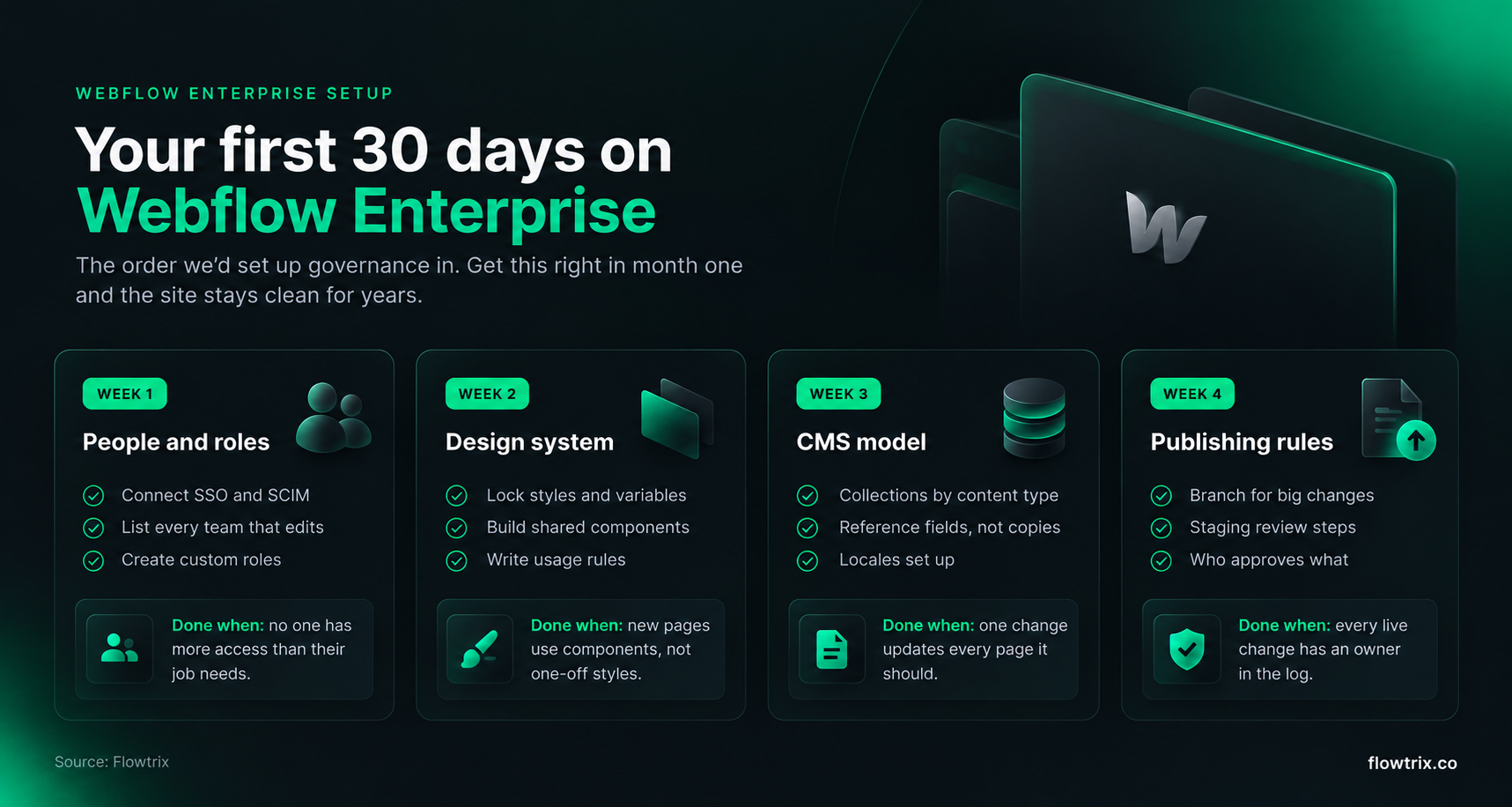
Your first 30 days on Enterprise
Buying Enterprise doesn't set up governance for you. Someone still has to decide who does what. This is the order we'd do it in.
Ask these before you sign a Webflow Enterprise contract
- Uptime: is a 99.99% SLA written into our agreement?
- CMS limits: what item, Collection and API limits does our contract set?
- Roles: can our custom roles split CMS, locales and publishing the way our teams work?
- Identity: are SSO, SCIM and just-in-time provisioning included?
- Security review: can we get the SOC 2 Type II report and ISO 27001 certificate for our IT team?
- Support: who is our contact, and how fast do they respond to a live-site issue?
- Partner: which Enterprise Partner will set up governance, and have they done it before?
Free website audit
Is your site ready for enterprise buyers?
Get a scored breakdown of your positioning, proof, conversion paths and technical health, before you talk to an agency. Results in about a minute.
85/100
Overall score
How Flowtrix sets up Webflow Enterprise

Flowtrix builds Webflow websites for funded B2B SaaS, AI and cybersecurity companies. We're a Webflow Enterprise Partner and a Webflow Partner of the Year 2025 nominee, and strategy, copy, design, Webflow build, SEO and AEO all sit in one team.
- Setup: Custom roles, design systems, CMS models and publishing rules, planned before the first page is built.
- Migrations: Page-by-page content mapping and redirects, so rankings and links carry over.
- Many markets: For Amazon Signage, we built one Webflow site in 8 languages and regions, each with its own SEO title and description.
- Starts at: Website builds usually cost US$25,000 to US$75,000+. SEO and AEO retainers start at US$3,000 a month.
Here's what our Webflow sites have done for clients:
| Client | What they do | What changed |
|---|---|---|
| Databahn | Security data platform, US$17M Series A | 5x traffic and a 35% conversion rate |
| Wayground | EdTech, rebranded from Quizizz | 30% more traffic and 52% more leads |
| ChatLabs | AI social commerce | 3.5x pipeline and 40% more sign-ups |
| akirolabs | AI procurement, Berlin | 2.5x conversion rate and 40% lower bounce rate |
| Salesken | Sales AI, US$22M Series B | 5x more conversions |
Here's how one of those builds came together, from messaging to launch, in our ChatLabs case study:
Back to the three questions
Who can change the live site? With custom roles, branching and an audit trail, you can answer that in one sentence.
What happens at 10,000 pages? On Enterprise's current CMS, not much. You're nowhere near the limit.
Why does a landing page take three weeks? On a well-set-up Webflow site, it shouldn't. If it still does, the problem is usually the setup, not the platform.
Flowtrix has delivered 100+ projects for B2B SaaS, AI and cybersecurity teams, with SEO and AEO built into every build.


FAQ's
Quick answers to what enterprise teams ask before they move to Webflow.












.svg)

.svg)



%201.svg)


.svg)
.svg)

