



Use to summarize this article


- What changed: Gemini started replacing Google Assistant on Android on 4 September 2026, and Siri AI launched with iOS 27 on 14 September. Spoken questions now get answers written by AI.
- What's gone: Google stopped showing FAQ rich results in May 2026. FAQ markup still helps Google understand a page.
- Old numbers: "50% of searches by voice" and "40.7% of answers come from featured snippets" come from 2014 and 2018.
- The quick test: Read your key pages out loud. If the answer takes more than two sentences to show up, rewrite it.
- In Webflow: Schema in Page Settings, llms.txt in Site settings and the Audit panel cover most of the technical work.
Pick up your phone and ask it a question your buyer would ask. Something like "Which SIEM tools work well for a 200-person fintech?" Listen to the answer. Then check whose websites it came from.
That's voice search in 2026. There's no list of ten blue links. There's one spoken answer that names a few companies and leaves the rest out.
To optimize a Webflow site for voice search in 2026, put a plain answer at the top of every key page, turn real sales questions into a CMS-driven FAQ, add schema in Page Settings, upload an llms.txt file, keep Core Web Vitals in the green, and get mentioned on the other sites AI assistants read. Spoken answers now come from AI assistants like Gemini, Siri AI, Alexa+ and ChatGPT, not just from featured snippets.
We first wrote this guide in December 2024. Almost every voice assistant has changed since then, so we rewrote it on 29 October 2026.
What changed in voice search since 2024
In 2024, voice search mostly meant Siri, Alexa or Google Assistant reading out a featured snippet. In 2026, the same question goes to an AI model. It reads a few pages, writes its own answer and says it out loud.
Here's how that happened, month by month.
| When | What happened | What it means for your site |
|---|---|---|
| June 2025 | Google launched Search Live, a back-and-forth voice mode inside AI Mode, as a US test | Spoken questions in Google get an AI answer with links |
| January 2026 | Amazon launched Alexa.com. Alexa+ early access had passed 10 million people | Alexa now answers like a chatbot, on speakers and in the browser |
| February 2026 | ChatGPT reached 900 million weekly users | Your buyers can ask ChatGPT the same question by voice |
| March 2026 | Search Live expanded to 200+ countries, in every language AI Mode supports | Voice answers in Google are now global, not US-only |
| May 2026 | Google stopped showing FAQ rich results | FAQ markup no longer gets you extra space in search results |
| 4 September 2026 | Gemini started replacing Google Assistant on Android phones | "Hey Google" now opens Gemini |
| 14 September 2026 | Siri AI launched with iOS 27, on iPhone 15 Pro and newer | Siri can now answer complex questions itself |
Sources: TechCrunch, Dataconomy, EMARKETER, GSMArena, TechWyse, ETV Bharat and Engadget.
Smart speakers are still around, too.
But speakers are only one way in. The same questions now come through phones, laptops and cars, into the AI tools people already type into. So the job isn't "rank for voice." It's being the page an AI assistant picks when it builds an answer.

Three voice search stats to stop quoting
Search "voice search statistics" and you'll see the same numbers in nearly every guide. Our old version of this post used some of them too. Here's where they actually came from.
| The stat | Where it came from | What to do instead |
|---|---|---|
| "50% of searches will be voice by 2020" | A 2014 prediction by Andrew Ng about Baidu in China. It covered voice and image searches together, and Comscore says it never published it (Brodie Clark) | Use Edison Research's yearly Infinite Dial study for smart speaker numbers |
| "40.7% of voice answers come from featured snippets" | Backlinko's study of 10,000 Google Home answers, February 2018, years before AI answers (Backlinko) | Ask the assistants your buyers' questions and see which pages they use |
| "Add FAQ schema to win rich results" | Google limited FAQ rich results in 2023 and dropped them for all sites in May 2026 | Keep FAQ markup where it fits, for meaning, not for extra space |
That 2018 study still teaches one useful thing. The average voice answer was 29 words, written at about a 9th-grade reading level. Short, plain answers worked then. They still work now, because an assistant has to sum you up in a sentence or two.
Who answers your buyer's question now
Five assistants matter most for B2B buyers. They don't all work the same way, so here's a quick look at each.
Gemini on Android phones

Gemini started replacing Google Assistant on Android phones on 4 September 2026. "Hey Google" or a long press on the power button now opens Gemini, and connected watches and earbuds switch with the phone.
What it means for you: Gemini is built by Google and can pull from Google Search, so your normal SEO work still counts here.
Google Search Live

Tap the Live icon in the Google app and talk. You hear an answer, ask follow-up questions and can open the web links it shows. It's available in 200+ countries.
Google is also testing a new voice button on Android that sends spoken questions straight to AI Mode or Search Live, instead of a normal search. In August 2026 it was in the Google app beta (Shopifreaks).
What it means for you: The links on screen are where your clicks come from. Pages with a clear answer are the ones worth linking to.
Siri AI on iPhone, iPad and Mac
Apple launched Siri AI with iOS 27 on 14 September 2026, built using Google's Gemini models. It needs an iPhone 15 Pro or newer. In Engadget's early testing, it answered complex questions and handled multi-step requests. On the Mac, it's built into Spotlight.
What it means for you: iPhone users who ask Siri a work question now get a real answer, not just "Here's what I found on the web."
Alexa+
Amazon's new Alexa had more than 10 million early access users by January 2026, when Amazon also launched Alexa.com in the browser. Amazon says people have two to three times more conversations with it than with the old Alexa.
What it means for you: For most B2B companies, Alexa matters less than the others. Check it if you sell to small businesses.
ChatGPT voice
ChatGPT had 900 million weekly users in February 2026, and voice mode is one tap away in the app.
What it means for you: This is where buyers compare vendors out loud. Ask it about your category and check whether you're named.

The read-aloud test
This is the quickest voice search audit there is. Open your homepage, one product page and your pricing page. Read the first two sentences of each out loud.
If a listener can't tell what you sell and who it's for, an AI assistant will struggle too.
Here's what a fix usually looks like on a B2B site:
| Page | Before | After |
|---|---|---|
| Homepage | "Unlock the future of unified data intelligence across your hybrid ecosystem." | "We help security teams send cleaner log data to their SIEM, so they store less and pay less." |
| Pricing | "Flexible plans that scale with you." | "Plans start at $500 a month for up to 10 users. Enterprise pricing depends on data volume." |
| Feature page | "Next-gen AI-powered workflows." | "Our tool writes the first draft of a security report from your alerts. Your analyst checks it and sends it." |
| FAQ | "Integrations? We've got you covered." | "Yes. We connect with Salesforce, HubSpot and Slack, and with anything else through our API." |
The "after" column does four things:
- Answers first: The point comes in the first sentence, not the third.
- Names things: The buyer, the product and the number are all there.
- One idea per sentence: Easy to read out, easy to quote.
- Sounds like a person: It's how your sales team would say it on a call.

Seven fixes to make in Webflow, in order
Do these in order. The first two are writing work. The rest you can mostly do in an afternoon inside Webflow.

1. Put the answer at the top of each key page
Under each heading that asks a question, the first sentence should answer it in under 30 words. Use real questions as headings where buyers have them. "How long does setup take?" works better than "Onboarding."
2. Turn sales-call questions into a CMS FAQ collection
Ask your sales team for the 20 questions they hear most. Add them to a Webflow CMS collection with fields for the question, the answer and the page it belongs to. Then show the right questions on each page with a filtered collection list.
This works better than one long FAQ page. Each answer sits next to the content it's about, and you update it in one place.
3. Add schema in Page Settings
Webflow now supports schema in Page Settings, and Webflow AI can suggest the right schema type for a page (Webflow). Start here:
- Homepage: Organization
- Blog posts: Article or BlogPosting
- Product pages: Product or SoftwareApplication
- Pages with real Q&A: FAQPage
Google's Rich Results Test no longer checks FAQ markup, so test it with the Schema Markup Validator instead.
Page Settings works well one page at a time. If you want schema on every CMS page without writing JSON-LD, our Flowtrix Schema App adds it from inside Webflow. It has ready presets for Organization, Article, Breadcrumbs, WebSite, WebApplication, Product, Reviews and Local Business, and you can install it from the Webflow Marketplace.
4. Upload an llms.txt file
An llms.txt file is a short plain-text guide to your site for AI tools. It says what you do and links to your most useful pages. In Webflow, go to Site settings > SEO > LLMs.txt, upload a UTF-8 file under 100 KB and publish. It goes live at yourdomain.com/llms.txt (Webflow Help).
To be honest, it's a newer standard, and not every AI company says it reads it. It takes about 20 minutes, so it's still worth doing.
5. Run the Audit panel
Webflow's Audit panel checks one page or the whole site for missing alt text, meta titles, meta descriptions and schema. Fix what it flags before you publish.
6. Keep Core Web Vitals in the green
Google's "good" scores are LCP under 2.5 seconds, INP under 200 milliseconds and CLS under 0.1. On Webflow sites, the usual problems are heavy hero videos, too many third-party scripts and big Lottie files. Test on mobile in PageSpeed Insights.
7. Get mentioned on other sites
AI assistants don't only read your website. They read review sites, comparison posts, forums and directories. If G2, Reddit and a few industry blogs describe you the same way your homepage does, an assistant has more reason to name you.
Voice search checklist for a Webflow site
- Answer first: the first sentence under each question heading answers it
- Real questions: FAQ items come from sales calls, stored in a CMS collection
- Schema: Organization, Article, Product or SoftwareApplication, and FAQPage where it fits
- llms.txt: uploaded in Site settings and live on your custom domain
- Audit panel: no missing alt text, meta titles or meta descriptions
- Speed: LCP, INP and CLS all in the green on mobile
- Read aloud: homepage, product and pricing pages pass the read-aloud test
- Mentions: review sites and comparison posts describe you the way you describe yourself
Free website audit
Is your site easy to quote aloud?
Get a scored breakdown of your positioning, proof, conversion paths and technical health, before you talk to an agency. Results in about a minute.
85/100
Overall score
How to tell if it's working
No tool shows you "voice traffic." Search Console doesn't separate spoken searches from typed ones. So track the signals around it.
| What to check | Where | How often |
|---|---|---|
| Question searches you show up for | Search Console > Performance > Query filter > Custom (regex) | Monthly |
| Visits from AI tools | GA4 > Traffic acquisition, filtered to chatgpt.com, gemini.google.com and perplexity.ai | Monthly |
| What assistants say about you | Ask 10 buyer questions in Gemini, ChatGPT and Siri, and note who gets named | Monthly |
| Page speed | PageSpeed Insights, on mobile | After every big change |
What this looks like on a client site
ChatLabs is an AI social commerce company and a Flowtrix client. We redesigned its website on Webflow.
When we asked ChatGPT "What are the best AI social commerce platforms to convert social traffic?" on 16 October 2026, ChatLabs was the first name it gave.
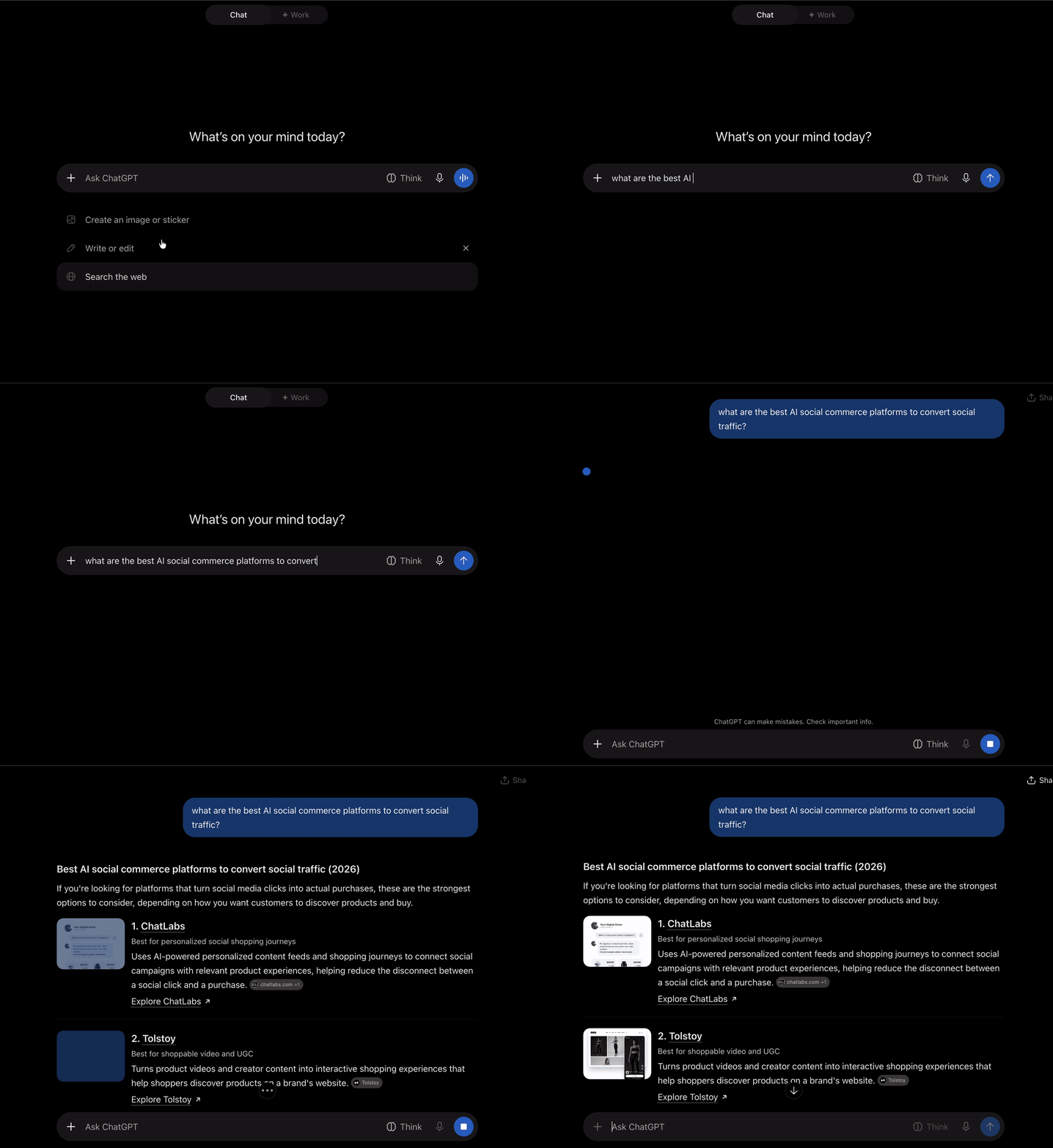
Here's the full story of the ChatLabs website, from messaging to launch.
Where Flowtrix fits

Flowtrix builds Webflow websites for funded B2B SaaS, AI and cybersecurity companies. Strategy, copy, design, Webflow build, SEO and AEO (getting named in ChatGPT and Google's AI answers) all sit in one team.
- Webflow status: Webflow Enterprise Partner, and a Webflow Partner of the Year 2025 nominee.
- For voice and AI search: Answer-first copy, CMS-driven FAQs, schema and llms.txt, as part of our SEO and AEO work. We also built the Flowtrix Schema App for no-code schema in Webflow.
- Starts at: Website builds usually cost US$25,000 to US$75,000+. SEO and AEO retainers start at US$3,000 a month.
- Good fit if: You've raised a round, sell something complex and want buyers to hear your name in the answer.
Here's what our Webflow sites have done for clients:
| Client | What they do | What changed |
|---|---|---|
| Databahn | Security data platform, US$17M Series A | 5x traffic and a 35% conversion rate |
| ChatLabs | AI social commerce | 3.5x pipeline and 40% more sign-ups |
| Wayground | EdTech, rebranded from Quizizz | 30% more traffic and 52% more leads |
| akirolabs | AI procurement, Berlin | 2.5x conversion rate and 40% lower bounce rate |
| Salesken | Sales AI, US$22M Series B | 5x more conversions |
Start with one page
You don't need to rebuild your whole site for voice search. Pick the page that brings in the most demo requests and read it out loud.
Rewrite the first two sentences. Add the questions your sales team hears. Add schema. Then ask Gemini and ChatGPT about your category a month later and see what changed.
Then do the next page.
Flowtrix has delivered 100+ projects for B2B SaaS, AI and cybersecurity teams, with SEO and AEO built into every build.


FAQ's
Quick answers to what B2B teams ask about voice search and their Webflow site.










.svg)

.svg)



%201.svg)


.svg)
.svg)

