



Use to summarize this article


- License fees are the small part: Webflow localization starts at $9 per locale per month on Essential and $29 on Advanced, on top of your Site plan.
- Tier choice depends on SEO needs: Essential covers up to 3 extra locales, while Advanced supports up to 10 and adds translated URL slugs, asset localization and a glossary.
- Real budgets run wider: Once translation, setup and QA are added, projects land between roughly $3,000 for a lean launch and $60,000 or more for content-heavy sites.
- Translation is the biggest line item: It makes up 40% to 70% of first-year spend, with post-edited machine translation at $0.04 to $0.10 per word and full human translation at $0.10 to $0.25.
- Budget for upkeep: Reserve 15% to 25% of the initial translation spend each year to keep every locale in sync.
Webflow localization cost in 2026 starts at $9 per locale per month on the Essential add-on and $29 per locale per month on Advanced, plus your Site plan. A Team platform plan ($2,500 a month) and custom Enterprise pricing sit above those. A small two-language site can run on a few hundred dollars a year in license fees.
The real project budget, once you add translation, setup and QA, usually lands between roughly $3,000 for a lean launch and $60,000 or more for a content-heavy multi-locale site.
From what we have observed over the years, pricing confusions result in unnecessary costs and we don’t want that for you.
In this guide, we help you understand what Webflow charges, as precisely as published pricing allows. Then we cover the costs that sit around that number: translation, implementation, design QA, SEO verification and the ongoing work of keeping languages in sync.
How much Webflow localization costs in 2026?
Firstly, it’s important to understand that localization in Webflow comes as an add-on.
You pay for a Site plan first (the hosting plan for the site itself: Basic at $15 a month with no CMS, or Premium at $25 a month for CMS sites, billed yearly), then pay again for each additional language, which Webflow calls a locale.
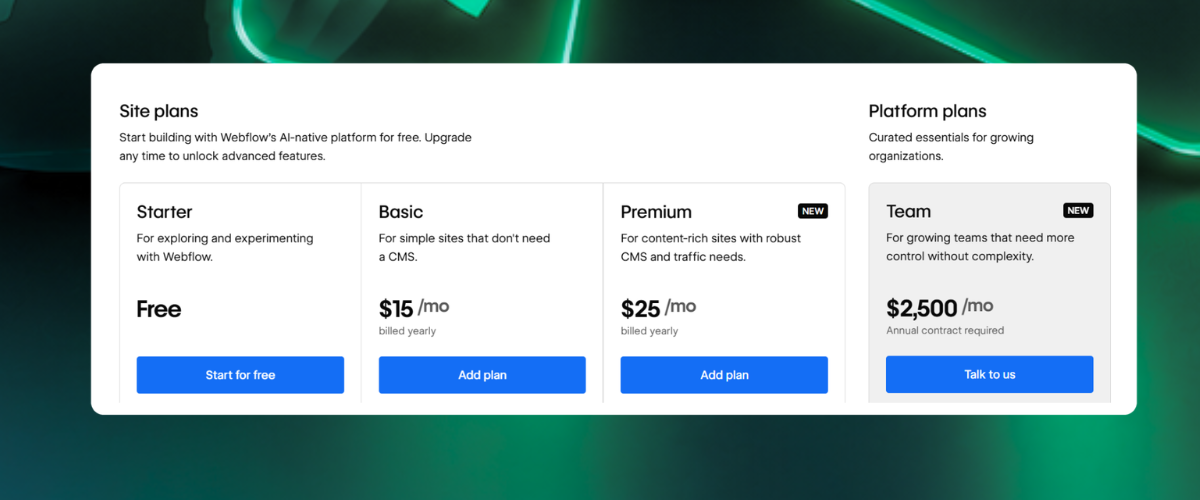
Your original language is the primary locale and is not charged as an add-on locale.
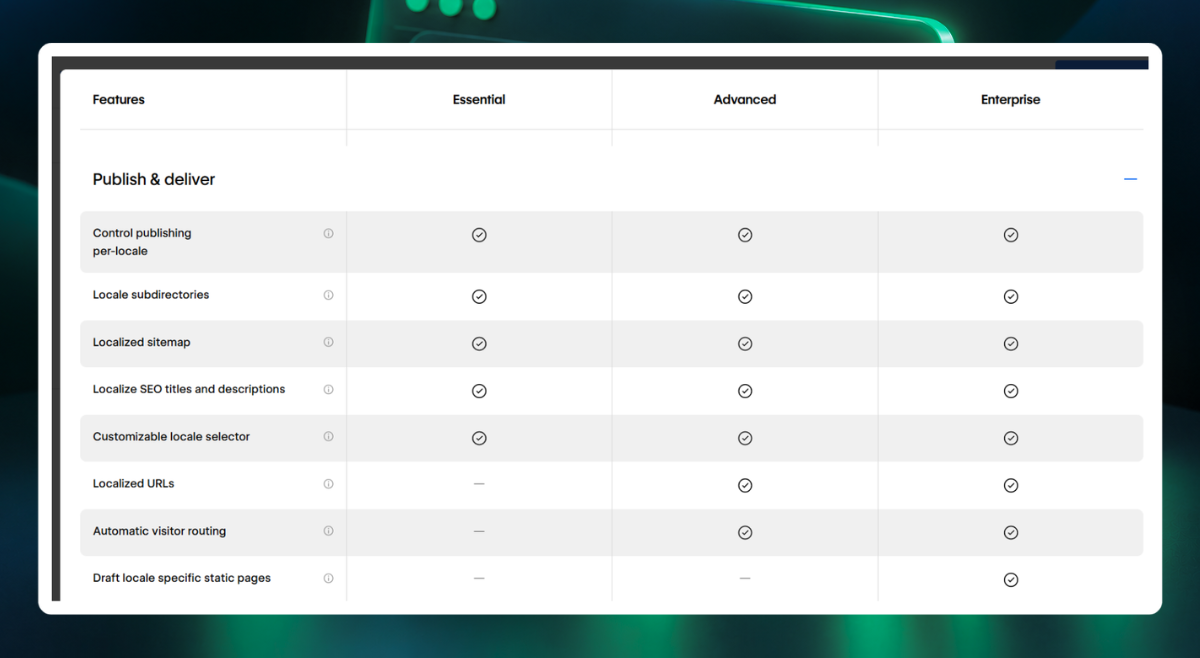
The tier-wise pricing for Webflow is shown in the table below.
Note:
- Two extra languages on Essential is $18 a month
- Two on Advanced is $58 a month
They reflect about 3% to 10% of what a typical first-year project costs.

What Webflow actually charges: licenses
Webflow localization cost is calculated per locale, per month, and the tier you choose applies across your locales.
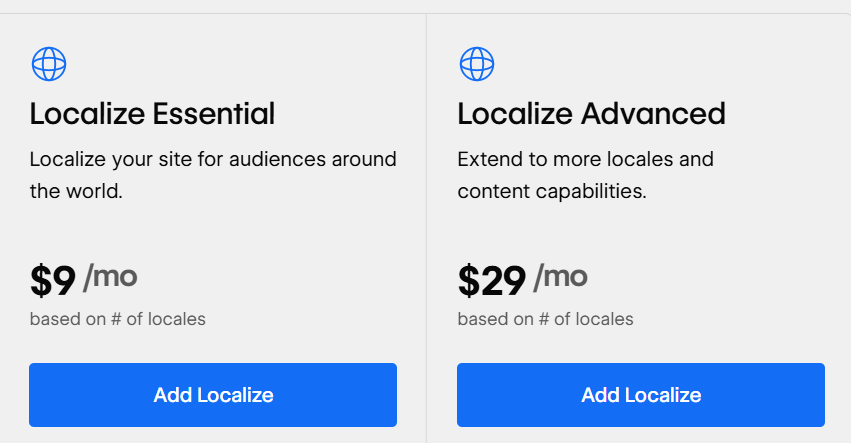
Here’s how different tiers vary and what you will be charged for them:
Essential
- This tier covers the fundamentals: multiple locales, locale-specific content editing, hreflang handled for you, and built-in machine translation as a first draft.
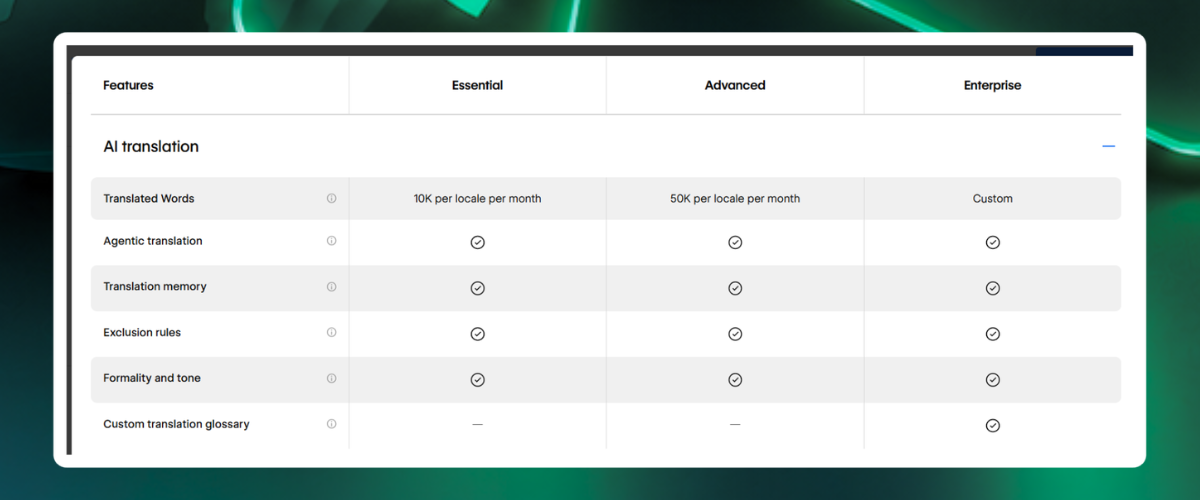
- Published figures put the machine-translation allowance at around 10,000 words per locale per month.
- There’s a cap of 3 additional locales on this tier.
Advanced
- This tier is the best for SEO-driven teams. It adds translated URL slugs, asset localization (different images per locale), a glossary for consistent terminology, and per-locale style adjustments.
- The machine-translation allowance rises to around 50,000 words per locale per month.
- You can add 10 locales in this tier.
Team platform plan
- This is a bundled option that sits between Advanced and Enterprise.
- Webflow lists it at $2,500 a month on an annual contract, about $30,000 a year, with the site, Workspace seats (5 full and 5 limited) and Localize with 2 locales included.
- Each extra locale costs a separate fee. On Localize alone it is far dearer than Advanced, where 4 locales come to about $1,392 a year, so it only makes sense when you need the seats and platform features in the bundle too.
- Compare the whole package, not the Localize separately.
Enterprise
- This tier is custom-quoted, with a custom number of locales and the governance features larger organisations expect.
- Between Advanced and Enterprise sits the Team platform plan at $2,500 a month on an annual contract, about $30,000 a year.
- It bundles the site, Workspace seats and Localize with 2 locales included, and extra locales cost a separate fee.
Ask for a quote for anything above that.

Webflow localization cost stack 2026: everything license doesn’t cover
The table below clearly shows the complete localization cost stack when building or migrating a multilingual website to Webflow.
Remember, percentages may vary with content volume. It’s important that you pay attention to the patterns to estimate possible costs.
How much does translation cost with Webflow localization?
There are 3 ways to produce the words necessary to localize your website and they vary largely based on the cost. Let’s understand each of them.
Raw machine translation
This is what Webflow's built-in tool gives you. It is fast and effectively free within your quota as a first draft.
Webflow agentic translation handles plain descriptive copy reasonably well and struggles with product terminology, humour, regulated claims and anything where the English has a double meaning.
Machine translation with human post-editing
This is the pragmatic middle. Under this method a linguist reviews and corrects the machine output.
Industry rates for such translation commonly sit around $0.04 to $0.10 per word depending on language pair and subject matter.
Fully human translation
Human translation from scratch runs higher, commonly $0.10 to $0.25 per word and above for legal, medical or highly technical content.
Note that these are market ranges not quotes.
A 10,000-word marketing site translated with post-editing at $0.07 per word costs $700 per language. Add a 100,000-word blog archive and the same method costs $7,700 per language, before a single hour of design work.
Understand how a quote works for translation cost
For Webflow, the built-in machine-translation allowance is per locale, per month. Here’s how it looks for different tiers:
- Essential: a locale with 10,000 words of monthly allowance needs ten months to machine-translate a 100,000-word archive.
- Advanced: the same archive takes two months. Meanwhile your English site keeps publishing. Webflow's translation memory softens this a little, because repeated content that has already been translated counts less against the limit, but unique articles get no such help.
If you have a large CMS, there are 3 honest options:
- Translate the highest-value content first and leave the rest in English
- Buy translation through a vendor and bring it in through a partner app or the API, or
- Phase the rollout across quota cycles
All three are fine.
Other aspects that add-up to Webflow localization cost: implementation & QA
Implementation & QA are some of the important aspects that top Webflow agencies charge you for. Here’s what’s included under implementation and QA:
Text expansion
German and Finnish copy commonly runs 20% to 35% longer than English, and French and Spanish are often 15% to 25% longer. A navigation bar that is elegant in English can wrap onto two lines in German.
This may affect existing buttons and hero headlines may lose their rhythm. Someone has to test every template in every language. With Webflow’s Advanced tier you can adjust styles per locale to fix what you find.
CJK & other right-to-left languages
Japanese, Chinese and Korean need different line-height and font handling. Arabic and Hebrew need mirrored layouts. These are the languages where 'just translate the text' stops being true.
CMS structure
Each CMS item is translated per locale, including reference fields, rich text and slugs. Collections that were designed for one language sometimes need rethinking, particularly when you have fields that should be identical across locales and fields that should differ.
When we rebuilt ZingHR's website, the CMS had to organize solutions, industries, regions, and resources so marketing could publish without developer tickets. The migration also carried URL mapping, redirects, schema, and metadata, and the site ranks the same or better after launch. A structure like this is what a localization project inherits: every collection and reference field becomes a per-locale task.
Third-party tools
Cookie banners, chat widgets, forms, booking tools and analytics each have their own language settings. A fully translated page with an English consent banner is a quality failure and, in some markets, a compliance one.
Moreover, the overall localization cost also depends on whether you use one or multiple webflow sites for global markets.
Ongoing Webflow localization costs that teams often neglect
Launch is the cheapest moment in the life of a multilingual site, because everything is new and everyone is paying attention. The costs that accumulate afterwards are the ones that actually need your attention.
- Translation debt: Every English article, product update and legal change creates work in every other locale. If nobody owns that work, locales drift out of date, and an out-of-date page in a foreign language is worse than no page.
- License renewals: Plans can change and enterprise contracts commonly carry annual uplifts, so build a modest increase into year two.
- Seats: Webflow lists full seats at $39 a month and limited seats at $15 a month (billed yearly), with free seats for reviewers who only comment. Translators who edit inside Webflow need a limited or full seat.
- In-market review: A native speaker who knows your industry, reading each new page for tone, is a recurring cost that protects your brand.
- Monitoring: Indexation, ranking and conversion by locale, reviewed monthly, so you know which languages deserve more investment.
How to lower Webflow localization cost without lowering quality?
Here are a few ways you can cut down the overall Webflow localization cost without affecting the quality of work:
- Launch in tiers: Translate the pages that convert (home, pricing, top product and landing pages) first. Add the blog later, led by organic performance.
- Localize the right amount: Not every article needs to exist in every language. A market-specific resource centre beats a mechanical copy of your archive.
- Use machine translation selectively: where the stakes are low and pay for human review where they are not: pricing, legal, product claims, anything customers rely on.
- Build a glossary early: Fixing a product term once costs less than fixing it two hundred times.
- Choose the right billing cadence: Webflow's pricing page offers a yearly option that saves money, so commit to yearly billing once you are sure of the locales.
- Design for expansion: Flexible components with spare room for longer text cost less to build now than to retrofit later.
- Clean the CMS before you translate it: Consistent fields and collections mean you pay to translate content, not to untangle it.
For Lyric's enterprise supply-chain platform, we built modular page templates and a documented component library, with a CMS that supported 6 resource categories from launch. The team can extend the site without new design work, and that is the same property that lets a template absorb longer translated copy.
A quote that cannot answer these is a quote for something smaller than the project you have.
Sort out your Webflow localization with Flowtrix
If you are planning multilingual Webflow website development, start with three numbers: the word count per locale, the number of locales you can justify through the payback test, and whether translated URLs matter for your SEO plan.
They decide the tier, the translation budget and the timeline.
If your site is not yet ready to localize, because the CMS is untidy or the templates are one-offs, fix that first.
If you would like a second pair of eyes on those numbers, the Flowtrix team can turn them into a phased budget you can take to your finance team. Let’s Connect!









.svg)

.svg)



%201.svg)


.svg)
.svg)

