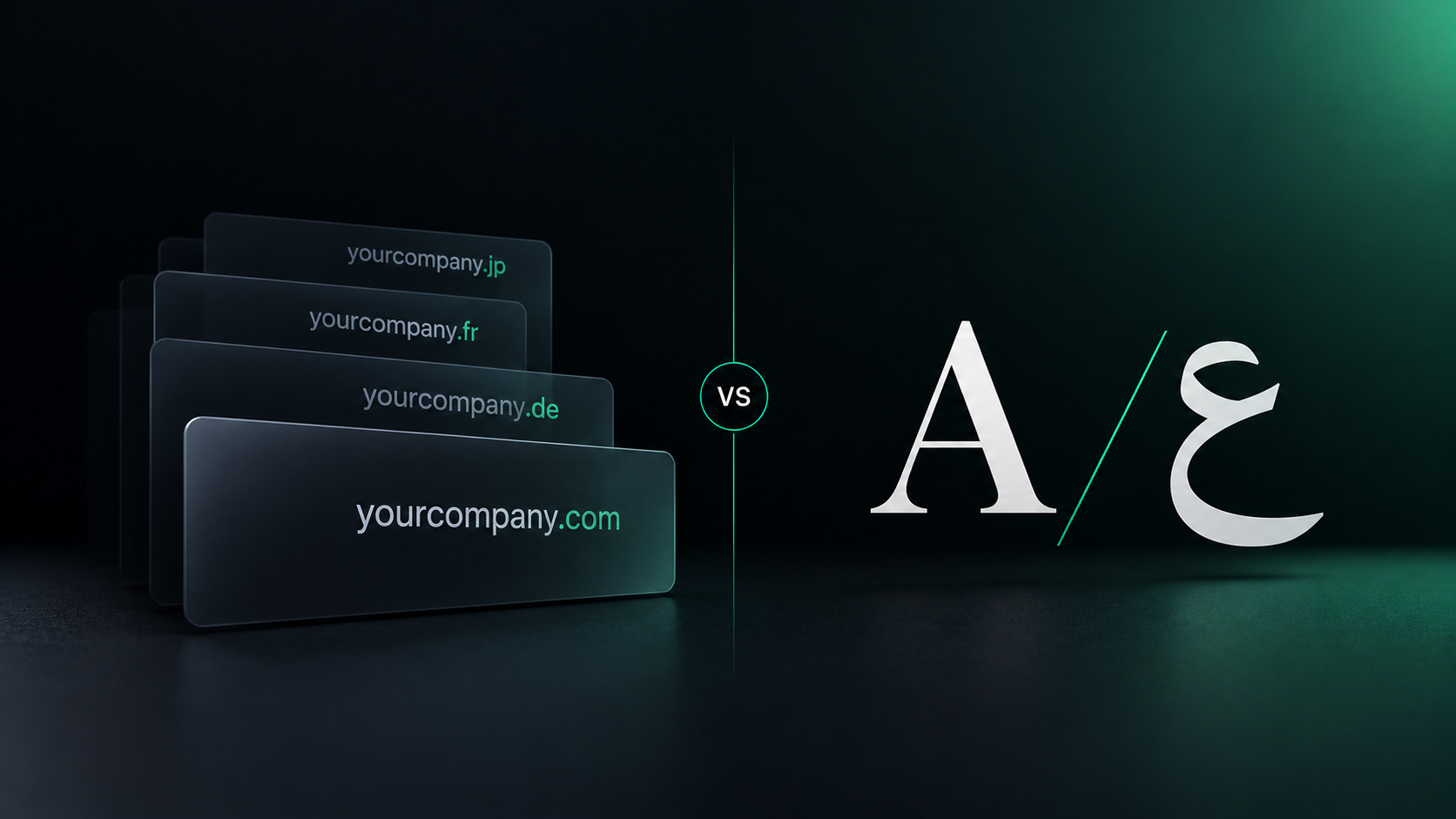




Use to summarize this article


- The short answer: Multilingual is one website in several languages. Multisite is several separate websites run together.
- Two questions, not one: How many languages you need and how many markets you sell to are separate. The Language × Market Grid gives four setups, and only one is multisite.
- SEO: Neither ranks better by default. Every version needs its own URL and correct hreflang, and multisite splits your authority across domains.
- Running cost: On a multisite setup, every shared change is built, checked, and published once per site.
- In Webflow: Localize handles multilingual sites. Shared Libraries keep separate sites on one design system.
A multilingual website is one website that offers its content in more than one language. A multisite setup is a group of separate websites, usually for different brands, countries, or products, managed together. One changes the language. The other changes the website.
The two terms often get used as if they mean the same thing. They don't, and the difference affects your build, your SEO, your running costs, and how your team works.
This guide explains both, where they overlap, what each one costs to run, and how to decide which one you need.
At Flowtrix, our enterprise website team builds both, for B2B SaaS, AI, and cybersecurity companies selling across regions.
Multilingual vs multisite, in one line
Multilingual is translation. Multisite is separation.
- A multilingual website keeps one domain, one CMS, and the same pages in every language. One team runs it, and your SEO authority stays in one place.
- A multisite setup runs several sites, each with its own pages, and often its own domain and team. Your SEO authority is split across them.
Your URLs, SEO, costs, and team setup all follow from this.

What is a multilingual website?
It's one website that speaks more than one language.
That's close to how Google defines it: "any website that offers content in more than one language."
Each language usually lives in its own folder, like /de/ or /fr/. Your pricing page in English has a pricing page in German. Change a component once, and every language gets it. One marketing team owns the whole thing.
What changes is the words, the SEO settings for each language, and small local details like dates, currency, and phone numbers.
What doesn't change is the structure. You still have one website, one design system, and one team.
Why "multisite" confuses everyone
Most articles on this topic are WordPress plugin comparisons, because in WordPress, Multisite is the name of a built-in feature. It lets you create several instances of WordPress managed within one installation. So "multisite vs multilingual" often turns into "which plugin should I install?"
Outside WordPress, multisite simply means one company runs more than one website.
In Webflow, that's separate sites in one Workspace. In a headless CMS like Contentful or Contentstack, it's one content hub feeding several front ends. In enterprise platforms like Adobe Experience Manager, regional sites can inherit content from a global master and override only what they need.
The tools differ, but the idea is the same: more than one site, with something shared in the background.
The upside is independence. Each site can have its own pages, offers, publishing schedule, and even a country domain like yourbrand.de. A regional team can edit its site without touching the global one.
The catch is that everything shared has to happen more than once. Each site needs its own plan, QA, and SEO work. And unless something keeps them in sync, the designs drift apart within months.
Language and market are two different questions
How many languages you need and how many markets you sell to are separate questions.
A site for the US and the UK has one language and two markets. A site for Canada in English and French has two languages and one market. The W3C makes the same point: a site can be international without being multilingual, and the other way round.
Put the two questions side by side and you get what we call the Language × Market Grid. It gives you four setups:
- Multilingual: One site, several languages, like /en/ and /fr/. For one market that speaks more than one language.
- Multi-regional: One site, several countries, often in the same language, like /en-us/ and /en-gb/. For when pricing, proof, or legal details change by country.
- Multilingual and multi-regional: One site, many languages and countries, like /de-de/ and /fr-ca/. For the same product sold to a global audience.
- Multisite: Separate sites, like yourbrand.com and yourbrand.de, and each one can be multilingual too. For markets or brands that work like separate businesses.

The first three are all one website. Only the fourth is multisite.
The second one gets missed the most. A B2B SaaS company selling in the US, UK, and Australia may not need a single translation. But it may need local pricing in GBP and AUD, UK and Australian customer logos, and a privacy page that reflects UK GDPR. That's multi-regional work, and it still fits on one site.
Can a website be both multisite and multilingual?
Yes. Because they answer different questions, you can have both.
One site can be multilingual and multi-regional at the same time. And a multisite network can contain sites that are each multilingual.
Amazon Signage, one site in 8 locales:
We built Amazon Signage's website as a single site that runs in 8 locales: en-US, en-GB, en-CA, fr-FR, fr-CA, de-DE, it-IT, and es-ES.
.png)
That's five languages across seven countries. English and French each cover more than one market, so the site is both multilingual and multi-regional. Every locale has its own SEO title and meta description, and there's still only one website to maintain.
.png)
ZingHR, three regions on one CMS:
ZingHR sells to enterprises in India, MEA, and SEA. Instead of three regional websites, we built region and industry-specific layouts into one CMS. Each region has its own pages, and the marketing team still runs one site.
What each setup does to your SEO
Neither one ranks better by default. What matters is how clearly you set each version up, and where your authority ends up.
Google's starting point is the same for both. It recommends different URLs for each language version, not switching languages with cookies or browser settings.
After that, five things matter.
1. Your URL structure: Google lists three main options:
- A subdirectory, like yourbrand.com/de/, is easy to set up and cheap to maintain. It usually means one multilingual site.
- A subdomain, like de.yourbrand.com, is easy to separate, but users can't always tell if "de" means the language or the country.
- A country domain, like yourbrand.de, sends the clearest country signal. It's also the most expensive, needs more infrastructure, and only targets one country. It usually means multisite.

URL parameters, like ?lang=de, aren't recommended. Server location matters less than people think. Google calls it a signal, but not a definitive one, since most sites sit behind a CDN anyway.
2. Your hreflang: These tags tell search engines which page is for which language or region. Google's rule is strict: each language version must list itself as well as all other language versions. Miss one, and Google may ignore the tags.
The codes have rules too. The language comes first and is required, like "de". The region is optional and comes second, like "de-AT". You can't use a country on its own, so "uk" doesn't mean the United Kingdom. It means Ukrainian. The UK in English is "en-GB".
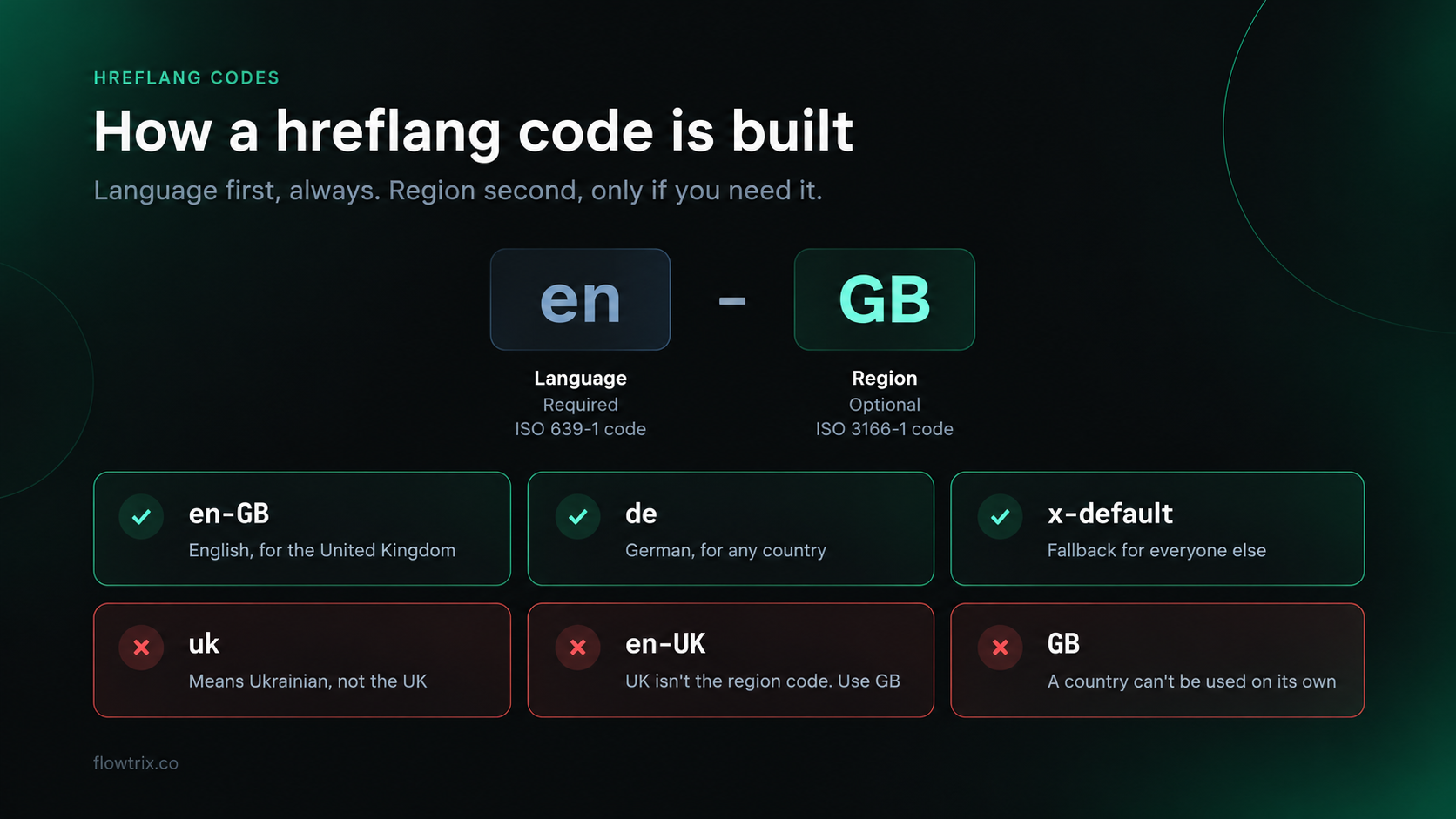
You can add hreflang in the page head, in HTTP headers, or in your sitemap. Google treats all three the same, so pick the one your platform handles best and stick to it.
.png)
On one multilingual site, this is usually handled for you. On a multisite setup, the tags have to link across separate domains, which is far easier to break. Add an x-default version as well, so visitors who match none of your languages still land somewhere sensible.
Hreflang checklist for any setup
- Every version lists itself and every other version
- Language first, region second, like en-GB
- An x-default for visitors who match no version
- Full URLs, including https://, pointing to live pages
- One method, page head, HTTP headers, or sitemap
- Cross-domain links checked on every site, if you run multisite
3. Duplicate content: This is the worry we hear most, and it's mostly unfounded. Google says localized versions are only considered duplicates if the main content remains untranslated. A real German page is not a copy of your English page.
The risk is with same-language versions. If /en-us/ and /en-gb/ are word-for-word identical, Google will pick one to show. Give each regional version something genuinely local, like pricing, proof, or contact details, and use hreflang so the right one shows in each country.
Translating only the menu and footer while leaving the main content in English doesn't count as a new version either. Google warns this creates a bad experience when the same content shows up several times in search.
4. Translation quality: Machine translation is fine as a first draft. Publishing hundreds of auto-translated pages with no human review is not. Google's spam policies list translating content to create many pages without adding value as scaled content abuse.
The same policy covers doorway pages, which includes running several domains aimed at specific regions that all funnel visitors to the same place. If your country sites are thin copies of each other, that's the line you don't want to cross.
5. Where your authority goes: On one site, every backlink helps the same domain. On a multisite setup, yourbrand.de has to earn its own links and trust.
Separate sites can also compete with each other. If two country sites target the same keyword in the same language, you're splitting your own rankings.
One more thing: don't auto-redirect visitors to a language based on their browser or IP. Googlebot usually crawls from the US, so Google warns it may never see your other versions. Use a visible language switcher instead, and make each option link to the same page in the other language, not to that language's homepage.
.png)
Free website audit
Is your site ready for more markets?
Get a scored breakdown of your positioning, proof, conversion paths and technical health before you add a new locale or a new site. Results in about a minute.
85/100
Overall score
Where AI search fits in
AI engines like ChatGPT, Perplexity, and Google AI Overviews tend to cite content in the language of the question. So both setups can win citations, as long as each language has real, indexed pages.
The difference is in brand signals.
One multilingual site keeps your brand, product names, and authority together. That makes it easier for an AI engine to see every language version as the same company.
A multisite setup spreads those signals across domains. Each site has to make it obvious who it belongs to, with the same brand and product names everywhere, and the same company details in its schema.
Either way, keep your answers in plain text, not only in images, and keep every locale up to date. We cover the research in Does Translating Your Website Improve AI Search Visibility?
What each setup costs to run
The build is the cheap part. The running cost is where the two setups really split.
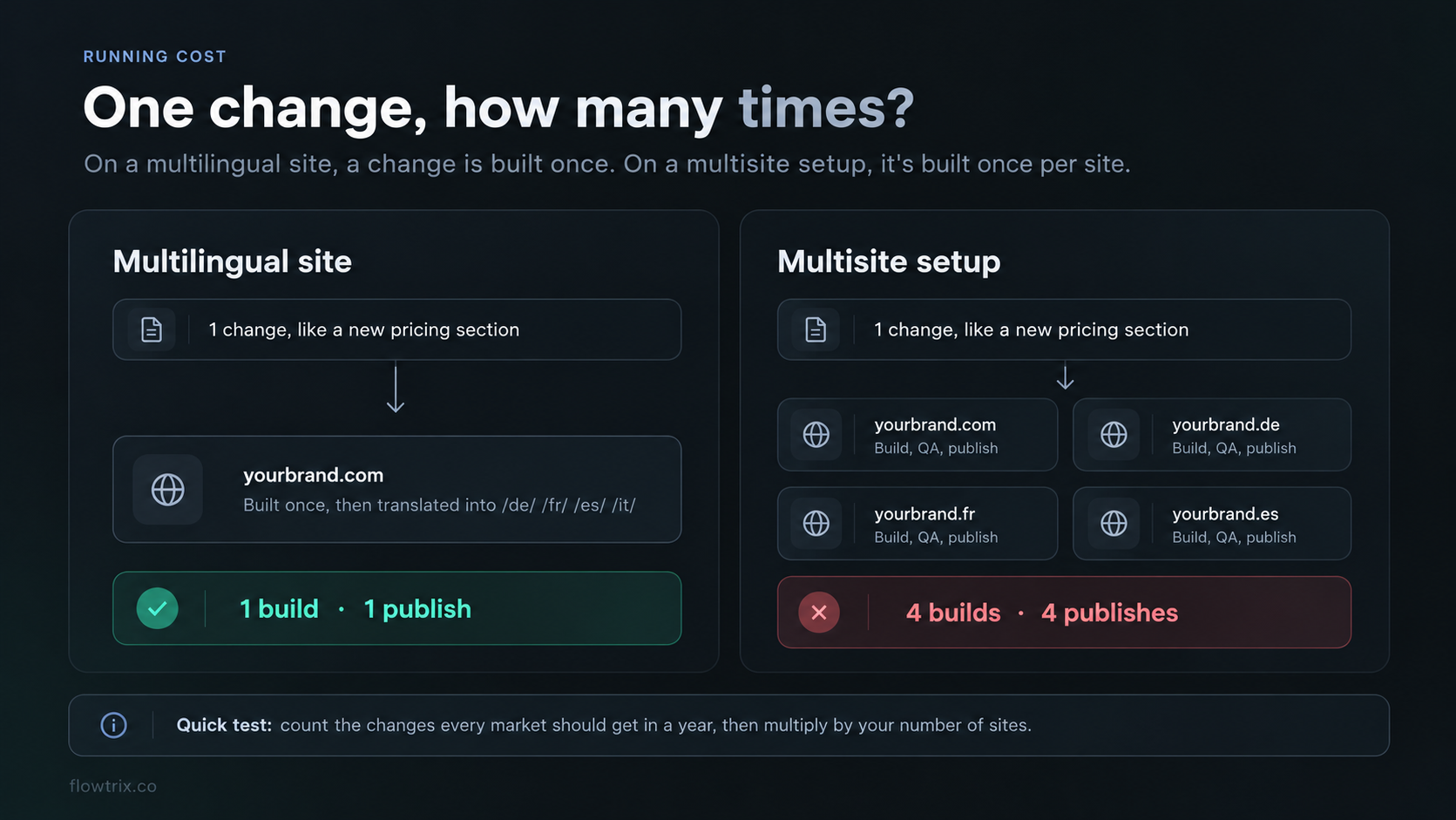
On a multilingual site, a new feature is built once. You translate the new copy, check each locale, and publish. Adding a language later mostly means translation and SEO work, not a new build.
On a multisite setup, almost everything multiplies by the number of sites:
- Hosting and plans: Each site usually needs its own plan, and sometimes its own add-ons.
- Integrations: Forms, CRM connections, analytics, cookie banners, chat widgets, and scripts have to be set up and kept working on every site.
- Updates: A new navigation item, a pricing change, or a legal update has to be made, checked, and published once per site.
- SEO: Each domain needs its own keyword plan, technical checks, and link building.
- Reporting: Analytics and Search Console are split across properties, so someone has to pull them together to see the full picture.
None of that is a reason to avoid multisite when you need it. It's a reason to know the cost before you choose it. A good test: count how many times a year you change something that every market should get. Then multiply that by the number of sites.
| What you're doing | Multilingual site | Multisite setup |
|---|---|---|
| Launching a new feature | Built once, then translated | Built and published on every site |
| Adding a new market | Add a locale, translate, set SEO | Set up a new site, plan, and integrations |
| Forms, CRM, and scripts | Set up once | Set up and maintained per site |
| SEO work | One domain, one plan | One plan per domain |
| Reporting | One property, filtered by locale | Several properties to combine |
| Team setup | One team, plus translators | Regional teams running their own sites |
Who owns what
The setup you choose decides how your team works, so it helps to agree on ownership early.
On a multilingual site, the global team usually owns the design, the page structure, and the main copy. Regional teams or translators own the language versions, and someone signs off on each locale before it goes live. The biggest risk is drift: the English page gets updated, and the German page quietly stays six months behind.
On a multisite setup, regional teams get more freedom. They can launch local campaigns and pages without waiting on the global team. The risk is that brand, messaging, and product names start to differ from site to site.
Whichever way you go, a few things keep it under control:
- One source of truth for product names, claims, and key messages.
- A glossary so every language uses the same terms for your product and features.
- A clear rule for updates, like "every locale gets updated within two weeks of the main page."
- One shared design system, so every site and locale is built from the same components.

How Webflow handles each one
Webflow has a separate tool for each setup.
Multilingual, with Webflow Localize:
Localize adds locales to a single site. Each locale gets its own subdirectory, like /de/ or /en-us/, along with localized content, SEO settings, and styles. You can rename the subdirectory without changing the locale's language code.
.png)
Localization Essential covers up to 3 locales, and Advanced covers up to 10. Webflow adds hreflang automatically when you use its auto-generated sitemap. And Agentic Translation can keep every locale in sync as your main content changes.
Two limits to know before you start. Localization isn't available with Webflow Ecommerce plans. And your primary locale is fixed: you can't change it later or swap a secondary locale into its place. So decide which language is your main one before you set anything up.

Multisite, with Shared Libraries:
For separate sites, Webflow's Shared Libraries share components, variables, custom fonts, tag styles, and assets across every site in one Workspace.
They share design, not content. Copy and translations are still managed site by site. You can't share a Library across Workspaces. Freelancer, Core, and Growth Workspaces get one shared Library, while Agency and Enterprise get unlimited. Enterprise Workspaces can also push updates to many sites at once, though each site still needs publishing.
So Localize shares everything across languages. Shared Libraries share only the look across separate sites.
Which one do you need?
Start with the Language × Market Grid to see which of the four setups you're in. Then look at what changes between your markets, not just how many languages you need.
- Only the language changes? One multilingual site.
- One or two markets need something different? A hybrid: one main site, plus a separate site for that market.
- The product, pricing, team, or domain changes? A multisite setup.
A few things push you toward separate sites even when the product is the same. A local legal entity that needs its own terms and privacy policy. Strict data or hosting rules in one country. A regional partner who runs their own marketing. Or a market where a local domain clearly earns more trust.
Most B2B SaaS companies land in the first group. Adding a locale is cheap. Running a second website isn't.
For the full decision, our guide to one Webflow site vs multiple sites walks through the costs and our Three Sames test.
Moving from one setup to the other
Your first choice doesn't have to be your last. Plenty of companies start with one site and split later, or merge several sites back into one.
Splitting a locale into its own site: Say your /de/ section has grown into a full German business with its own team and offers. You can move it to yourbrand.de. Map every old /de/ URL to its new address with a 301 redirect, update hreflang on both sides, and keep the old URLs redirecting for at least a year.
Merging sites into one: This is the more common move we see. A company has three regional sites that have drifted apart, and nobody wants to maintain them anymore. Bringing them into one multilingual site means choosing which content survives, redirecting every old URL to its closest new page, and setting up hreflang from scratch.
Either way, expect some ranking movement for a few weeks while Google catches up. Planning the redirect map before anything moves is what keeps that dip short.
Eight mistakes we see often
- Using "multisite" and "multilingual" as if they mean the same thing: You end up planning the wrong build and the wrong budget.
- Splitting into separate sites too early: It doubles the work and splits your SEO. Test a new market with a locale first.
- Switching languages on the same URL: Search engines can't index each version. Every language needs its own URL.
- Missing or one-way hreflang: If every version doesn't list every other version, Google may ignore the lot.
- Using the wrong codes: "uk" is Ukrainian, not the UK. Always start with the language.
- Publishing machine translation with no review: It reads badly, converts badly, and can count as spam at scale.
- Copying English metadata into every language: Your local rankings pay for it. Write titles and descriptions for each locale, based on what people actually search for there.
- Running separate sites with no shared design system: The sites drift apart and your brand looks inconsistent.
Moving an existing multilingual or multisite setup? Our multilingual migration guide covers URLs, redirects, and hreflang for every locale. Adding a right-to-left language? Start with building an Arabic and English website.
Start with one site. Split when the business does.
If your markets share a product and a team, one multilingual site is simpler, cheaper, and keeps your SEO in one place.
If a market needs its own product, pricing, legal setup, or team, give it its own site, and keep the design shared across all of them.
Whichever way you go, give every language its own URL, get hreflang right, have a real person review every translation, and keep every version current.
Planning a website for more than one market? Talk to Flowtrix. Our SEO and AEO team and migration team plan the setup before a single page is built.
Flowtrix has delivered 120+ revamps for B2B SaaS, AI and cybersecurity teams, including multilingual and multi-regional builds.

.svg)
FAQ's
The questions teams ask most when they plan a website for more than one language or market.












.svg)

.svg)



%201.svg)


.svg)
.svg)

