



Use to summarize this article


- An agent ready website is one that AI agents can find, read and act on for a person.
- Most of the work is good site basics: open access, clean HTML, clear headings and labelled forms.
- Google says Search doesn't use llms.txt, but Chrome checks for it. It takes an hour, so add one and move on.
- You can skip MCP servers, WebMCP and agent payments for now if you run a B2B marketing site.
- Flowtrix builds and audits B2B websites for SaaS, AI and cybersecurity companies, including what AI agents need to read them.
An agent ready website is a website that AI agents can find, understand and use on someone's behalf. These agents include tools like ChatGPT agent, Claude and Google's Project Mariner, which can visit pages, compare options and fill in forms for a person.
Here's what that looks like in practice. A buyer asks an AI tool to shortlist three security data vendors, check their pricing pages and book a demo with the best fit. The agent visits your site, reads what it can, and moves on if it can't make sense of it.
The good news is that learning how to make your website agent ready is mostly about basics a good site should already have. You don't need a rebuild, and you don't need to chase every new standard announced this year.
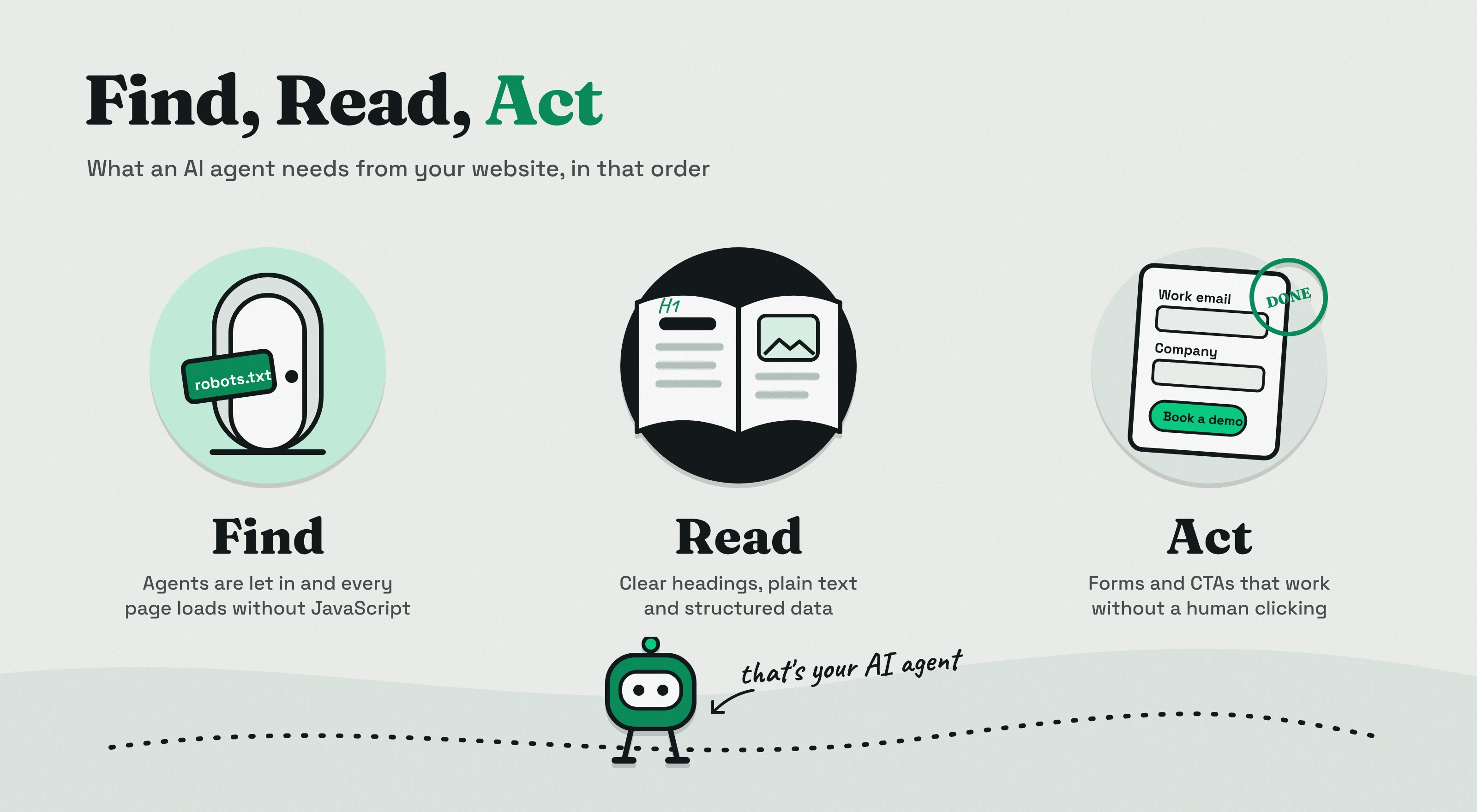
This guide splits the work into three steps we call Find, Read, Act. It also covers how to check your score, what to do about llms.txt, and what you can safely skip for now.
What Does Agent Ready Actually Mean?
It means an AI agent can reach your site, understand what you offer, and complete a simple task on it, like finding your pricing or booking a demo.
Search engines index your pages so people can find them. AI answer engines read your pages so they can quote you. Agents go one step further. They use your website the way a person would, but on that person's behalf.
That's why agent readiness overlaps so much with SEO and AEO. If you've already worked on ChatGPT optimization, you've done part of the job. The new part is making sure an agent can actually click, read and submit things on your site.
| What it covers | SEO | AEO | Agent readiness |
|---|---|---|---|
| Main goal | Rank in search results | Get quoted in AI answers | Let AI agents use your site |
| Who visits | Search crawlers and people | AI crawlers and answer engines | Agents acting for a person |
| What success looks like | Clicks from Google | Mentions and citations in ChatGPT, Perplexity or AI Overviews | An agent finds the right page and finishes the task |
| Main work | Content, links, technical health | Clear answers, structured content, schema | Open access, clean HTML, working forms |
How AI Agents Use Your Website
Agents read your page through screenshots, the HTML and the accessibility tree, then decide what to click. Google's web.dev team explains this in its guide to building agent-friendly websites.
Screenshots are the slowest and most expensive way for an agent to read a page, so most agents use them as a backup. The HTML tells the agent how the page is built. The accessibility tree, the same map screen readers use, tells it what each element is and what it's called.
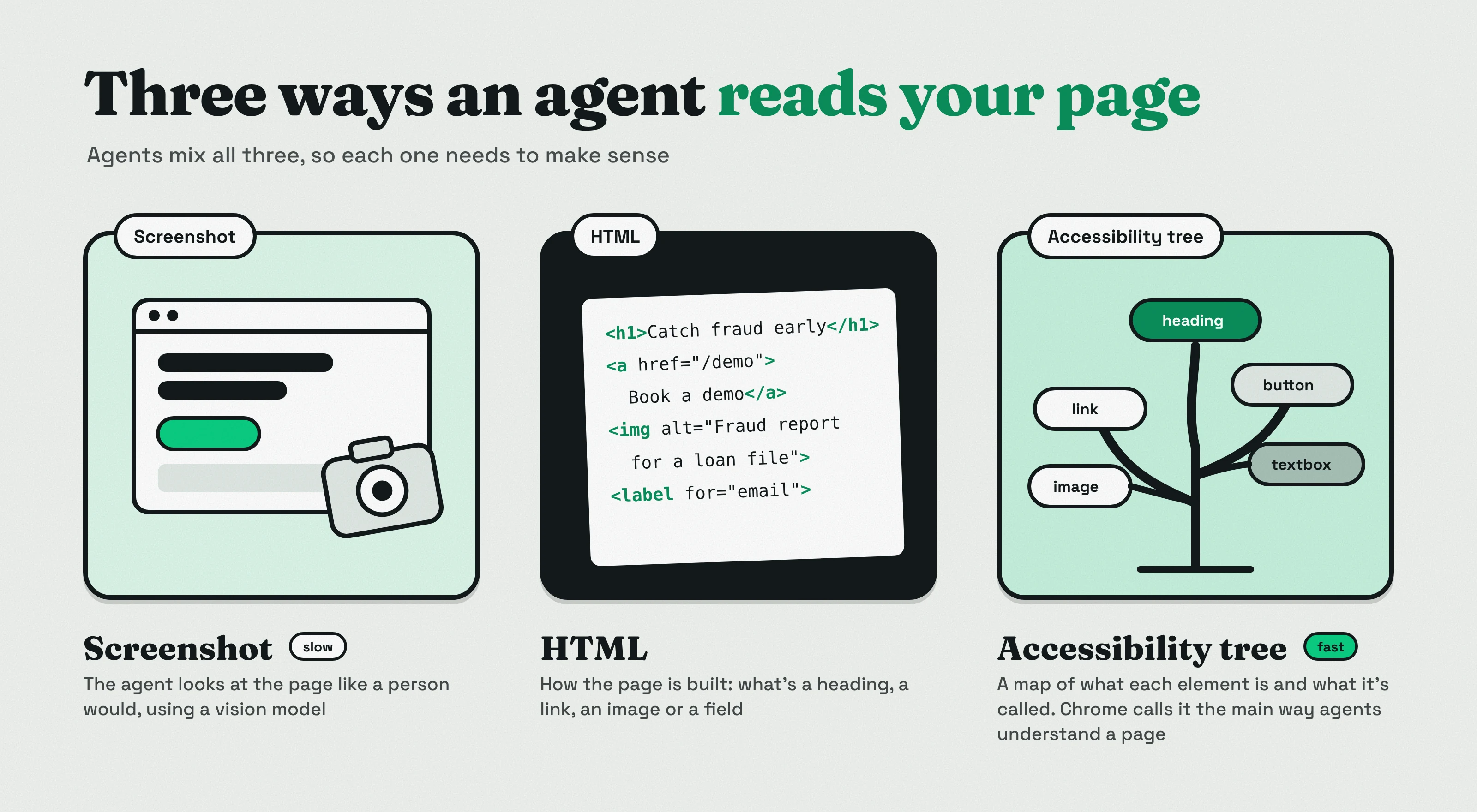
Chrome's team puts it simply in its agent-ready toolkit: "A well-formed accessibility tree is the primary way AI agents understand your page."
You don't need to panic about this. The same web.dev guide says "Everything we suggest to make a site 'agent-ready' also makes sites better for humans." An agent is just another kind of visitor, and it struggles with the same things people do: vague copy, hidden content and forms that don't make sense.
Check Your Score First
Run a free check before you change anything, so you know where you actually stand. Three tools are worth a look.
- isitagentready.com: Cloudflare's free checker scores your site on discoverability, content, bot access control and capabilities. Each failed check comes with a prompt you can hand to a coding agent.
- Lighthouse in Chrome: Chrome 150 added an Agentic Browsing category that checks accessibility for agents, layout stability and llms.txt. It's experimental and shows pass or fail results, not a ranking score.
- Flowtrix free AI website audit: scores your site on visual quality, clarity and technical health, so you can see the agent checks next to the things buyers care about.
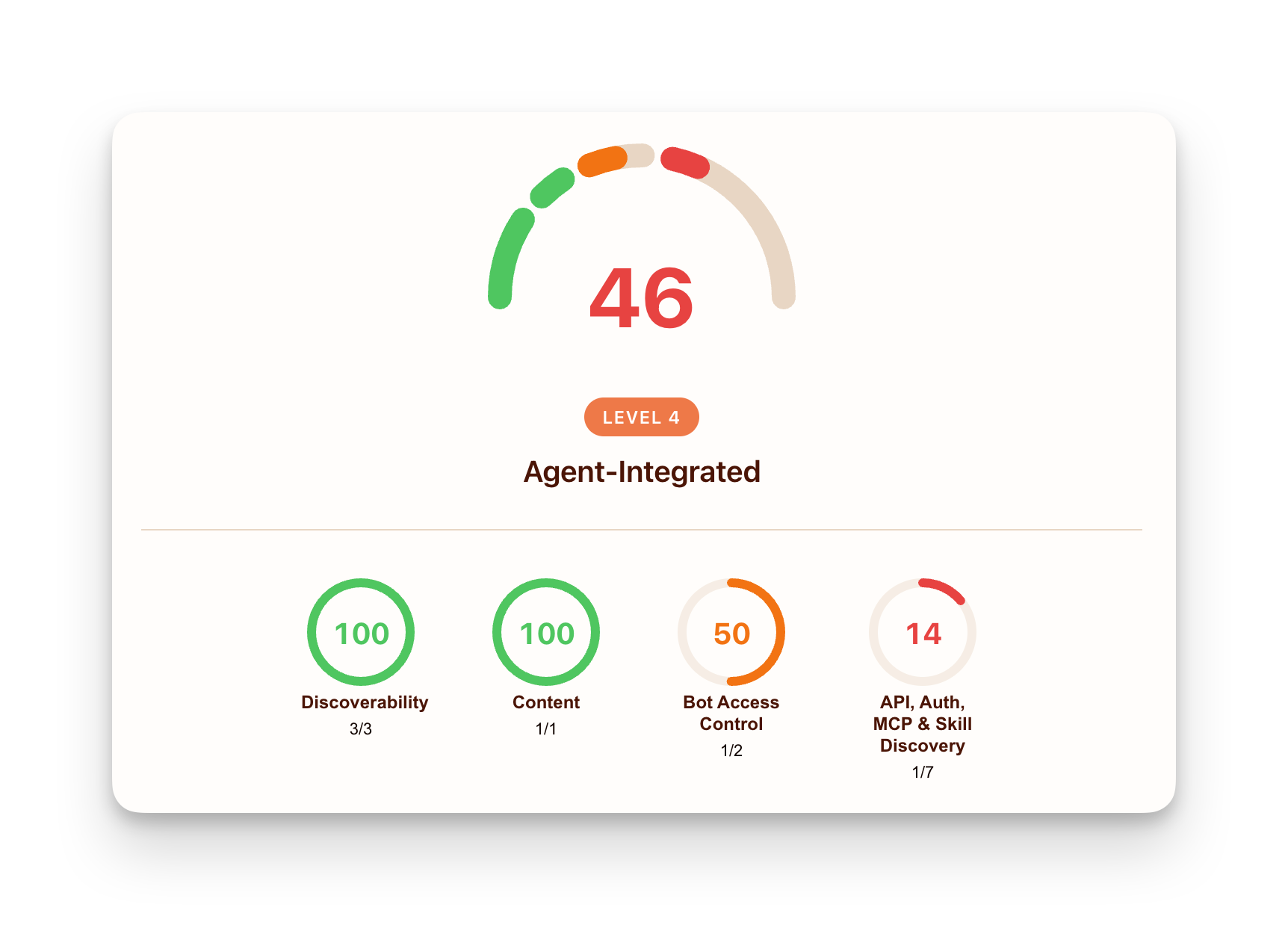
Don't expect a high score straight away. When Cloudflare launched the checker, it scanned the top 200,000 domains and found that 78% had a robots.txt file, but only 4% had stated how AI systems may use their content. Most newer standards showed up on fewer than 15 sites.
A low score doesn't mean your site is broken. Many of the checks are for products with APIs or online checkout, which most B2B marketing sites don't need. We cover what you can skip further down.
Free website audit
Is your site ready for AI agents?
Get a scored breakdown of your site's technical health, clarity and proof, including the checks agents rely on. Results in about a minute.
85/100
Overall score
Find: Let AI Agents Reach Your Site
Make sure agents are allowed in, your pages are listed in a sitemap, and your content loads without JavaScript. If an agent can't get to the page, nothing else matters.
Start with three checks:
- robots.txt: this small file at yoursite.com/robots.txt tells bots what they can and can't visit. Make sure you aren't blocking the AI search and user bots you want, by accident.
- Sitemap: list every page you want found, and keep it updated when you publish.
- No accidental noindex: check that key pages like pricing, product and case studies don't carry a noindex tag left over from staging.
Then check that your content exists in the HTML. If your site is built with a JavaScript framework and renders everything in the browser, some agents and crawlers will see an empty page. Server-side rendering or pre-rendering fixes this. We walked through how to test it in our Lovable SEO guide, and the same test works on any stack.
Speed matters too. An agent working through ten vendor sites won't wait on a slow one, and neither will the buyer. Our guide to Core Web Vitals on a B2B SaaS website covers the usual fixes.
Which AI bots should you allow?
AI companies use different bots for different jobs. Blocking one doesn't block the others, so it helps to know what each one does.
| Bot | Company | What it does | Follows robots.txt? |
|---|---|---|---|
| GPTBot | OpenAI | Collects content that may be used to train AI models | Yes |
| OAI-SearchBot | OpenAI | Finds pages to show in ChatGPT search | Yes |
| ChatGPT-User | OpenAI | Visits a page when a ChatGPT user asks it to | OpenAI says rules may not apply |
| ClaudeBot | Anthropic | Collects content that may be used for training | Yes |
| Claude-SearchBot | Anthropic | Indexes pages to improve Claude's search results | Yes |
| Claude-User | Anthropic | Visits a page when a Claude user asks a question | Yes |
| Google-Agent | Browses sites for users, starting with Project Mariner | Generally no, as it acts for a user |
Sources: OpenAI crawler docs, Anthropic support and Search Engine Journal on Google-Agent.
How to block AI agents on your website
If you don't want your content used for AI training, you can block the training bots in robots.txt and still allow the search and user bots. That way you stay visible in AI search without giving your content away for training.

Keep in mind that robots.txt is a request, not a lock. Bots that act for a user, like ChatGPT-User and Google-Agent, may not follow it at all. If you need a hard block, you'll have to do it at your CDN or firewall.

How to detect AI agents on your website
Look for these bot names in your server or CDN logs. In analytics, visits sent from ChatGPT, Claude or Perplexity often show up as referral traffic, but only if you set GA4 up to group them. Our guide on how to track AI search traffic in GA4 shows the setup step by step.
Agents that run inside a real browser can look like normal visitors, so you won't catch all of them. That's fine. The goal is to spot the trend, not count every visit.
Read: Make Your Pages Easy to Understand
Use real headings, plain text and clean HTML, so an agent can tell what each page is about and what each element does. This is the part of agent readiness that most B2B sites get wrong, and it's the easiest to fix.

So what makes a website readable to AI agents? Go through your key pages and check these:
- One H1 per page: the main headline, written as real text, not inside an image.
- Headings in order: H2s for sections, H3s inside them. Agents use them to jump to the right part of the page.
- Plain-language copy: say what the product does, who it's for and what it costs. "AI-powered platform" tells an agent nothing.
- Real buttons and links: use button and link elements, not styled divs. Web.dev specifically recommends this so agents know what's clickable.
- Alt text on images: describe product screenshots and diagrams. Skip decorative images, and never use placeholders like "logo" or "image1".
- Key details in text: pricing, features, integrations and security info should be on the page, not only in a PDF, a video or an image.
Add schema markup where it helps
Schema is code that labels your content for machines, like "this is our company", "this is an FAQ" or "this article was written by this person". Start with Organization, BreadcrumbList, Article with author details, and FAQPage where you have real FAQs.
Be realistic about it. Google's own AI optimization guide says generative AI search doesn't need structured data or any special schema. It still recommends schema as part of your overall SEO, and agents outside Google can use it to get facts right.
Keep your content structured
A CMS with clear fields for things like pricing tiers, case study results and author names makes all of this easier. A headless CMS goes further and serves content over an API, which keeps it structured wherever it shows up. BetterCMS is one example built this way, and it outputs clean markdown for answer engines.
And write for people first. Content written only to please AI tends to read badly and help nobody. We cover the details in our guide on AI content and SEO.
What this looks like on a real site
Making a complex product easy to understand is most of what we do at Flowtrix. Owlery is an AI-powered freight platform with seven solutions and 100+ integrations, so the risk was a website that tries to say everything and ends up saying nothing. We gave each solution its own page and every buyer type a clear path. After the launch, Owlery saw 42% more demo bookings and 2.5x more engagement.

Should You Create an llms.txt File?
Yes, if it's quick for you. Just don't expect it to move your rankings. llms.txt is a plain text file in markdown that sits at your site root, at yoursite.com/llms.txt. It gives AI tools a short summary of your site and links to your most important pages.
Here's why the advice online is so mixed. Google's AI optimization guide says you don't need new machine-readable files like this, because Google Search doesn't use them. At the same time, Chrome's Lighthouse now includes an llms.txt check in its agentic browsing audits. Search Engine Journal summed it up well: Google's answer depends on which product you ask.
The usage data is honest about it too. Ahrefs looked at 137,210 sites in its web analytics and found that 28% had an llms.txt file. In May 2026, 97% of those files got no requests at all.
Our take: it takes an hour, it does no harm, and some agents and coding tools do read it. We have one on flowtrix.co. Spend that hour, then put your real effort into the Find, Read and Act basics.
How to create an llms.txt file
- Start with your name and a one-line summary of what your company does and who it's for.
- List your key pages under simple headings, like product, pricing, case studies and docs, each with a short note.
- Save it as llms.txt and upload it to your site root, so it loads at yoursite.com/llms.txt.
- Make sure it returns properly. Lighthouse flags a server error, and treats a missing file as not applicable.
- Update it when you add or retire important pages.
A simple llms.txt example for a B2B SaaS company looks like this:
# Acme Security

> Acme helps security teams cut SIEM costs by filtering log data before it reaches storage.

## Product
- [Platform overview](https://acme.com/platform): how the pipeline works
- [Pricing](https://acme.com/pricing): plans and what each includes

## Proof
- [Case studies](https://acme.com/customers): results from named customers

## Company
- [Security and compliance](https://acme.com/security): SOC 2 and data handling
- [Contact sales](https://acme.com/demo): book a demo
The format follows the llms.txt proposal. You can test yours with Lighthouse or by adding llms.txt to an isitagentready.com scan.
Act: Make Your Forms and CTAs Work for Agents
Keep forms short, label every field, and make sure your main CTA works without pop-ups or hidden steps. For a B2B site, "act" usually means one of three things: booking a demo, starting a trial or contacting sales.
- Label every field: connect each label to its input, so an agent knows that box is for a work email and not a phone number.
- Ask for less: every extra required field is another chance for an agent, or a person, to give up.
- One clear primary CTA: "Book a demo" in the same place on every page beats five competing buttons.
- No overlays on top of buttons: web.dev warns that transparent overlays and ghost elements can hide clickable elements from agents.
- Keep the layout steady: if your buttons jump around as the page loads, agents that read screenshots get confused.
- Booking links that open normally: a calendar link that loads as its own page is easier to use than one buried in a pop-up chain.
Can AI agents sign into your website?
For most marketing sites, they don't need to. Keep your public pages, pricing and demo forms open, and the question goes away.
If you have a product login, there are newer standards like OAuth server discovery that let agents sign in safely with the user's permission. That's work for your product team, not your marketing site, and it can wait until customers actually ask for it.
One trade-off to know: heavy CAPTCHA puzzles will stop agents along with spam bots. If you rely on one, pick a lighter check where you can.
What You Can Skip for Now
If you run a B2B marketing site with a demo or contact form, you can skip most of the newer agent standards for now. They're real and some will matter later, but they're built for products with APIs, self-serve signups or online checkout.
| Standard | What it does | Who needs it now | Our call for B2B sites |
|---|---|---|---|
| MCP server | Lets AI tools connect directly to your product or data | Products with an API customers use through AI tools | Skip, unless your product team is already building one |
| WebMCP | Lets a web page offer tools an agent can call in the browser | Teams testing it through Chrome's early program | Skip, it's still a proposed standard |
| Agent payment protocols | Let agents pay or check out for a user | Ecommerce and self-serve SaaS | Skip if buyers talk to sales first |
| Web Bot Auth | Lets bots prove who they are | Sites that need to verify bots | Leave it to your CDN |
| Markdown for agents | Serves a markdown version of a page when an agent asks | Docs and content-heavy sites | Nice to have, not urgent |
| llms.txt | Gives AI tools a short map of your site | Anyone with an hour to spare | Do it, but don't expect rankings |
Google's guide makes the same point in its own way. It describes agents as systems that do tasks for users, like booking or comparing products, and simply tells site owners to keep an eye on new ways agents can interact with sites. That's not a reason to build everything today.
When should you revisit this list? When you launch a self-serve plan, open a public API, start selling online, or see real agent traffic in your logs.
Getting these basics right is a big part of what we do at Flowtrix. For AuditCue, a governance, risk and compliance platform, we built a website that makes complex audit and risk workflows simple and clear. AuditCue saw 55% more demo bookings and 40% more quality leads. Here's what Gaurav Kulkarni, Co-founder at AuditCue, said:
"Flowtrix exceeded our expectations and delivered the website before deadline."
Your Agent Ready Checklist
Work through this list in order. Most teams can finish the Find and Read items in a week or two.
Agent Ready Website Checklist
- Find: robots.txt allows the AI search and user bots you want
- Find: CDN and firewall settings checked for default AI bot blocking
- Find: sitemap live and complete, with no accidental noindex on key pages
- Find: page content shows up in the HTML without JavaScript
- Read: one H1 per page and headings in order
- Read: pricing, features and security details written as text
- Read: real alt text on meaningful images, no placeholders
- Read: Organization, Article and FAQPage schema where they fit
- Read: llms.txt published at your site root
- Act: every form field labelled, with as few required fields as possible
- Act: main CTA and booking link work without pop-ups or overlays
- Check: run isitagentready.com and Lighthouse again after your fixes
AI agents are a new kind of visitor, but what they need isn't new. A site that's easy to reach, easy to read and easy to act on works better for agents and for the people sending them.
That's the work we do at Flowtrix. We've worked on 100+ projects with B2B, SaaS, AI and cybersecurity companies, across websites, branding and search visibility, and we'll tell you which fixes matter for your site and which ones can wait.
Flowtrix has worked with 100+ B2B, SaaS and AI companies. Here are a few recent projects.

3.5x more pipeline and 85% demo-to-trial conversion for an AI-powered social funnel platform.

Conversion rate rose to 35% and demo bookings went up 40% for a security data platform.

2.5x more engagement and 30% more traffic after the rebrand from Quizizz to Wayground.

22+ pages rebuilt in 4 weeks for a global HRMS, with a full SEO migration and Core Web Vitals work.
FAQ's
Short answers to what B2B teams ask us most about getting their website ready for AI agents.