



Use to summarize this article


- Lovable now makes pages readable for Google on its own, so rendering is no longer the big problem.
- Before launch, check titles, meta tags, canonicals and your sitemap on every key page.
- Rewrite anything that looks or sounds AI-made, starting with the hero headline.
- Test your database rules and API keys, and get a developer to review security.
- Set up GA4, Search Console and form tracking before you send traffic.
- Flowtrix helps B2B teams make a Lovable site launch-ready, or rebuild it on the right stack when they outgrow it.
It usually goes like this. A founder builds the company website in Lovable over a weekend. It looks clean, the demo form works, and the link goes out to investors on Monday.
A few weeks later, the site is nowhere on Google for its own category. And the first comment from a prospect is that it looks like every other AI startup.
The good news is that Lovable SEO is in much better shape than it was a year ago. Lovable now renders pages for search engines on its own. The catch is that rendering was never the whole job.
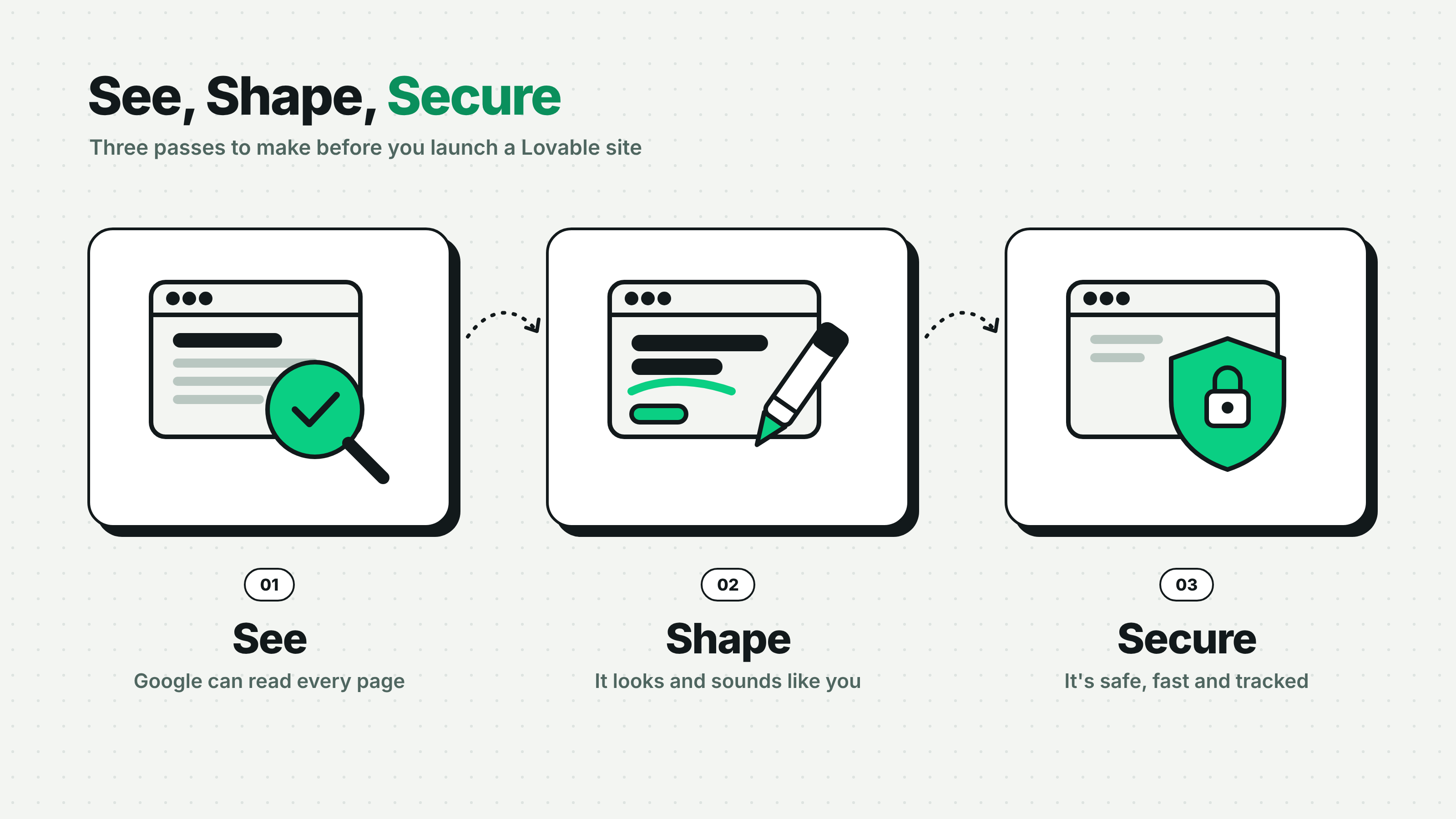
This guide covers what to fix before you launch, in three passes we call See, Shape, Secure. Make sure Google and AI tools can see your pages, shape the site so it doesn't look AI-generated, and secure it so launch day doesn't turn into a cleanup.
Is Lovable Good for SEO?
Yes, mostly, and much more than it used to be. According to Lovable's SEO docs, apps created from 13 May 2026 use TanStack Start with server-side rendering, so search engines and AI crawlers get complete HTML. Older React and Vite apps get pre-rendered pages on their published URLs.
Lovable announced this as part of its Discoverability launch. The same update added an SEO review you can run before or after publishing, one-click fixes, and keyword research powered by Semrush.
That's a real improvement. A lot of the Lovable SEO advice still ranking today was written for the old, client-rendered Lovable, and it tells you to set up pre-rendering services you no longer need.
But the review has limits, and Lovable is upfront about them. Its docs say the review doesn't run again on its own when you publish, no longer runs Lighthouse audits, and doesn't judge content quality, search intent or page speed. It also says plainly that it does not guarantee rankings.
| Area | What Lovable handles now | What's still on you |
|---|---|---|
| Rendering | Server-side rendering for new apps, pre-rendering for older ones | Testing that Google actually sees each key page |
| robots.txt and sitemap | Creates robots.txt, and can create or fix a sitemap | Submitting the sitemap and keeping it current |
| Titles and meta tags | Flags duplicates and can fix them | Writing titles people actually want to click |
| Design and copy | Generates a clean first version | Making it look and sound like your company |
| Security | Runs a quick scan when you publish | Testing access rules and getting a developer review |
| Content | Builds pages from your prompts | A blog, a publishing workflow and someone who owns it |
If you built with Bolt or v0 instead, the Shape and Secure passes in this guide apply just the same. Rendering works differently on each tool, so check your tool's docs for the See pass.
Can Google See Your Lovable Site?
Probably, but check it page by page before launch. Rendering is now handled at the platform level, so most Lovable SEO problems come from the setup around it: the sitemap, robots.txt and canonical tags.
Run the right test
On a new app with server-side rendering, open any page, right-click and choose View Page Source. You should see your headline and body copy in the HTML.
On an older app, view-source will still show an almost empty page. That's expected. Lovable only serves the pre-rendered version to verified crawlers, and your browser isn't one. Unverified bots and link checkers see the empty version too, which is why some third-party SEO scanners still report a blank site.
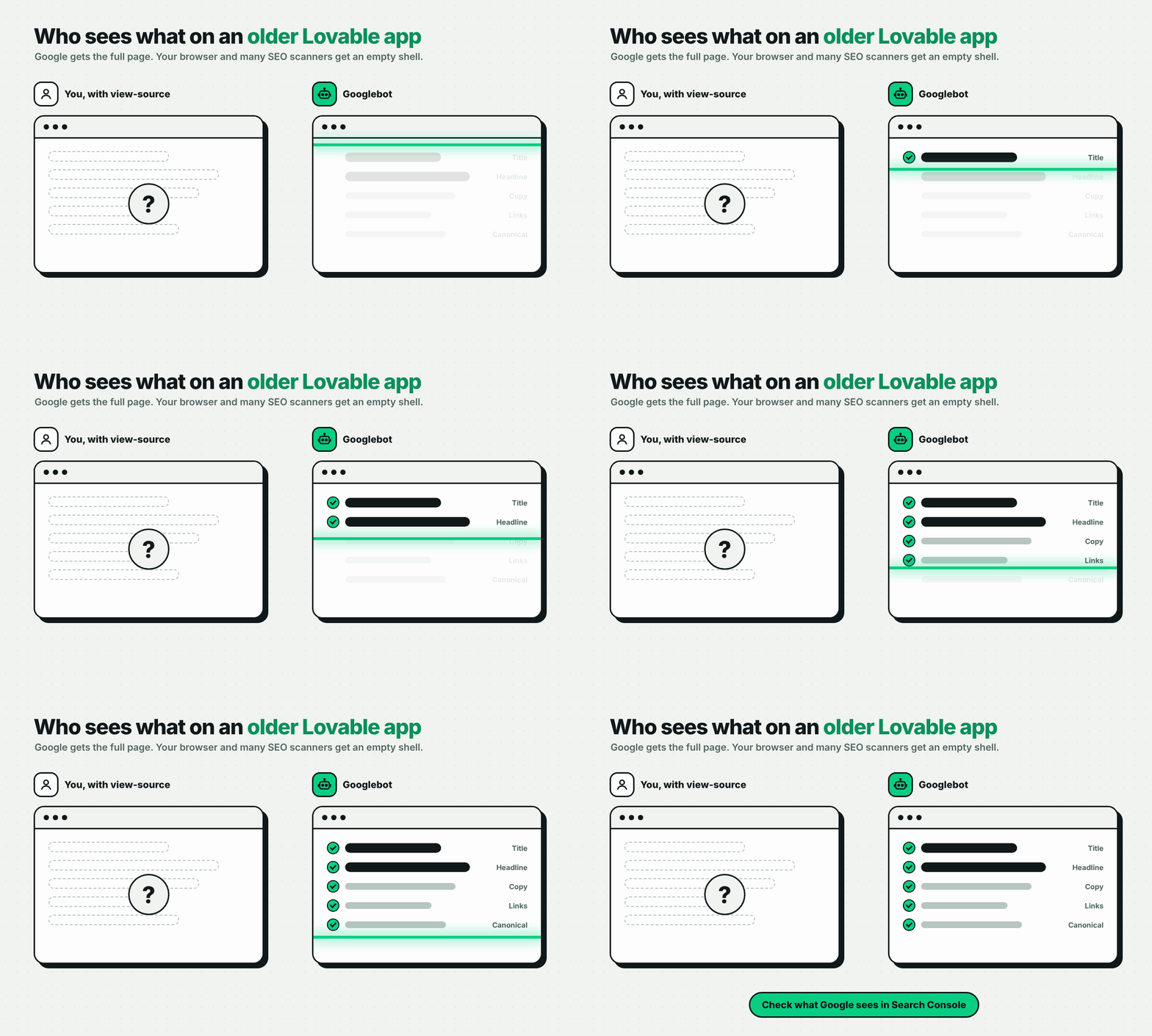
So use Google's own tool. In Search Console, open the URL Inspection tool, click Test live URL, then View tested page. If your headline and copy show up in the HTML there, Google can read the page.
Check the sitemap and robots.txt
Lovable creates a robots.txt file with every new project, but not always a sitemap. Open yoursite.com/robots.txt and yoursite.com/sitemap.xml in your browser.
If the sitemap is missing, ask Lovable to create one, then submit it in Search Console. Check that every page you want found is listed, and that robots.txt isn't blocking any of them.
Fix canonicals that point to the homepage
This is the one we'd check first. Lovable's own review lists canonical URLs that point to the homepage as a common issue. That tag tells Google every page is a copy of your homepage, so your pricing, product and use-case pages can quietly drop out of results.
Each page's canonical tag should point to that page's own URL. Check five or six key pages by hand, even if the review says you're fine.

Fix Your Page Titles and Meta Tags
Every page needs its own title, description and social preview. AI builders tend to reuse the same tags across pages, and Lovable's review lists duplicate titles across routes as a common issue.
Go through each page and check these:
- Title tag: unique, roughly 60 characters or less, with the topic first. "Pricing | Acme" beats "Acme | AI-powered platform" on every page.
- Meta description: one or two plain sentences on what the reader gets. Google may rewrite it, but a good one still helps people click.
- One H1 per page: the main headline, as real text, not inside an image.
- Open Graph tags: Lovable's docs recommend a unique og:title, og:description and og:image for each page, so links shared on LinkedIn or Slack don't all show your homepage preview.
- Internal links: link from the homepage to product, pricing and case study pages with clear anchor text, so crawlers find them and understand how they connect.
- Alt text: describe images that carry meaning, like product screenshots and diagrams.

Lovable's SEO review can fix many of these in one click. Run it, but read what it changes. A tool can make your titles unique. It can't decide what your buyers search for.
The same basics help with AI search. ChatGPT and Perplexity need to understand what each page is about before they can mention it.

Make It Look Less Like AI Built It
Replace anything a prompt would write for any company with something only your company could say. This is the part of Lovable SEO most guides skip, and it's the part B2B buyers notice first.
Search gets people to the page. What they see in the first few seconds decides if they stay. A well-known Carleton University study found that people form a visual first impression of a web page in about 50 milliseconds.
Enterprise buyers have seen a lot of AI-built sites by now. When yours looks like the default output, they assume the product is early too, even when it isn't.
Spot the AI defaults
Here's what we see most when founders send us an AI-built site:
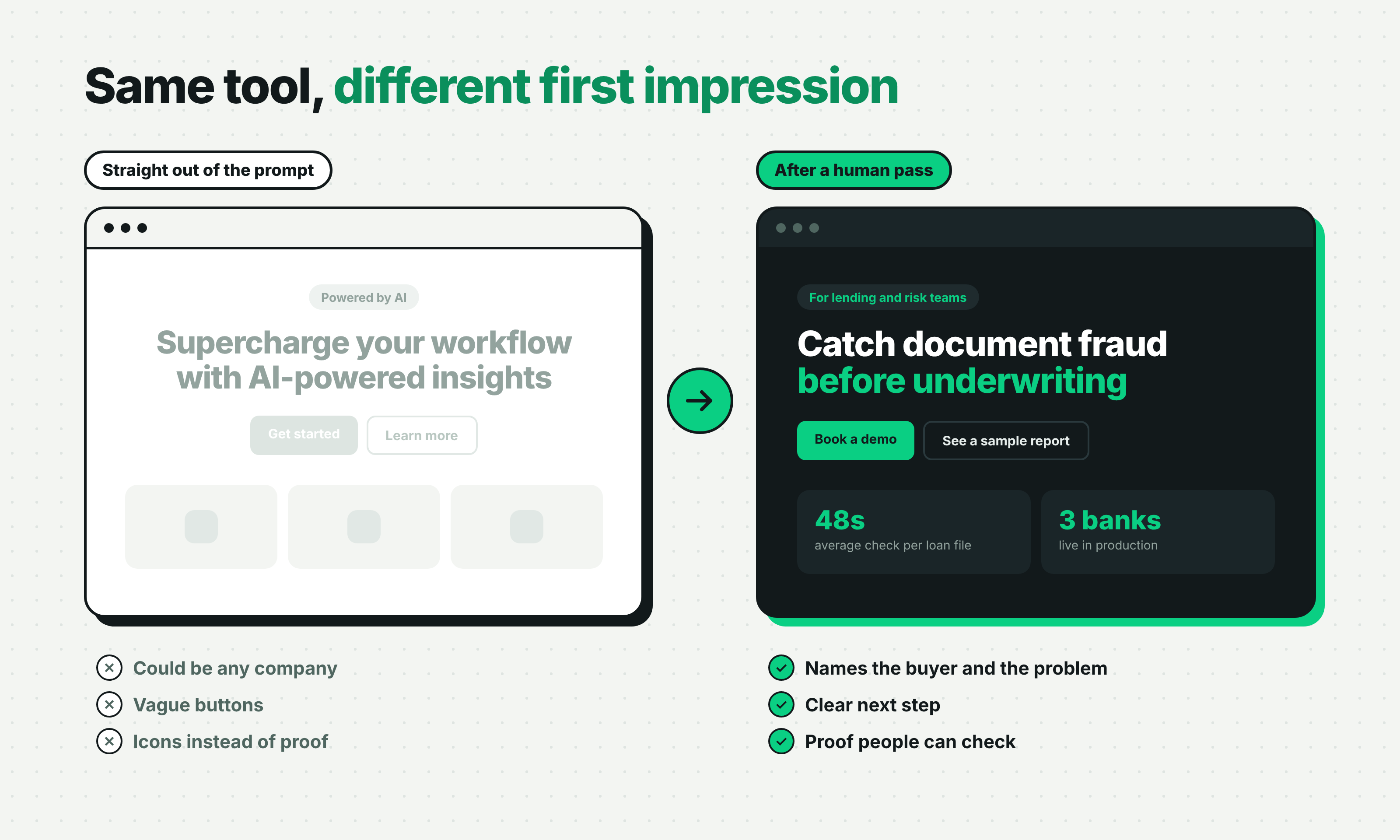
- Headlines that fit any product: "Supercharge your workflow", "Unlock the power of AI", "The all-in-one platform". If a competitor could paste your headline onto their site, it isn't doing its job.
- The same hero layout: a centered headline, two buttons, three feature cards with icons and a soft gradient behind it all.
- Testimonials nobody gave: placeholder quotes like "This changed everything for our team" with a first name and an initial. Remove them before launch. Fake proof does more damage than no proof.
- No point of view: copy that explains what the product does but never says who it's for or why it's different.
- Visuals that could be anyone's: abstract shapes and generic dashboards instead of your real product.
What to change first
You don't need to redesign everything. Start where buyers look first.
- Rewrite the hero headline: name the buyer and the problem. "Catch document fraud before underwriting" tells a lending team more in six words than any "AI-powered platform" line.
- Show the real product: real screenshots or a short product video beat abstract illustrations.
- Add proof people can check: customer logos you have permission to use, named testimonials and numbers with a source.
- Pick a voice and keep it: write the way your founders talk on a sales call, then cut every word that sounds like a brochure.
- Break the template: change at least the hero, the section order and one signature visual, so your site doesn't share a skeleton with thousands of others.
Using AI to write isn't the problem. Google says it rewards helpful content however it's produced. The problem is publishing the first draft. We cover this in more detail in is AI content bad for SEO, and if you're an AI company, our guide to AI startup website design shows how to explain a complex product simply.
What this looks like on a real project
This is most of what we do at Flowtrix. Databahn sells an AI-powered platform for security and telemetry data, which is hard to explain in one screen. We built the site around visual storytelling, with illustrations and animations that show how the product simplifies complex data flows.
After the revamp, Databahn's conversion rate rose to 35% and demo bookings went up 40%. Vipul Nanda, Head of Marketing at Databahn, put it simply: "We have seen a significant uptick on inbound leads after the Website revamp."
TripleDart needed its website to match a new AI-native go-to-market positioning. Here's how we rebuilt it:
Check Your Security
Treat security as a launch blocker, not a later task. Lovable apps often connect to a Supabase database, and the usual risk isn't the platform itself. It's access rules nobody tested.
In 2025, a researcher found 303 exposed endpoints across 170 Lovable projects that were missing proper row-level security. It was logged as CVE-2025-48757. Lovable has since added a quick security scan that runs when you open the publish dialog.
Before launch, check these five things:
- Run the deep scan: the quick scan runs on its own, but Lovable's deeper scan has to be started by you.
- Test row-level security: confirm RLS is on for every table that holds user or lead data, and that new tables get policies too.
- Keep keys out of the frontend: Lovable's docs say secrets in frontend code "should be considered compromised". Store them in Secrets and use them only in server-side code.
- Check login on the server: a login check that only runs in the browser can be bypassed.
- Clear critical findings: fix anything marked critical in the Security view before the site goes public.
Then get a developer to review it. Lovable itself says its tools can't guarantee complete security, and it recommends a professional review for apps that handle sensitive data. This list isn't a full audit. It's the minimum before real users arrive.
Check Your Page Speed
Test your key pages on mobile in PageSpeed Insights before launch, because Lovable's SEO review no longer checks speed for you.
The usual problems on AI-built sites are the same ones we see everywhere: heavy hero images, animation libraries loading on every page, and chat or form scripts that slow down clicks. Our guide on how to improve Core Web Vitals on a B2B SaaS website walks through each fix.
Keep in mind that Core Web Vitals use 28 days of real visitor data, so a brand-new site won't have any at first. Use the lab score to catch big problems, then watch the real numbers once traffic comes in.
Free website audit
Is your Lovable site ready to launch?
Get a scored breakdown of your positioning, proof, conversion paths and technical health. Results in about a minute.
85/100
Overall score
Set Up Tracking
Connect GA4, Search Console and your CRM before you send anyone to the site. Launch-week traffic is the easiest to explain later, and the hardest to get back if you weren't tracking it.
- Search Console: Lovable can verify your site with a verification tag and submit your sitemap from the chat.
- GA4: add it to every page, and mark form submissions and demo bookings as key events.
- Forms to CRM: send a test lead from every form and check it lands in HubSpot, Salesforce or wherever your sales team works. A form can look right and still send data nowhere.
- AI search traffic: visits from ChatGPT, Perplexity and Claude are easy to miss unless you set GA4 up for them. Our guide on tracking AI search traffic in GA4 shows how.
Add a Blog
Lovable is a great builder, but it isn't a content system. If your plan includes a blog, guides or case studies, decide where that content will live before you launch.
You can prompt Lovable to make blog pages, but then every new post goes through a prompt or a developer. That works for three posts. It doesn't work for a team that wants to publish every week.
A headless CMS solves this. Your writers publish in the CMS, and your Lovable site pulls the content in. BetterCMS is built for exactly this. It connects with Lovable, is headless by default and serves content over an API. It has a Blog page type, a content calendar with scheduled publishing, meta title and description fields, and clean markdown for answer engines.
We're a BetterCMS partner, so we've seen this setup up close. Whatever you choose, give each post its own URL, title and meta description, and make sure new posts get added to your sitemap automatically.
Your Launch Checklist
Go through this the week before launch, and again on the day you go live. It puts the See, Shape and Secure passes in one place.
Lovable Website Launch Checklist
- Rendering tested with Search Console URL Inspection on every key page
- Sitemap live, complete and submitted, with robots.txt not blocking key pages
- Canonical tags pointing to each page's own URL
- Titles, meta and OG images unique on every page
- Hero and copy rewritten to name your buyer, with no placeholder testimonials
- Security deep scan run, RLS tested, no keys in frontend code and a developer review done
- Page speed checked on mobile for the homepage, pricing and demo pages
- Tracking GA4, Search Console and forms-to-CRM tested with a real submission
Run Lovable's SEO review one last time after your final changes. Remember, it won't rerun on its own when you publish.
Should You Rebuild Instead?
Usually not at launch. Rebuild when the site has to do more than Lovable was built for. A Lovable site is a fine way to launch, test your messaging and raise a round. The signs you've outgrown it tend to show up later:
- Marketing waits on prompts: every new page or edit goes through a developer or a chat window.
- You're selling to enterprise: buyers expect a site that looks established, with security pages, case studies and proof that holds up in procurement.
- Your content is growing: dozens of posts, case studies, landing pages or languages need a real CMS and clear ownership.
- Many people touch the site: design, marketing and product all need to ship without breaking each other's work.
When that happens, rebuild on a proper stack, not just a different tool. That could be Webflow, Framer, Sanity, BetterCMS, or a Next.js or Astro front end with a headless CMS. The right choice depends on your team, your content and your integrations.
Plan the move like any migration. Keep your URLs or redirect them, carry over titles and meta tags, and test indexing after launch. When we rebuilt ZingHR's website, that meant 22+ pages in 4 weeks, with a full SEO migration and Core Web Vitals work across every template.
AI got you to a working site faster than ever. The work that's left is the human part: making it easy to find, easy to trust and clearly yours.
That's what we do at Flowtrix. We've worked with 100+ B2B, SaaS and AI companies on websites, branding and search visibility, and we'll tell you honestly whether your Lovable site needs a cleanup or a rebuild.
Flowtrix has worked with 100+ B2B, SaaS and AI companies. Here are a few recent projects.

22+ pages rebuilt in 4 weeks for a global HRMS, with a full SEO migration and Core Web Vitals work across every template.

8+ pages in 4 weeks, rebuilt around a new AI-native go-to-market positioning, with content updates 10x faster.


20+ pages in 5 weeks, with content updates 10x faster and an increase in conversions.
FAQ's
Short answers to what founders ask us most about Lovable SEO.