



Use to summarize this article


- Sanity suits marketing-led teams: Choose it when marketers edit weekly and you want flexible, structured content with live visual editing. Budget for the Studio build, not just the seats.
- Payload suits developer-led teams: It lives inside your Next.js codebase with no per-seat fees and full data ownership, but you self-host and own upgrades, backups and security.
- Contentful suits large organisations: It earns its price with governance, many locales and an established vendor, but it has the highest cost and the hardest exit.
- Cost is more than licences: Estimate build cost, annual running cost and the cost of changing your mind over 24 months before you decide.
- You may not need headless at all: A typical Seed to Series B SaaS site with a small blog is often better served by a visual builder like Framer or Webflow.
Sanity is a good choice if marketers will edit your site every week and you want flexible, structured content with live visual editing. Choose Payload if you have in-house Next.js developers and want the CMS inside your own codebase, with no per-seat fees and full data ownership. Contentful should be suitable if you are a larger organisation that needs governance, many locales and an established enterprise vendor, and you can pay for it.
Nobody picks a CMS because they love content modelling. They pick one because last quarter's pricing page update took 9 days, three Slack threads and a developer who was supposed to be shipping the product.
We build B2B SaaS marketing sites, so we see these platforms perform after launch. Here we compare Sanity vs Payload vs Contentful: their real costs, the editing experience, SEO and AI-search implications, and post launch considerations.
Sanity vs Payload vs Contentful at a glance
Here’s a brief comparison of the three headless CMS before we discuss their differences in detail.
Sanity: Strengths and possible drawbacks
Sanity's editing interface, called the Studio, is an open-source React application that your developers configure. That sounds like a technical detail, but it is the reason marketers tend to like it.
A well-built Studio uses your team's vocabulary, mirrors the structure of the real site, and pairs with live visual editing so an editor can click a headline in a preview and change it.
Real-time collaboration means two people can work on the same document without overwriting each other.
Pricing
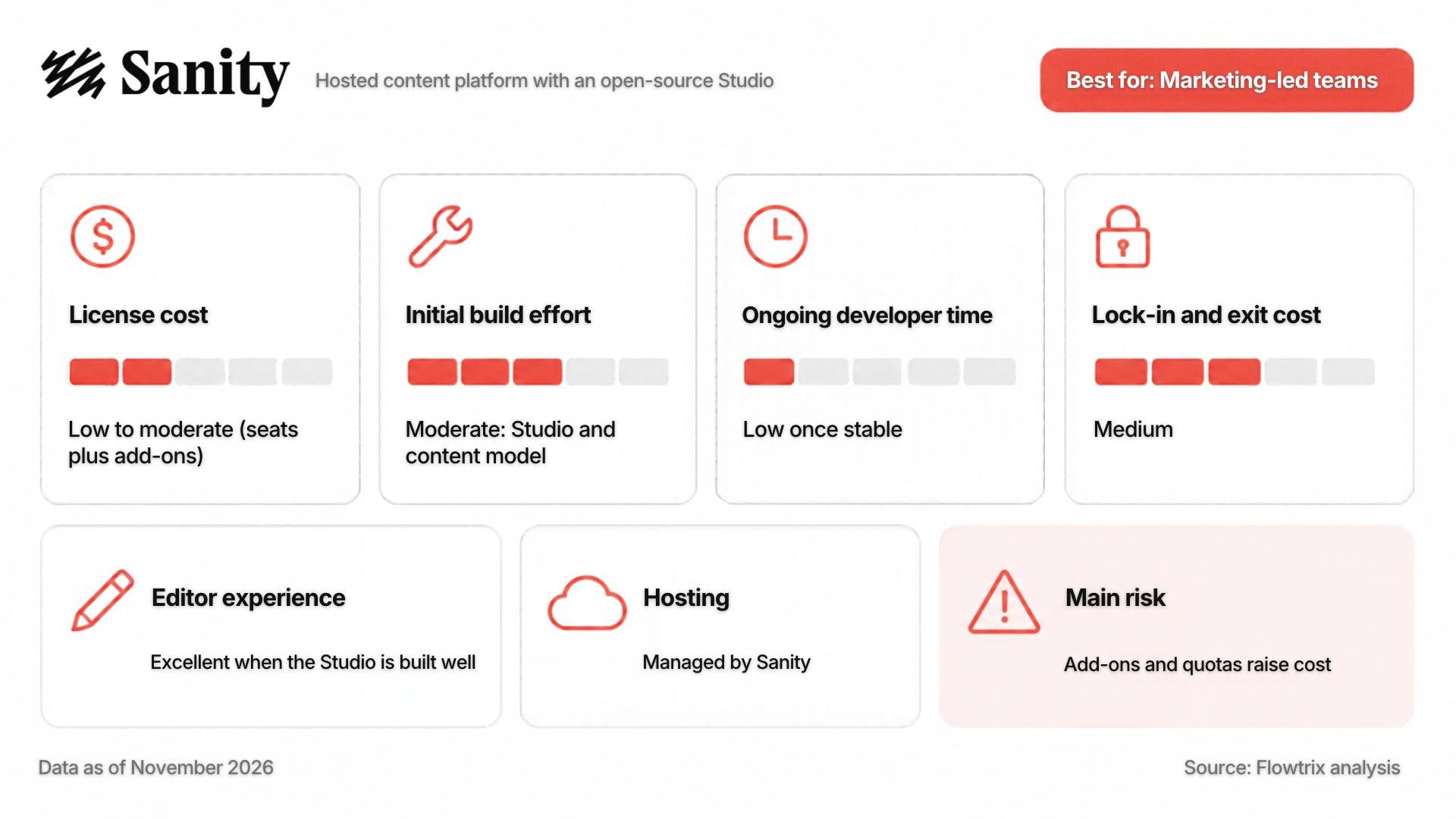
The pricing is friendly at a small scale.
- As of November 2026, the Free plan covers up to 20 seats, 10,000 documents and two public datasets
- The Growth plan costs $15 per seat per month, allows up to 50 seats, raises the document quota to 25,000 and adds private datasets
- Viewer roles are free, so only editors, developers and admins use a billable seat
- A 12-person content team on Growth comes to roughly $180 a month
Possible drawbacks
Here are a few downsides you may face:
- The per-seat figure is not the whole bill. Add-ons for extra document quota, additional datasets and dedicated support are priced separately and can add up quickly.
- SSO is generally an Enterprise-tier feature, which matters if your security review requires it
- Sanity's query language, GROQ, is powerful but unfamiliar to developers who only know REST or GraphQL
- And because the Studio is configurable, a rushed one gives editors a poor experience
The tool does not guarantee quality; the implementation does.
Flowtrix’s opinion: For a B2B SaaS marketing team that edits often and has a developer or agency to set up the Studio properly, Sanity is usually the safest default. Budget for the build, not the seats.
Payload: Strengths and possible drawbacks
Payload is open source and TypeScript-native, and it is built on Next.js, so the CMS can live in the same project as your website. It supports Postgres and MongoDB and can be self-hosted anywhere that runs Node.
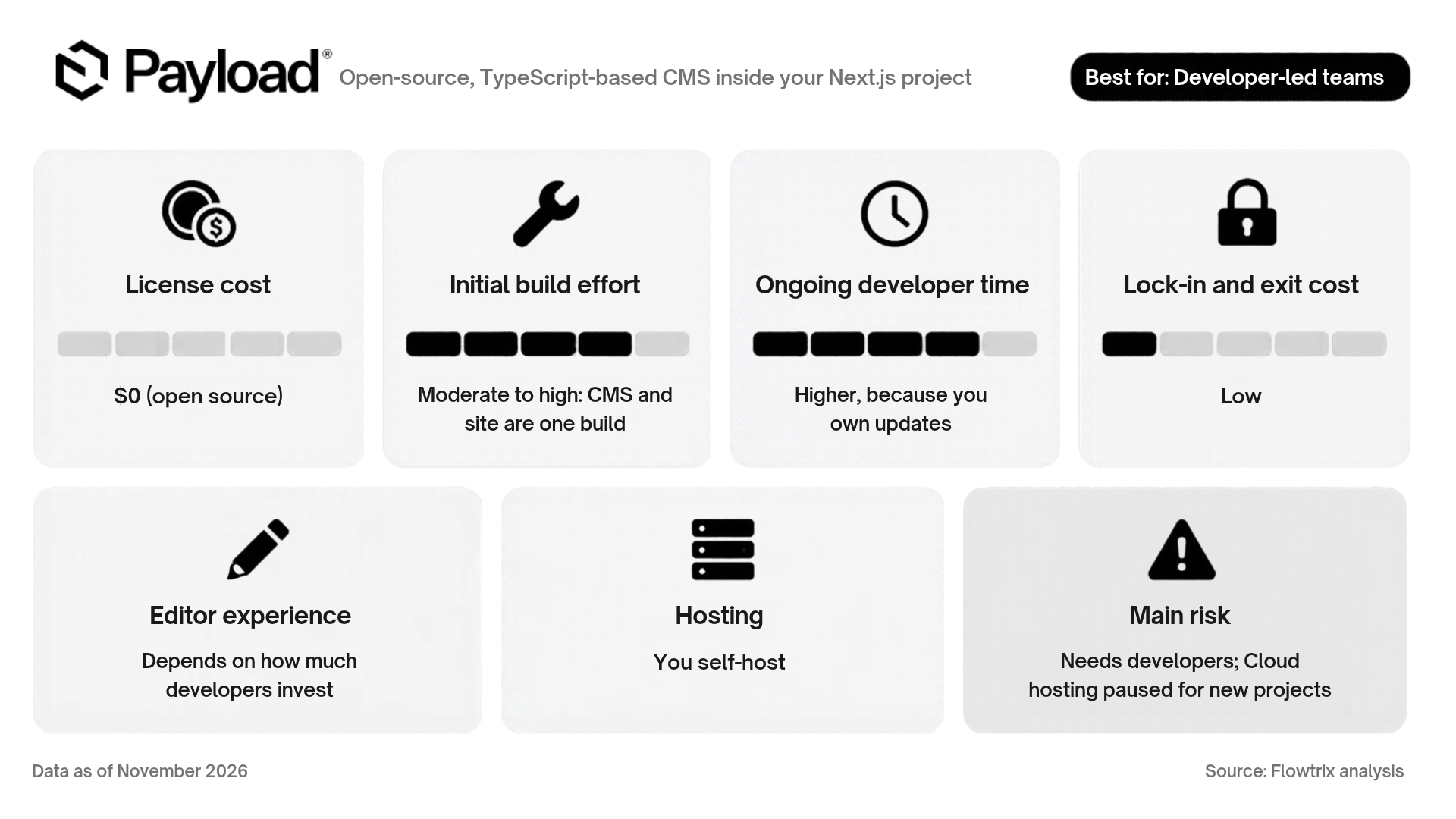
There are no per-seat fees and no API quotas to watch, and your content sits in your own database, which makes it the easiest of the three to leave.
Figma acquired Payload in 2025, with the stated logic of connecting design and production workflows.
Possible drawbacks
- New Payload Cloud deployments have been paused since the acquisition, while existing Cloud projects keep running. For a new project, self-hosting is the practical route, and that needs someone comfortable running a Node application and a database, including backups, upgrades and security patches.
- The editing experience is a developer deliverable. Payload's admin panel is capable out of the box, but marketers get a great experience only if developers configure clear field labels, reusable page blocks, live preview and sensible permissions. If engineering plans to build it once and move on, expect friction.
- The ecosystem is smaller than Contentful's, with fewer ready-made integrations.
Flowtrix’s opinion: Payload is the strongest option when the website is closely tied to your product, for example gated content, dynamic pricing or heavy personalization, and your developers want one codebase. However, it may not be the best choice if your marketing team is supposed to manage everything.
Contentful: Strengths and possible drawbacks
Contentful is the mature option. The interface is conventional, roles and workflows are well defined, and procurement and security teams already know the vendor. For organizations with many markets, many editors and compliance requirements, it is the lowest-risk choice for governance and support.
Pricing
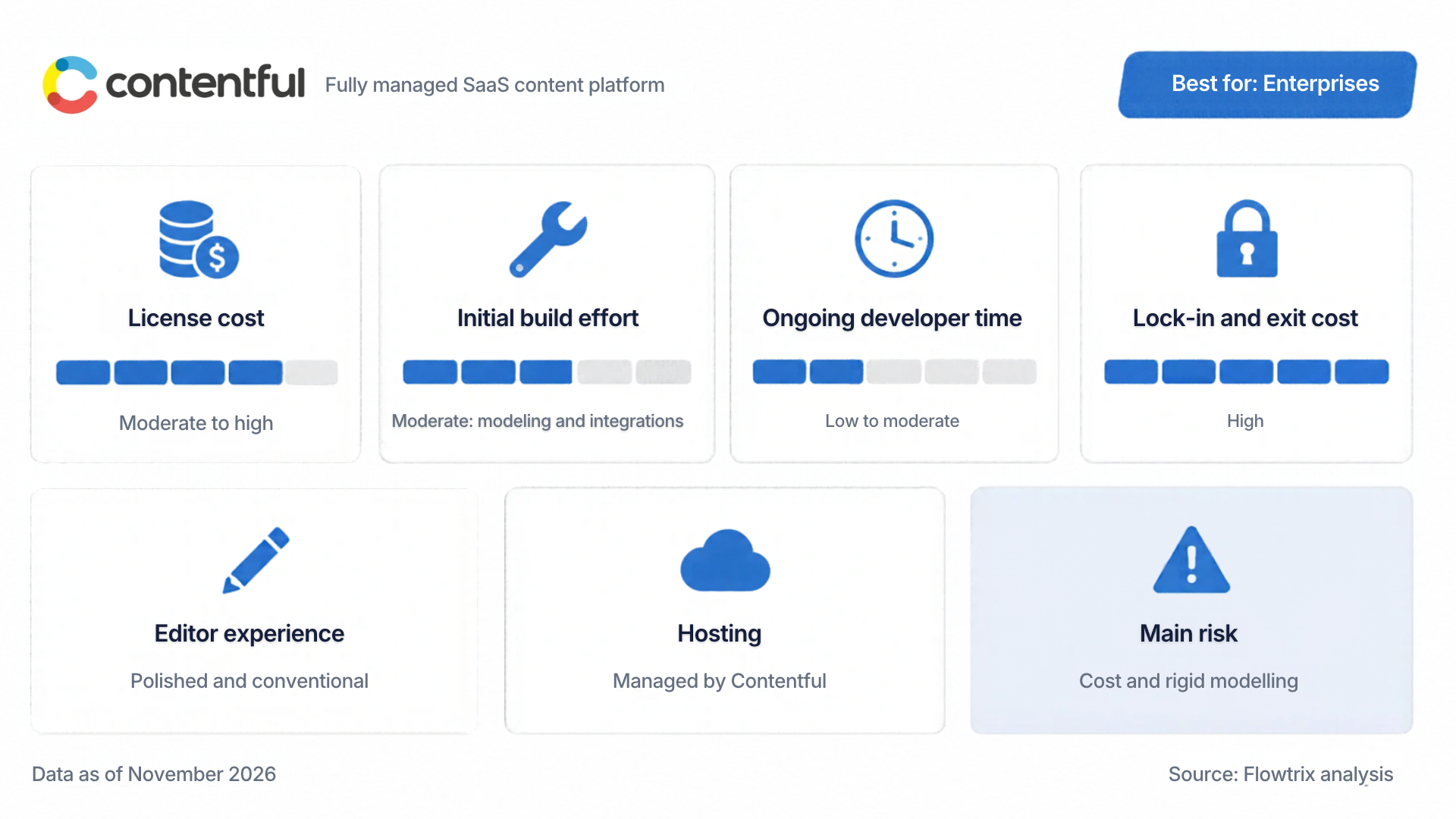
- The Free plan is built for learning: one starter space, two roles and two locales
- The Lite plan, aimed at smaller businesses running a single project, was listed at around €300 a month in October 2026 and includes limits such as 20 users, 3 roles, 3 locales and 1 million API calls a month.
Possible drawbacks
- Beyond Lite you are in quote territory that may range up to a few thousands of dollars
- Locales are a quiet constraint. Sites that need ten or more languages are pushed to a higher tier.
- Content modelling is also more rigid than in Sanity, which suits governance and frustrates a marketing team that wants to edit a page type on a Friday.
Flowtrix’s opinion: Contentful earns its price when you have many locales, many teams and a security and compliance process that expects an established vendor. For a 40-person SaaS company with a 30-page site, it is usually more platform than you need.

Sanity vs Payload vs Contentful: Cost comparison
The cost differences between Sanity, Payload, and Contentful are shown in the table below based on various aspects involved.
When deciding between the 3 CMS, a better exercise is to estimate three numbers over 24 months: build cost, annual running cost, and the cost of changing your mind.
Sanity vs Payload vs Contentful: SEO and AI-search readiness
Sanity, Payload, or Contentful, no CMS makes you rank. What it controls is how easily your team does the things that matter, and how consistently.
For classic SEO, look for:
- Editable title tags, meta descriptions, canonical URLs and Open Graph fields on every page type, with sensible defaults
- Redirect management that does not need a deployment
- Stable, clean URLs and an automatically updated sitemap
- Structured-data fields for FAQ, Article, Organization and Product, so schema is not hand-coded per page
- Fast rendered output. Speed comes mostly from your front-end framework and hosting, not the CMS
For visibility in Google AI Overviews, ChatGPT, Gemini, Claude and Perplexity, look for:
- Modular content: Definitions, answer blocks, comparison tables and FAQs stored as discrete fields are easier to reuse and easier for machines to parse
- Visible authorship and freshness: Author, reviewer and last-updated dates should be required fields, not afterthoughts
- Consistency: When every comparison page follows the same structure, your content becomes easier for AI systems to read and trust
Sanity's flexible modelling and Contentful's strict modelling both support this well when set up with intent. Payload supports it too, with the advantage that schema logic can sit beside your front-end code. In practice the CMS is rarely the bottleneck. A rushed, unplanned content model is.
Wayground is an AI-powered, teacher-first platform serving a large education audience. We led its Webflow development, and engagement increased 2.5x. If your site is mostly marketing content, even enterprise-stage companies can sometimes avoid a heavier CMS. Where governance, many locales and formal procurement rules dominate, use the Contentful or Sanity Enterprise CMS.
Sanity vs Payload vs Contentful: Lock-in and exit flexibility
Vendors rarely put out the guide to leave when shortlisting a CMS as the best option. But it’s something important you need to know before committing to one.
- Payload is the easiest to exit. Your content is in your own database and the code is yours.
- Sanity sits in the middle. Content can be exported, but queries written in GROQ and a custom Studio have to be rebuilt in a migration.
- Contentful is the hardest to leave, because models, locales, workflows and integrations are platform-specific, and exports rarely map cleanly onto another system.
Lock-in is acceptable when it buys something. Contentful buys governance and support. Sanity buys editing quality. Payload's buy freedom at the cost of responsibility. The risk is lock-in you did not choose.
Platform ownership is part of this too. Payload's move to Figma is one example of a CMS changing hands. When you evaluate any tool, ask what happens to your site if the vendor's priorities change.
Sanity vs Payload vs Contentful: How to check editing experience?
When comparing the three headless CMS options for your website, you should be sure that the choice you make supports your content/marketing team.
Here’s what to ask your vendor for each (Sanity, Payload, and Contentful):
- Can a marketer assemble a new landing page from existing blocks without a developer? This depends on how the page-builder components were modelled far more than on the CMS you picked.
- Is preview instant and accurate? If editors cannot see the page as it will appear, trust in the tool fades within weeks.
- Can two people work on the same page safely? Check how each tool handles simultaneous editing in your actual setup.
- Can editors schedule and roll back? A 9am launch should not need anyone online at 9am.
- What happens when the team needs something the model does not allow? If the answer is "raise a ticket," you have rebuilt the old bottleneck with a newer logo.
If none of these three CMS options meet your requirements, you can check other best headless CMS choices available.
Amazon Signage needed a site that six very different audiences (K-12, healthcare, retail and more) could understand quickly, and one its own team could extend without waiting on developers. We built 20+ pages in Webflow with CMS-driven industry pages, blog, customer stories and partner listings, plus localized content for global markets. Content updates became 10x faster, and the team can now build and edit without relying on designers.
Read the full Amazon Signage case study →
Do you even need a headless CMS?
The most important question even before this comparison: Is headless CMS the right choice for you?
A headless CMS stores content and serves it through an API. Your website, built separately in a framework such as Next.js or Astro, fetches that content and renders it.
That means you are making three decisions at once:
- A content model: how pages, case studies, pricing tiers, testimonials and FAQs are structured.
- An editing environment: what your marketers see when they log in on Tuesday with a launch on Thursday.
- A working relationship with your developers: who has to be involved when something changes.
A headless CMS pays off when you have a lot of structured content, multiple sites or channels, complex localisation, or developers who want a code-first workflow.
For a typical Seed to Series B SaaS marketing site, with a home page, product pages, pricing, 20 to 40 blog posts and a handful of case studies, the extra moving parts often cost more than they return.
For that profile, a visual builder with a built-in CMS is frequently the better answer. Framer and Webflow let designers and marketers publish and edit pages visually, with CMS collections for blogs, case studies and landing pages, and no separate hosting, API or preview environment to manage.
Lyric’s supply chain platform is complex, but its marketing site didn’t need a complex stack. We designed and built a 10+ page, enterprise-grade Webflow site in 4 weeks, with no separate hosting, API or preview environment to manage.
Choose your development partner wisely
Whether you choose Sanity, Payload, Contentful or any other headless CMS, the tool matters less than the team that models your content and builds the editing experience. When evaluating an agency, look for:
- Shipped work on the stack you are considering, and willingness to discuss what went wrong on those projects
- A content-modelling process, not only a design process
- Honest opinions about when not to go headless
- Handover quality: Documentation, training and a plan for your marketing team to work independently
- B2B SaaS context: Pricing pages, security pages, integration directories and comparison pages follow patterns that generalist studios often miss
Here are a few quick links to help you find the right agency:
- Top 10 Headless CMS Agencies in the USA (2026)
- Top 5 Headless CMS Agencies in the Middle East (2026)
How to choose between Sanity, Payload, and Contentful: Scenario-based guide
Here are five different scenarios and the best CMS choices for each one of them:
- Series A SaaS, three-person marketing team, one front-end developer: Sanity. Marketing gets a proper editing environment, the developer is not a bottleneck, and seat costs stay small. Invest in the Studio build. If you are planning your site for this stage, our breakdown of what changes on a SaaS website after Series A funding is a useful companion.
- Product-led startup with a strong Next.js team and gated or dynamic content: Payload. One codebase, no seat fees, and content and application logic live together. Plan hosting and ownership from day one.
- Late-stage SaaS with several regional sites and a security review: Contentful, or Sanity Enterprise. Governance, locales and vendor support can justify the price. Get written quotes for both before deciding.
- Bootstrapped company with a 25-page site and a weekly blog: None of the three. Use a visual builder with a CMS and put the saved budget into content and design.
- Agency or consultancy running several client sites: Sanity or Payload, depending on whether you want a managed platform or full control. Standardize a starter and a content model you can reuse.
Make the best choice with Flowtrix
The best CMS is the one your editors will still be happy with in month six and your finance team can price across 24 months. Feature checklists matter far less than those two tests.
Before you commit to one CMS consider your actual requirements and weigh what the CMS actually offer.
If you would like a second opinion on your shortlist, we will look at your content, team and constraints and tell you honestly if the answer is none of the above. Get a CMS recommendation for your site →