

Use to summarize this article


- Different tools: WordPress is a full CMS. Astro is a framework that builds plain, ready-made pages and needs a separate CMS for editing.
- Editing: WordPress wins. Anyone can change anything in minutes, which is also why pages drift over time.
- Speed: About 67% of Astro sites pass Google's page speed test, against about 49% of WordPress sites (HTTP Archive, 2026).
- Security: 91% of new WordPress bugs in 2025 were in plugins, and the median time to the first attack was 5 hours.
- The pick: WordPress for many daily publishers. Astro plus a headless CMS if a developer or partner owns the site.
For most B2B marketing sites, Astro is faster and safer out of the box, while WordPress is easier for marketers to edit. If lots of people publish every day without a developer, WordPress is the safer bet. If a developer or partner looks after the site and your buyers care about speed and security, Astro with a headless CMS is usually the better fit.
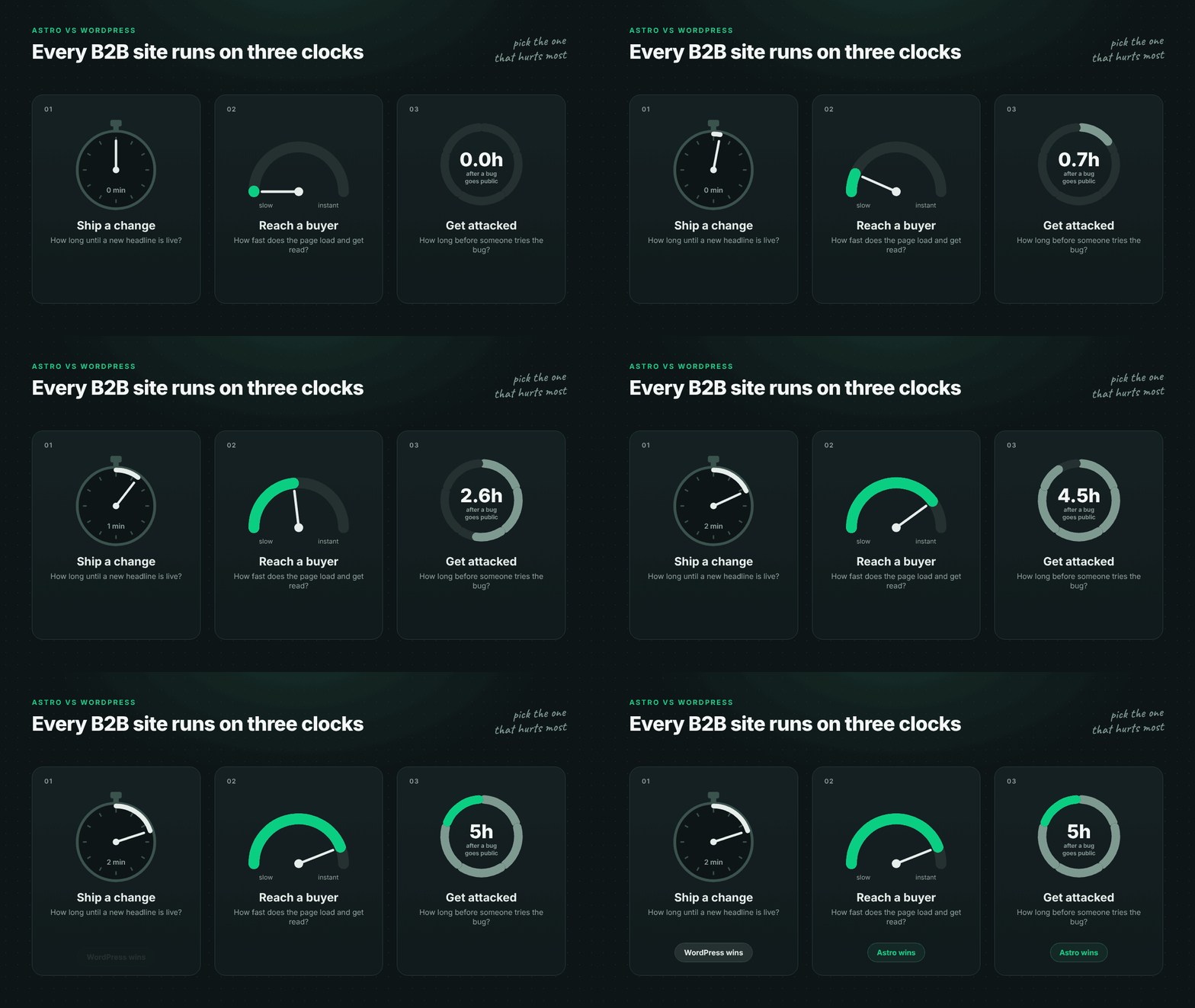
Most comparisons stop at a feature list. In practice, a B2B website has to get three things right: how quickly your team can update it, how fast pages load for buyers, and how safe it stays when a plugin bug goes public.
WordPress and Astro are good at different things. Work out which of the three is hurting you most, and the answer gets a lot clearer.
If you're still working out what your site needs to do for buyers, our guide to B2B web design in 2026 is a good place to start.
First, they're not the same kind of tool
WordPress is a content management system. You get a dashboard, a block editor, user roles, a media library and a plugin for almost anything. According to W3Techs, it runs about 39.5% of all websites.
Astro is a framework for building websites. It turns your pages into plain HTML ahead of time, so the browser has very little extra code to load. Astro's own docs are clear that it isn't a CMS, so your content lives in files or in a headless CMS, which is simply a separate editor that feeds content into the site.
So this isn't really CMS versus CMS. It's an all-in-one tool versus a fast engine that needs an editor added on.
Astro also has bigger backing now. Cloudflare bought Astro in January 2026 and promised to keep it open source, and the same announcement lists Webflow and Wix among the platforms built on it.
| What matters | WordPress | Astro + headless CMS |
|---|---|---|
| What it is | All-in-one CMS with editor, themes and plugins | Framework that builds ready-made pages, paired with a separate CMS |
| Editing | Built in. Anyone can change copy and layout | Through the CMS. Copy is easy to change, layouts are locked |
| Speed | Depends on hosting, caching and how many plugins you run | Fast by default. Pages are ready before anyone visits |
| Security | Public login, database and many third-party plugins to keep updated | No public login and far fewer moving parts |
| AI search | Fine if key content isn't loaded by scripts | Readable by AI tools by default |
| Best fit | Many daily publishers, stores, memberships | Teams with a developer or partner who care about speed and security |
Which one is easier for your team to update?
Say your product marketer wants to fix a headline before tomorrow's launch email. On WordPress, that takes a couple of minutes: log in, edit, publish.
Drafts, scheduling, roles and revisions are all built in. For a team that publishes several times a week, that's a big reason to stay, and it's why so many marketing teams won't give WordPress up.
The downside shows up slowly. When everyone can change everything, pages start to drift. One landing page gets a new button style, a case study uses a different heading size, and someone installs a page builder to fix one layout. A couple of years later, the site looks like six agencies built it.
On Astro, nothing goes live without a developer unless you connect a headless CMS. Once you do, marketers get a proper editor for headlines, copy, images and new pages, while developers decide which blocks they can use. Content stays easy to change, and the design stays consistent.
Put simply, WordPress makes every change easy. Astro makes content changes easy and design changes deliberate.
If you're choosing an editor for an Astro build, Sanity, Storyblok and BetterCMS are all common picks. Our list of the top Sanity agencies can help you compare partners.
Which one loads faster for buyers?
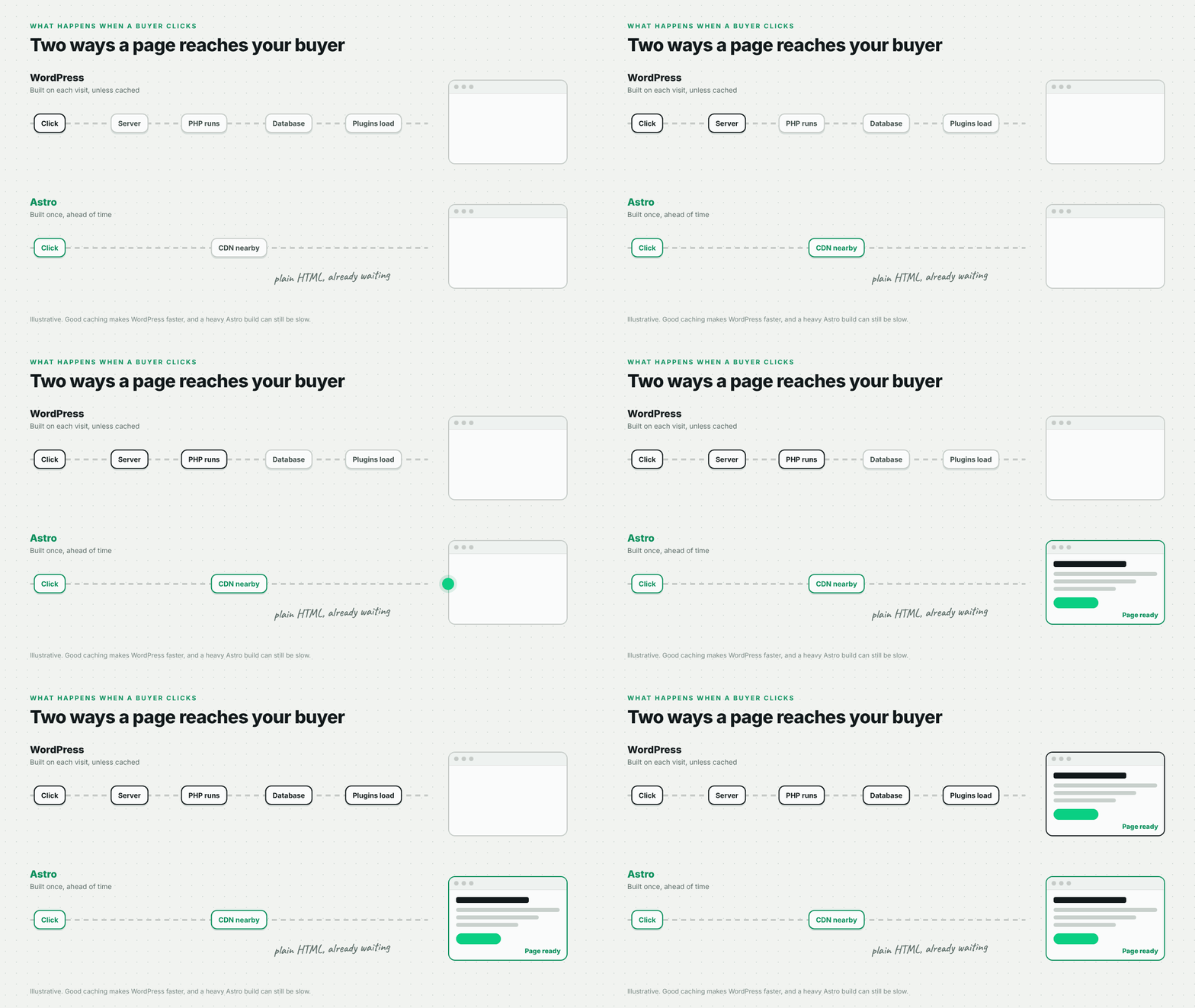
When someone opens a WordPress page, the server usually builds it on the spot. WordPress pulls the content from its database and loads every plugin before the page is sent. Good hosting and caching skip most of that work, but without them every visit repeats it.
An Astro page already exists before anyone asks for it. It's a finished file, stored on servers close to the visitor, so there's nothing to build when they click.
You can see the gap across the web. HTTP Archive data, reported by Search Engine Journal in May 2026, shows about 67% of Astro sites pass Core Web Vitals, Google's page experience test, compared with about 49% of WordPress sites.
That figure compares all Astro sites with all WordPress sites, not the same site built twice. A well-built WordPress site can pass and a sloppy Astro site can fail. What the gap shows is where each one starts: Astro starts light, and WordPress gets heavier with every theme and plugin.
Can ChatGPT actually read your site?
Buyers now ask ChatGPT, Perplexity and Claude for vendor shortlists, so it matters whether these tools can read your pages. A 2024 study by Vercel and MERJ found that none of the major AI crawlers run JavaScript, including the bots from OpenAI, Anthropic and Perplexity. The exceptions were Google's Gemini and Apple's crawler.
In plain terms, these tools only see what's in the page when it first loads. If your pricing table or feature list only shows up after a script runs, they simply don't see it.
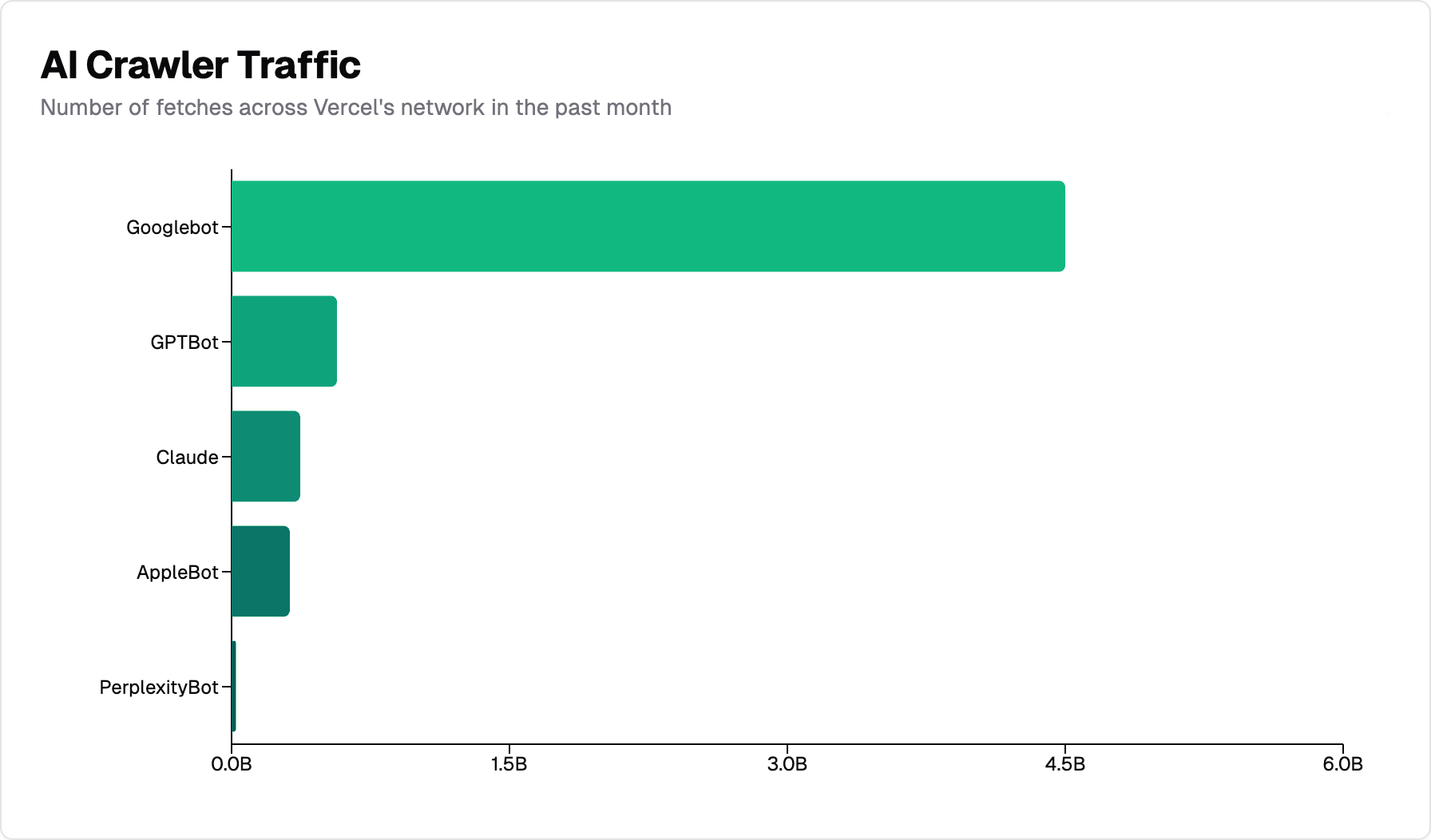
Astro sends finished pages by default, so this is mostly handled for you. WordPress can do the same as long as your theme and plugins don't load key content with scripts, so it's worth checking either way.
Being readable won't get you cited on its own. Clear answers, real data and mentions across the web still matter most, but a page AI tools can't read is a page they can't quote.

Which one is safer?
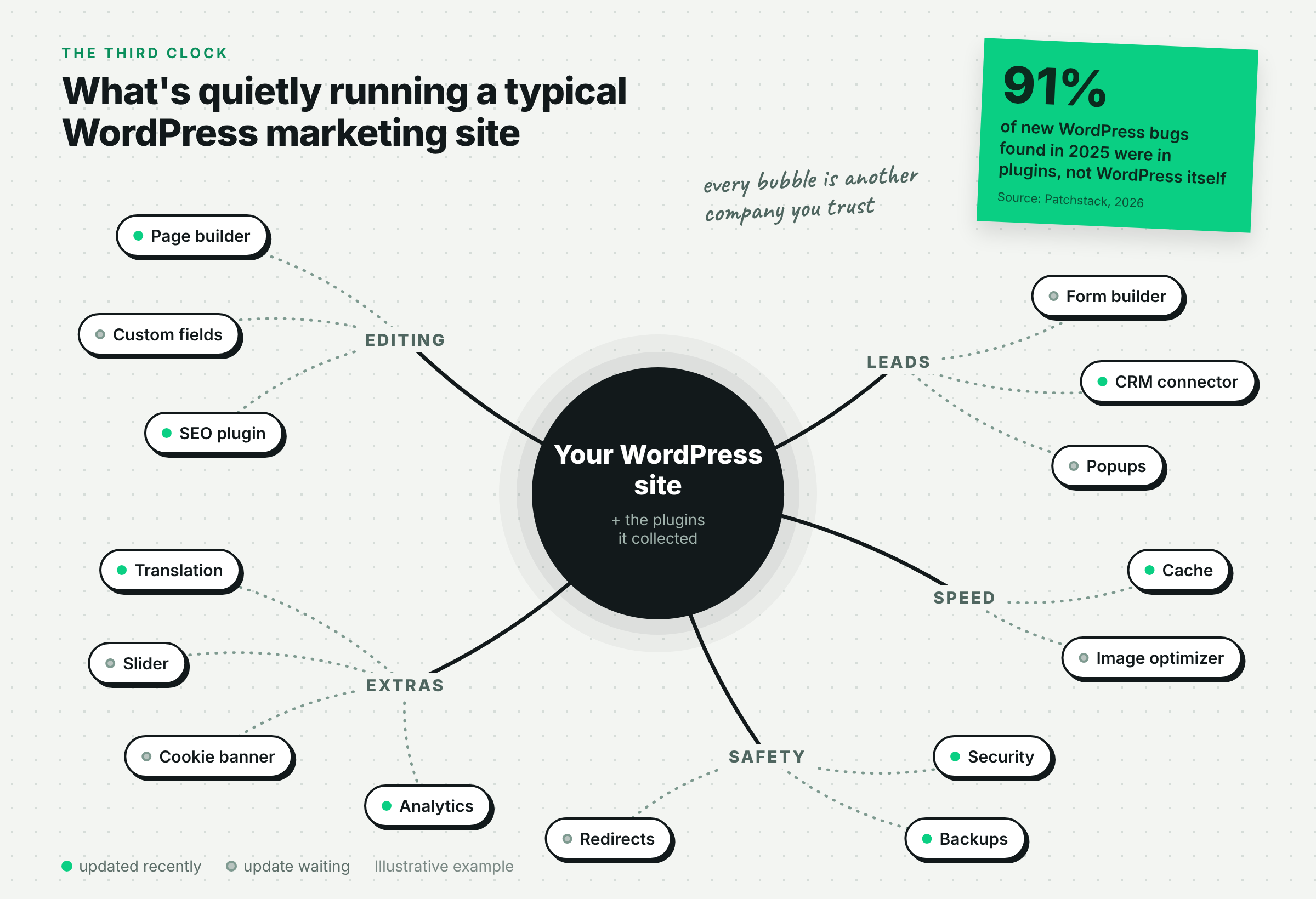
This is the question B2B teams should worry about most. Patchstack's State of WordPress Security in 2026 counted 11,334 new vulnerabilities in the WordPress ecosystem in 2025, up 42% on the year before. Only 6 were in WordPress itself, and 91% were in plugins.
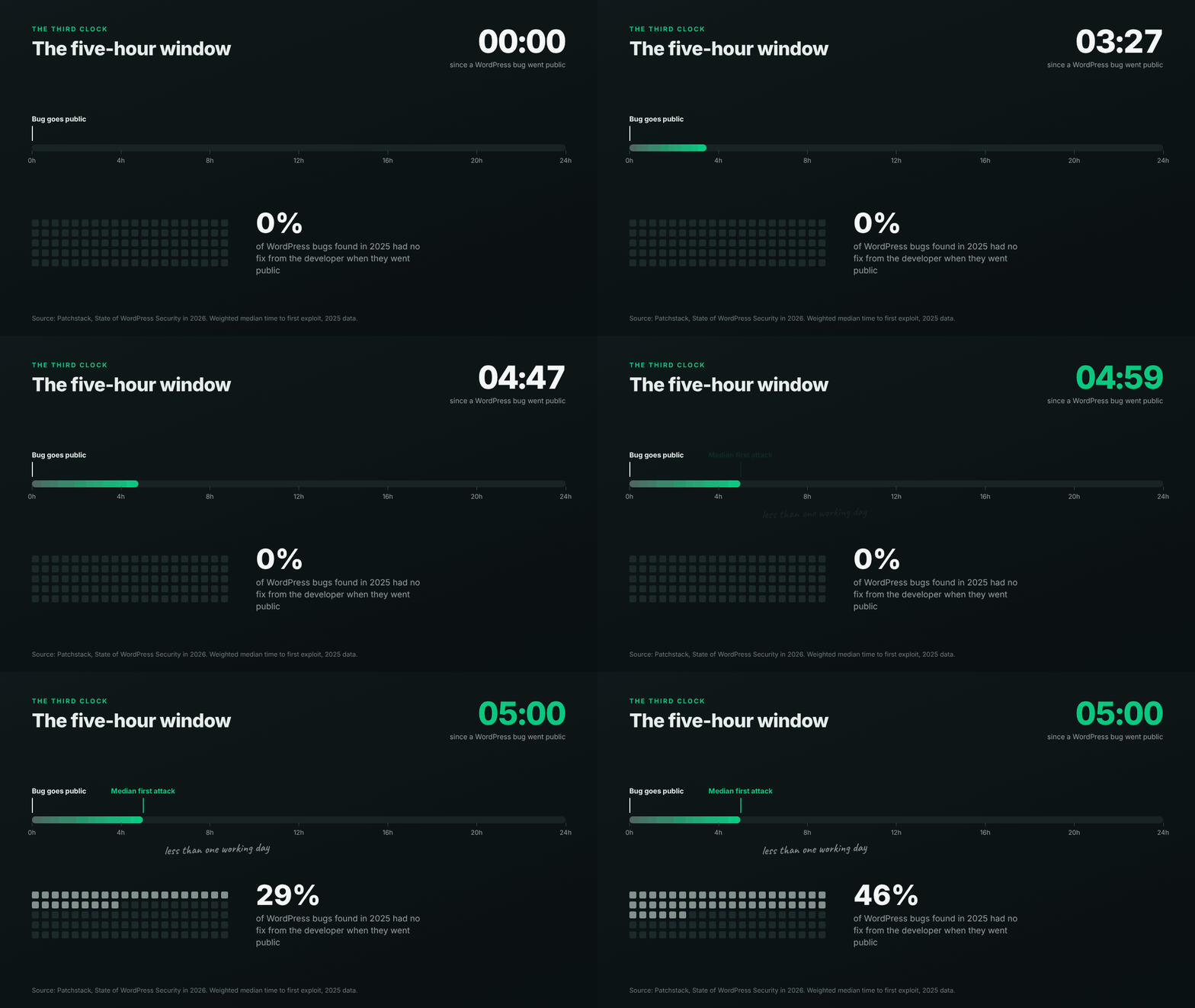
Two other numbers from the report stand out. 46% of those vulnerabilities had no fix from the developer when they went public, and the median time from going public to the first attack was just 5 hours.
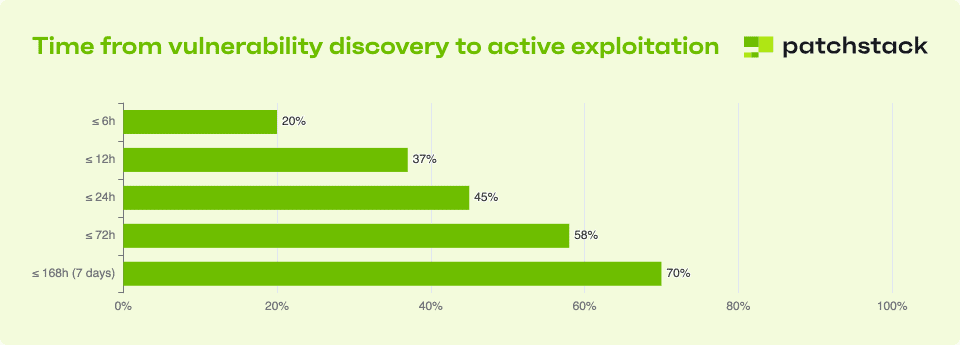
That's less than a working day between a bug being announced and someone trying it on your site. And for nearly half of those bugs, there was no patch to install yet.
So WordPress itself isn't really the problem. The risk sits in the plugins a marketing site picks up over the years, each one from a separate company with its own update schedule.
For B2B companies, this tends to come up during security reviews. When an enterprise buyer's IT team checks your setup, an outdated plugin or a public login page is an easy thing to flag.
An Astro site gives them much less to look at. Visitors only see finished pages, with no login page to attack and no database behind each page. You still need to look after your CMS, forms and scripts, but the list is much shorter.
If you sell to enterprises, our guide to the WCAG failures procurement teams check covers the other half of that review.
Can you use both?
Yes, and plenty of teams do. They don't want to lose the editor they know, but they're tired of paying for a slow, risky website.
So they split the two. WordPress stays in the kitchen, where marketers write and edit, and Astro runs the dining room, the fast public site buyers actually see.
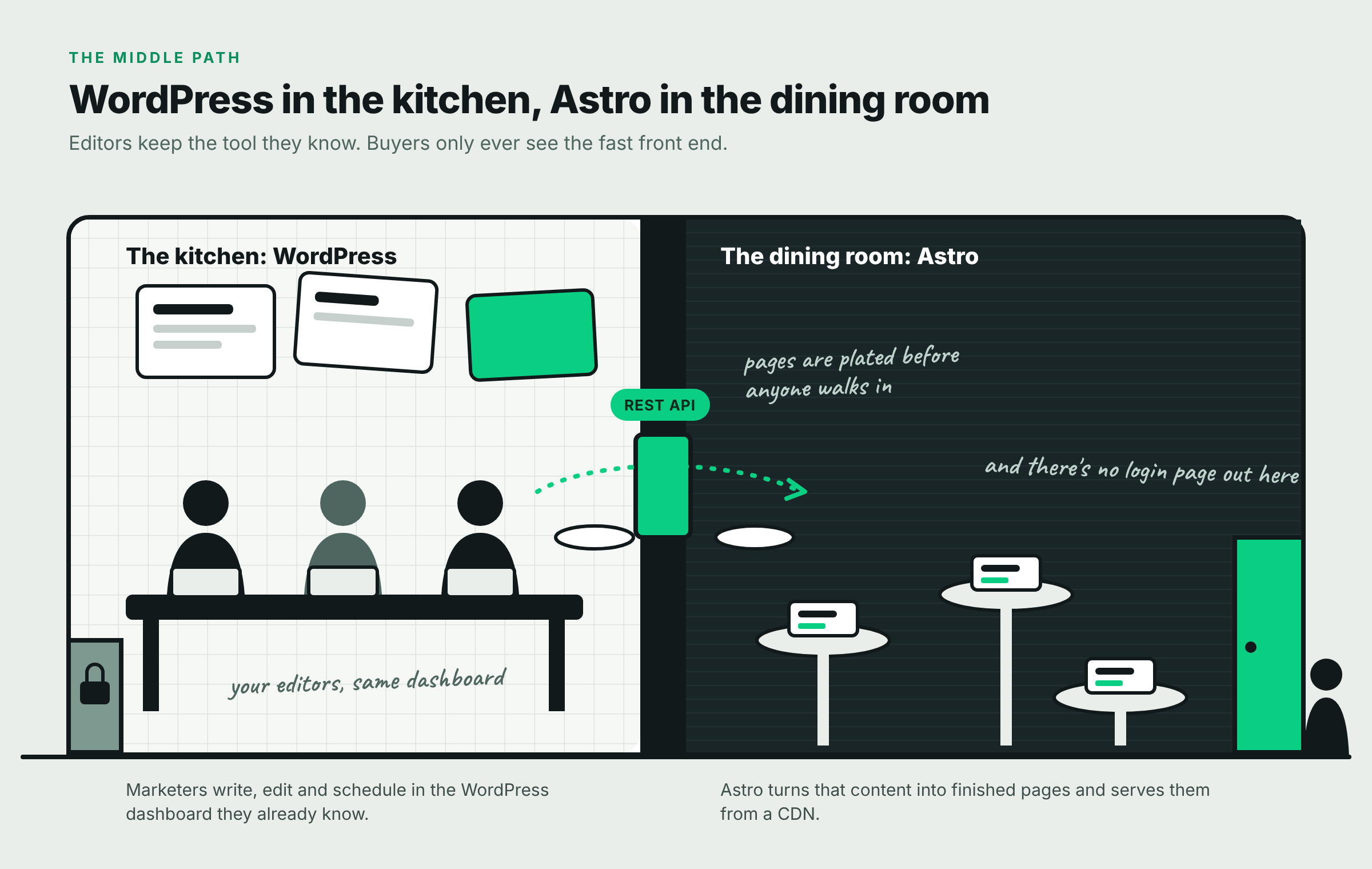
Astro pulls your content out of WordPress, as Astro's docs explain, and turns it into fast, finished pages. Visitors never see the WordPress login.
This works well when your editors are happy and only the public site is the problem. The catch is that you're now running two systems. Previewing pages takes extra setup, and plugins that change how the site looks, like page builders and sliders, stop working.
If you're starting from scratch, you can skip this step. A headless CMS built for the job, like Sanity, Storyblok or BetterCMS, is usually simpler than running WordPress just to write in it.
A test you can run this week
Before anyone rebuilds anything, spend an hour on these four checks. They'll show you where your current site is falling short.
- Count your plugins: Note how many are active, and how many haven't been updated in six months. A long list, or several outdated ones, points to a security risk.
- Time a real change: Ask someone to change a homepage headline and publish it. Then ask them to add a new section to a landing page. If the first takes minutes and the second needs a developer, you'll feel at home on Astro.
- Check your three biggest pages: Run your homepage, pricing page and top landing page through PageSpeed Insights. Look at the real-user data at the top, not the lab score.
- Read your page like an AI tool: Open your pricing page, right-click and choose View page source. Search for one price or feature name.

If the plugin count and speed results worry you more than the editing test, Astro deserves a serious look. If editing is what your team can't live without, keep WordPress, or use both and keep the editor.
What to check before you switch
The platform itself isn't the SEO risk. The move is, which is why these steps matter more than the tool you pick.
Before you switch a WordPress site to Astro
- 301 redirects from every old URL to its closest new page
- Titles, descriptions, canonicals and schema carried across
- Every form sends a test lead to your CRM before launch
- Analytics, pixels and consent tools working on every page type
- Search Console checked daily for the first two weeks
A move is also a good time to clean up. If your sitemap has grown one page at a time for years, cut it back to the pages buyers and search engines actually need before you rebuild them.
How we built Javelin ITCS on Astro
Javelin ITCS is a technology consulting, workforce and staffing group founded in 2024. It's the platform behind IRIS Consulting, Thomas Group Consulting, Veterans Career Group and Vuesol Technologies, and it added Vuesol while we were still designing the site.
The old website was a four-page template that showed none of that. The first sitemap wishlist ran to 35 pages, so the real job was turning a growing group into one site that CIOs, talent leaders and candidates could all make sense of.
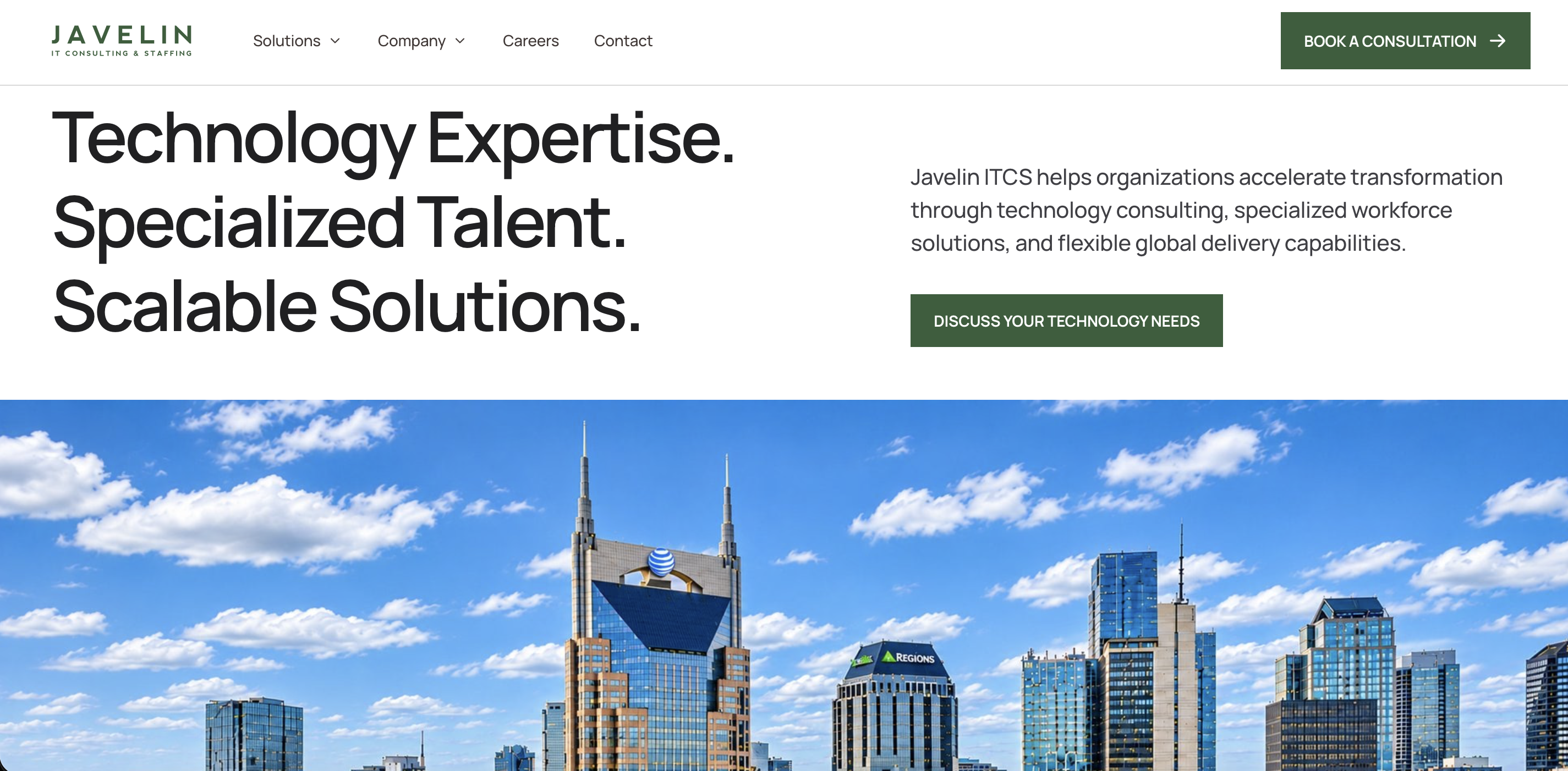
Here's what we built:
- 10 focused pages instead of 35: Each page targets a distinct search need and has its own title, description and social card.
- A component-based Astro site: Every page comes from signed-off Figma designs and a live style guide, so new pages and new companies look like they belong.
- Editing without a developer: Javelin's team updates copy, images, company profiles and job posts in BetterCMS on their own.
- One lead form behind every call to action: It routes inquiries to sales or careers across 7 different paths.
The site went live in 4 weeks. Because companies, solutions and industries are stored as structured content in the CMS, the next acquisition is a new CMS entry rather than a new website project.
So, which one should you pick?
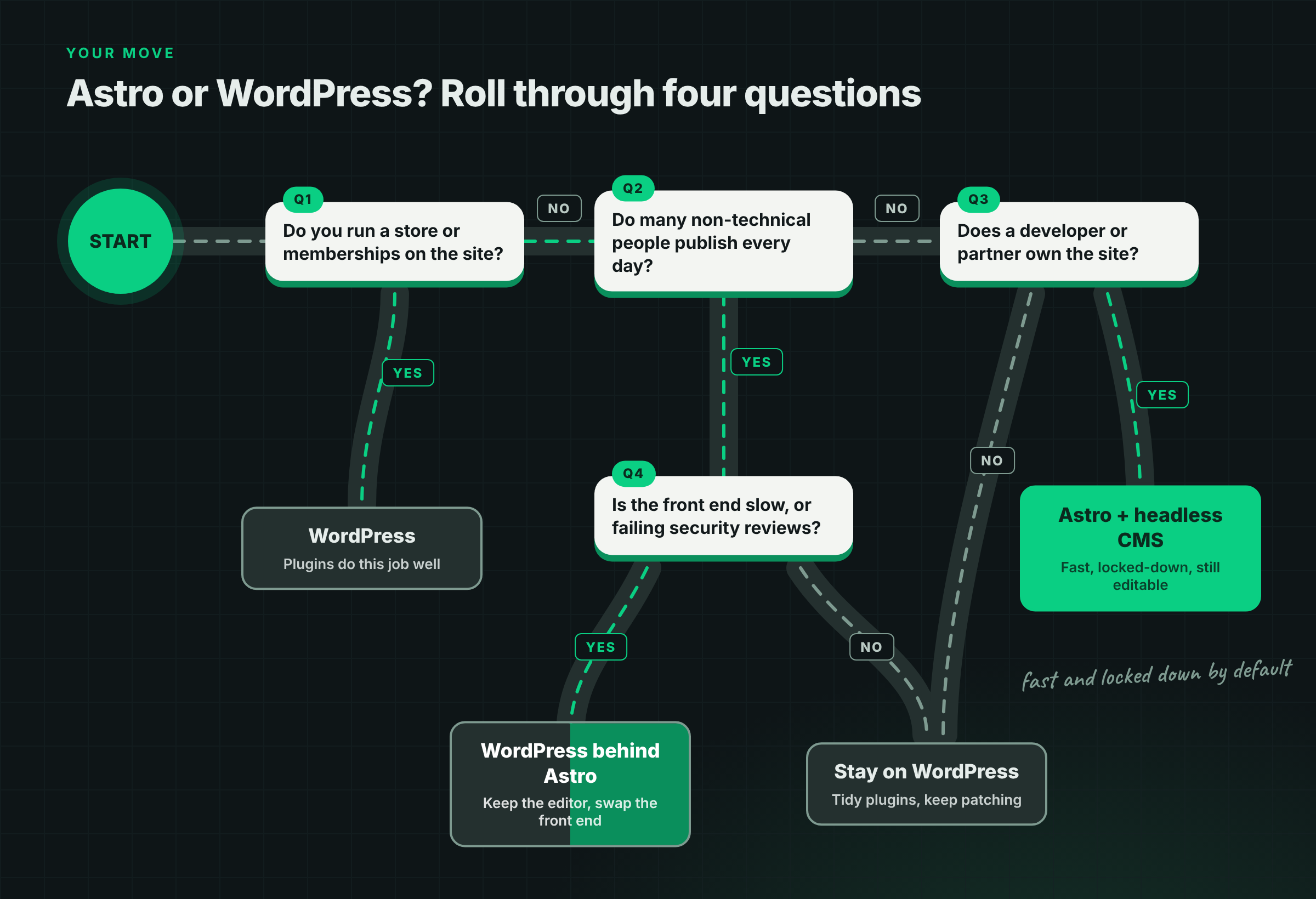
Choose WordPress if many non-technical people publish every day, you run a store or memberships, or nobody on your side can own code.
Choose Astro with a headless CMS if a smaller team publishes a few times a week and a developer or partner owns the site. It's an even better fit if your buyers notice speed, security and how you show up in AI search.
Choose both, with WordPress behind Astro, if your editors love WordPress and only the public site is letting you down.
WordPress is the better editor and Astro is the better engine. Which one you need depends on which problem is costing you more today. If you're planning a rebuild or a move off WordPress, Flowtrix can help you pick the right setup and make the switch without losing your rankings.
FAQ's
Quick answers to what B2B teams ask most when choosing between Astro and WordPress.